How to Add a Popup to Your Shopify Store [Step-by-Step Guide]
When the Polish brand WHOSE swapped their static signup form for a gamified “Spin-to-Win” widget, their conversion rate didn't just grow — it increased tenfold. In one week, they captured 4,450 new emails and saw 30% of those leads turn into sales.
This is the fruitful result of a calculated onsite strategy combined with the best practices. In this guide, we’re going to tell you how to use Shopify popups to replicate a success like this, determine which type fits your business best, and master the following:
- Why popups matter: Learn how they reduce abandonment, capture zero-party data, and improve the overall shopping experience
- Benchmark basics: Discover the exact strategies used by the “Elite 10%” to reach an average 41% CR.
- The nine most common types: Determine which formats are appropriate for each funnel stage.
- The setup for zero-code: In less than fifteen minutes, create a Shopify popup that converts visitors into buyers, without writing any code.
- Best practices: Discover how to safeguard your brand's reputation, user experience (UX), margin, and conversion rate.
- Multi-step & Gamified logic: See why games and 3-step flows outperform static forms by up to 300%.
TL;DR
- Popups remain the most popular type (74% among top performers), but timing is important.
- Limit to one or two fields. Your conversion rate drops by about 10% for each additional field. To gather preferences without compromising the 3.85% baseline CR, use multi-step forms.
- Gamification (Spin-the-Wheel/Pick-a-Box) delivers the most predictable revenue lift, averaging a 9.18% CR vs. 3.5% for static forms.
- Although 69% of the best widgets offer discounts, free shipping frequently gives cart abandoners a greater psychological value without lowering profit margins.
- Never show a popup on page load. Use a 20-second delay or 30% scroll depth to respect user intent.
Why popups matter for ecommerce stores
Popups are little windows that show up over the content of websites. They carry important information or encourage website visitors to take specific actions. Having proved to convert at around 3.53% on average, Shopify popups can offer significant advantages for online store owners who want to increase sales and their website’s performance. Here are some of the benefits of using Shopify popups on your online store:
1. Boosted conversion rates
The most immediate benefit is capturing intent. With Shopify popups, you can encourage your store visitors to take various actions, from making a purchase to subscribing to the Shopify newsletter. You may then create your own email list, which will lessen your future reliance on pricey bought advertisements.
2. Reduced cart abandonment
A well-timed Shopify popup with a special offer or discount code can even persuade clients to complete a transaction they may have otherwise abandoned.
3. Gathering zero-party data
Shopify popups may be used to collect consumer data, such as:
- Names,
- Phone numbers,
- Email addresses,
- Geo,
- Preferences,
- and much more.
Segment your email list, improve customer service, and personalize marketing efforts using this data.
4. Endorsing new goods or services
Shopify popups may also be used to advertise new products or services in order to increase income and sales. Such pre-order popups will help raise customer interest and encourage them to purchase later on.
5. Better customer experience
Popups are not only about collecting emails and offering discounts, but they are also much more. For instance, a popup can also show important information to your customers, such as
- Shipping details,
- Change of working hours,
- Size charts,
- Return policies, and others.
It’s a good way to reduce customer frustration and improve the overall user experience.
6. Testing new hypotheses
Did you know that Shopify popups can help you try out new marketing methods or product concepts? Claspo has an A/B testing tool that displays two different versions of a popup to two different groups of people. Based on the test results, you will see which course is best and modify your strategy accordingly. You can test:
- Offer,
- Copy,
- Visuals,
- Design,
- Trigger,
- Layout,
- Any variable that you think can improve conversions.
From our experience, 2-3 is the perfect number of use cases to have on a website simultaneously. Otherwise, you risk developing banner blindness and visitor frustration. Your Shopify popup should always add value and be relevant to the location and goal of your target audience.
Shopify conversion benchmarks: Layouts & performance (2026)
These benchmarks are based on our 3-year study of 779M+ impressions. We found that the success of your Shopify popup isn't about the size of the discount, but the logic of the trigger.
|
The Winning Layouts for Shopify |
|||
|
Layout |
Avg. CTR |
Best use case |
Where to place |
|
Popups |
10.6% |
High-impact hooks: Welcome offers, first-order discounts, and flash sales. |
Homepage (with delay) or Exit Intent. |
|
Floating boxes |
7.49% |
Promoting specific deals without blocking product images. |
Collection pages or long-form content. |
|
Floating bars |
5.13% |
Persistent, site-wide reminders (e.g., Free shipping or sitewide sales). |
Header or Footer (always visible). |
|
Built-ins |
4.9% |
High-intent zones where the user is already leaning in. |
Checkout pages or “Thank You” screens. |
In ecommerce, your goal is simple: turn a browser into a buyer. Our data shows that while the average Shopify popup converts at 3.53%, the “Elite” (Top 10%) use specific layout-to-goal pairings to reach much higher thresholds.
|
Ecommerce Performance by Goal |
|||
|
Marketing goal |
AVG performance |
Top 10% (Elite) |
Strategy for success |
|
Increase sales |
8% CTR |
17.48% CTR |
Stack promo code + countdown timer. |
|
Grow email list |
5.19% CR |
9.10% CR |
Use gamification (Spin-the-Wheel). |
|
Increase AOV |
5.41% CTR |
19.55% CTR |
Cross-sell “Pair it with” post-cart add. |
|
Prevent abandonment |
4.43% CTR |
11.03% CTR |
Exit-intent + free shipping offer. |
Most popular types of Shopify popups
In 2026, the most successful Shopify stores use a “multi-touch” strategy: they use different triggers to meet different needs. Below are the nine most effective Shopify popup types currently driving revenue.
1. Welcome popup
This is a traditional Shopify popup type and is referred to as the “first handshake.” This is what catches the visitor’s attention as soon as they land on your page.
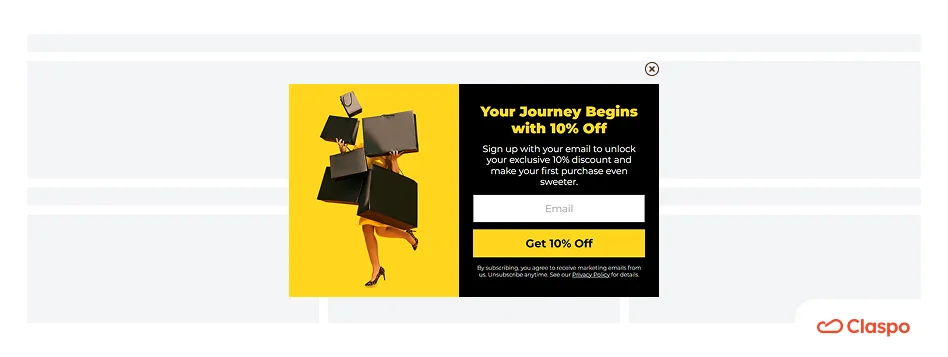
It’s especially effective when shown after a 15-20 second delay or 30-50% scroll depth. Welcome popups usually collect email addresses in return for a discount or exclusive content. Check out our email popup complete guide with 40+ examples to learn how to balance a strong welcome offer with a clean design.
2. Gamified popup
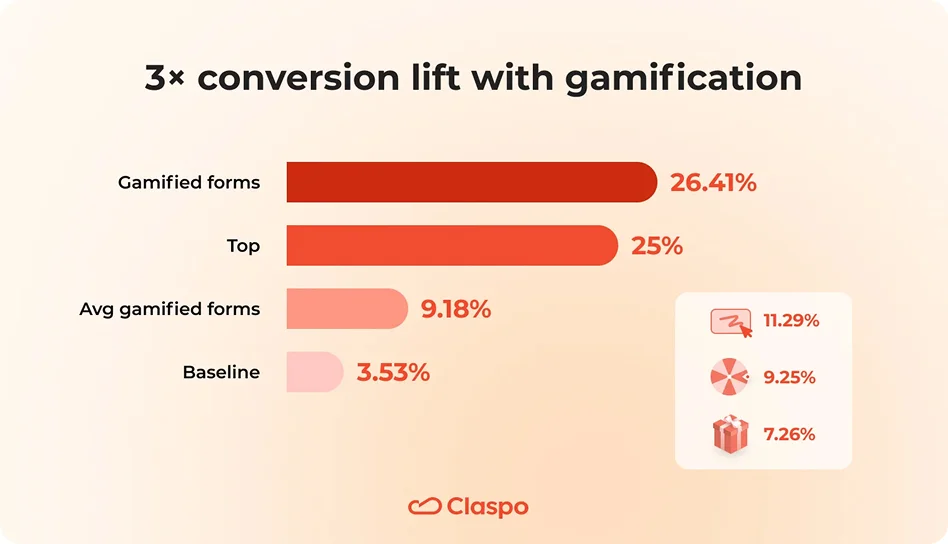
This Shopify popup type transforms boring data collection into an interactive, fun experience through card games, spinning wheels, slot machines, and other gamified elements. According to our benchmarks, gamification is the most predictable lift for list and revenue growth, reaching an elite 9.18% average CR, which is triple the rate of static forms.
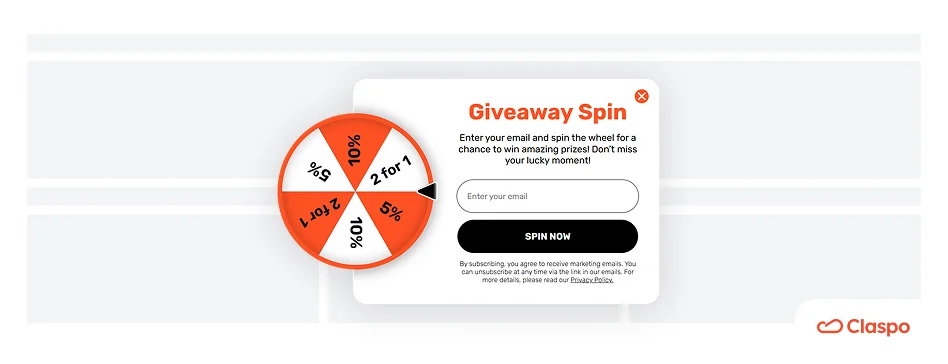
By turning the subscription into a “win,” you lower the psychological barrier to sharing an email. The Spin-the-Wheel popup helped a Polish brand WHOSE get a 50% CR during their Black Friday campaign. Check out our guide on the Spin-the-Wheel component to learn the mechanics you can use to increase your site’s performance.
3. Exit-intent popup
Smart targeting detects when a visitor wants to leave a website and shoots a popup with an alluring offer.
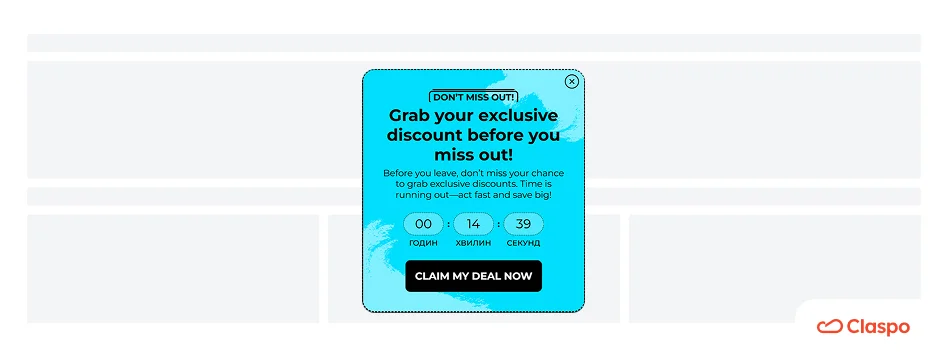
On average, stores reach a 4.43% CTR by using these for high-value, “last-second” saves. Instead of a generic “Don't go,” try offering a limited-time bonus with a countdown timer or a “Save my cart” link. For more advanced tactics, dive into these 12 exit-intent examples and 5 great hacks to see what keeps visitors from bouncing.
4. SMS popup
These Shopify popups are specialized for mobile-first engagement, often featuring a two-step flow: first, collect the email, then offer an extra "VIP" discount if they provide their phone number.
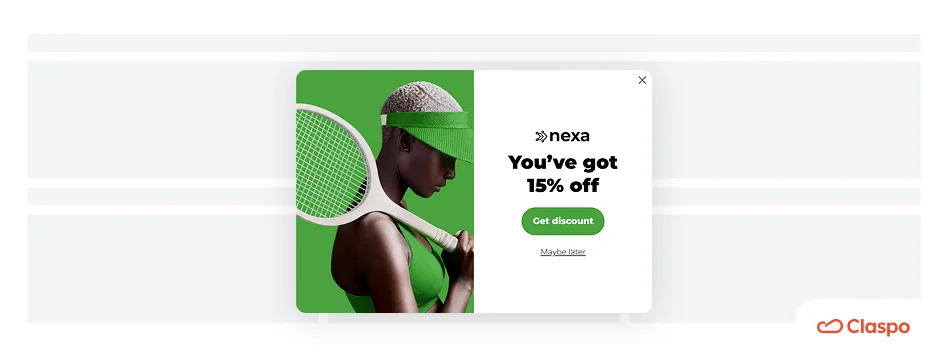
The two-step approach helps avoid overwhelming the user while building a high-value marketing channel. Read our breakdown on how to create an SMS popup that really works to optimize for mobile responsiveness.
5. Cart abandonment popup
These popups are designed for high-intent visitors who have products in their cart but are holding back.
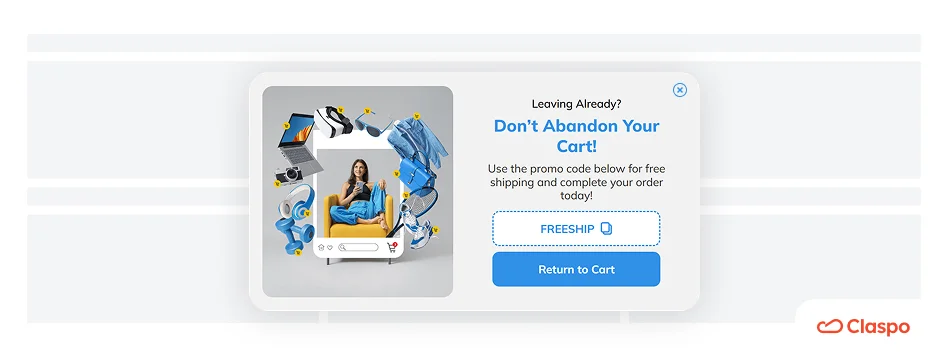
Our research shows that combining exit-intent logic with a free shipping offer is the #1 way to save a sale without eroding your margins on the actual product price. To refine your strategy, look at these 7 cart abandonment examples to save sales and see how timing can change your recovery rate.
6. Upsell & Cross-sell popup
These appear at the peak moment of intent—immediately after a user clicks "Add to Cart."
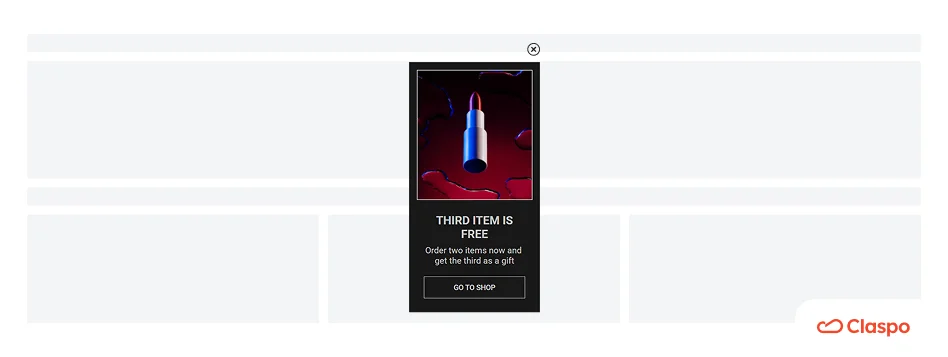
By suggesting a complementary product (e.g., "Need batteries for this?") or a bundle deal, you can significantly increase your Average Order Value (AOV). Contextual upsells hit an elite 19.55% CTR because they solve a problem the user is currently thinking about.
7. Countdown timer popup
This Shopify popup type is the ultimate tool for creating the feeling of peak urgency. Whether it’s for a BFCM flash sale or a “Same-day shipping” deadline, a visible clock drives action.

Combining a countdown timer with email results in 2.56% CR, if you add a promo code, the conversion rate lifts to 3.42%, but the best conversion rate of 16.12% is seen among Shopify popups that have a timer and a gamification element in them.
8. Survey popup
These popups are ideal for zero-party data, as they ask the customer about their preferences, sizing, or interests.
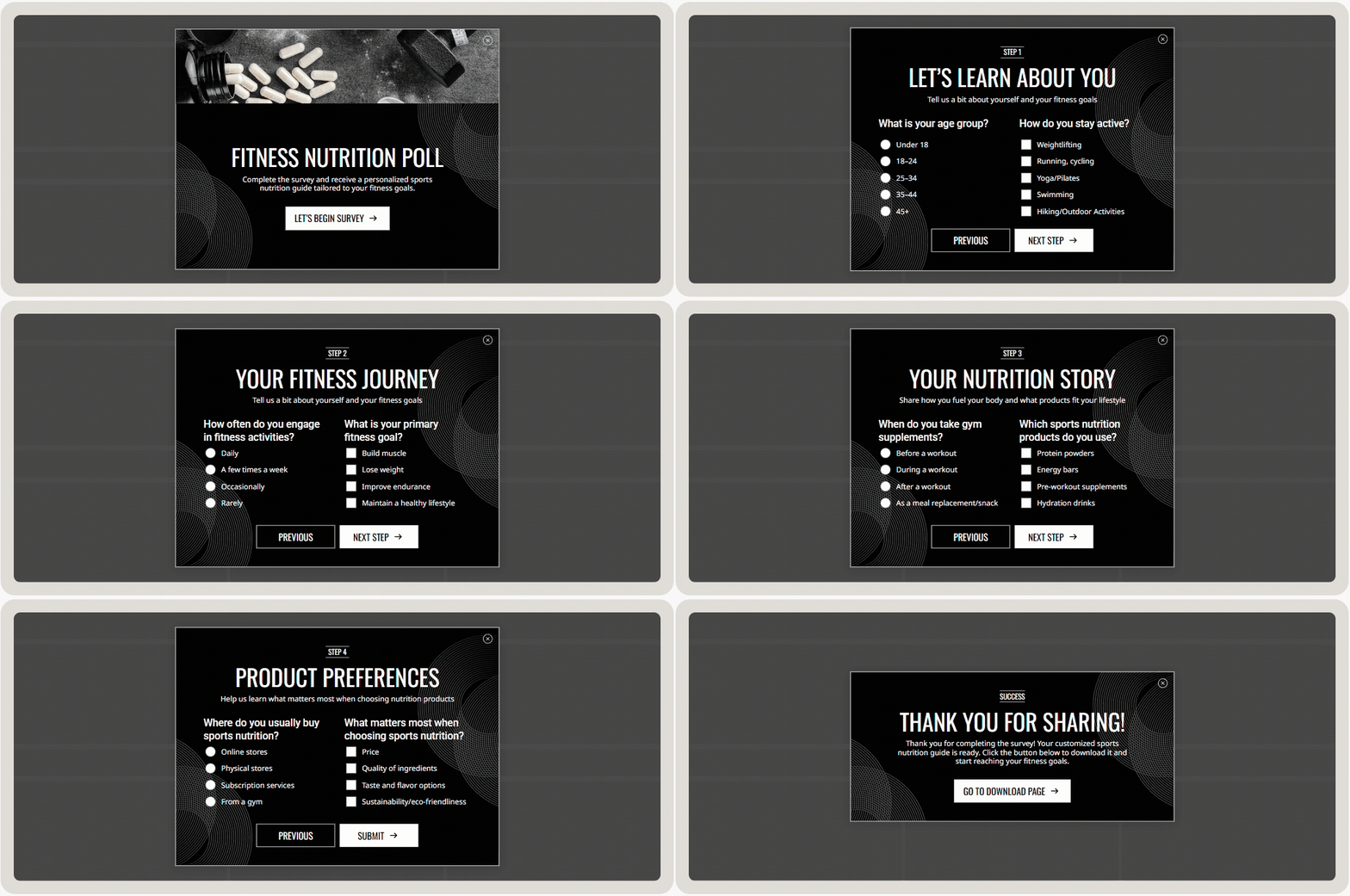
These popups convert best when they feel like a “personal stylist quiz” rather than a boring questionnaire. You can learn how to structure your questions to improve your marketing segmentation in our guide on popup surveys and everything you need to know.
9. Informational & Social proof popups
Sometimes, the best Shopify popup doesn't ask for anything at all. Use these to guide users to correct regional stores, highlight “Free returns,” “Low stock alerts,” or sizing guides.

How to add a popup on Shopify store (3 Methods with Step-by-Step Guides)
There are three ways to add a Shopify popup. Choose the option that best fits your needs:
- The App method (most popular),
- Native Shopify way,
- The Custom Code.
Method 1: Add a high-converting Shopify popup with Claspo (recommended)
This is the most popular way to add a Shopify popup that will grab your customers' attention and increase CR. Don't worry; you don't need to be a tech genius to make it happen. Here's a step-by-step guide that will have you up and running with a high-converting Shopify popup in 15 minutes or less.
Step 1: Install the app
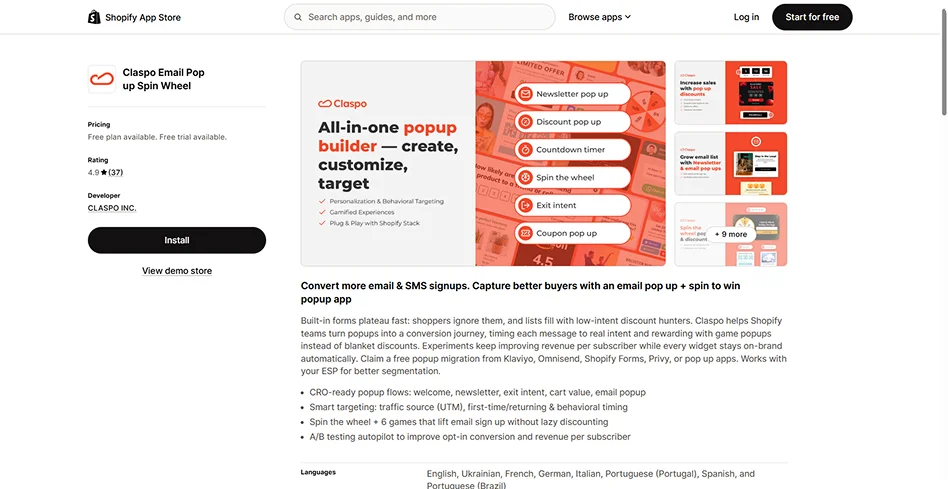
Search for Claspo in the Shopify App Store and click Install. Authorization takes less than 30 seconds.
Step 2: Choose a template to boost your CRO
Select from over 1,000 templates that we designed to fit various use cases, industries, and formats. Each template has relevant design elements, interactive components, and copy, so you don’t have to start from scratch and waste time on design.
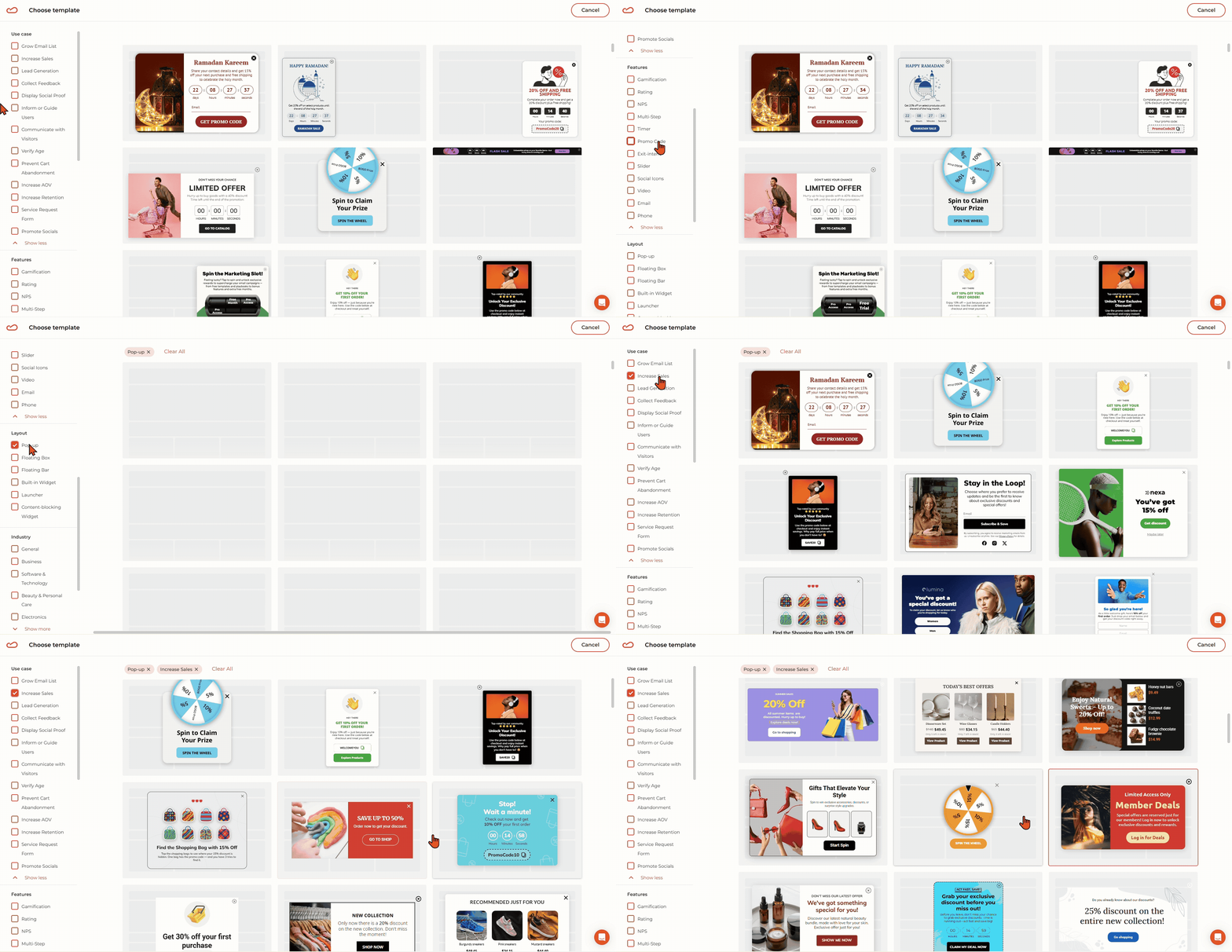
Filter templates to match your business goal: increase sales, grow email list, increase AOV, prevent cart abandonment, or any other available.
Step 3: Customize the template to create a killer popup
Use the drag-and-drop editor to match your brand. Everything you see can be customized — just click it and tweak it directly on the screen.
For this guide, we’ve chosen a template with the “Pick-a-Box” mechanic to make it more appealing for visitors and increase the chances of getting that 9.18% CR.
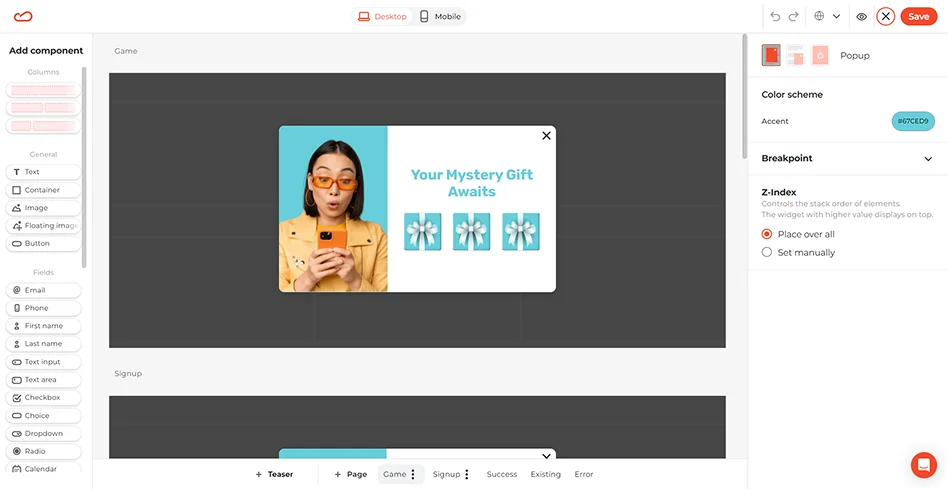
Screen 1. The hook
Customize your “Pick-a-Box” visuals and the overall popup design. Tweak fonts, colors, text size, button shapes, etc. You can choose any of our default box designs or upload your custom image that will serve as a box. This comes in handy during seasonal campaigns when you can use pumpkins, hearts, flowers, ornaments, etc.
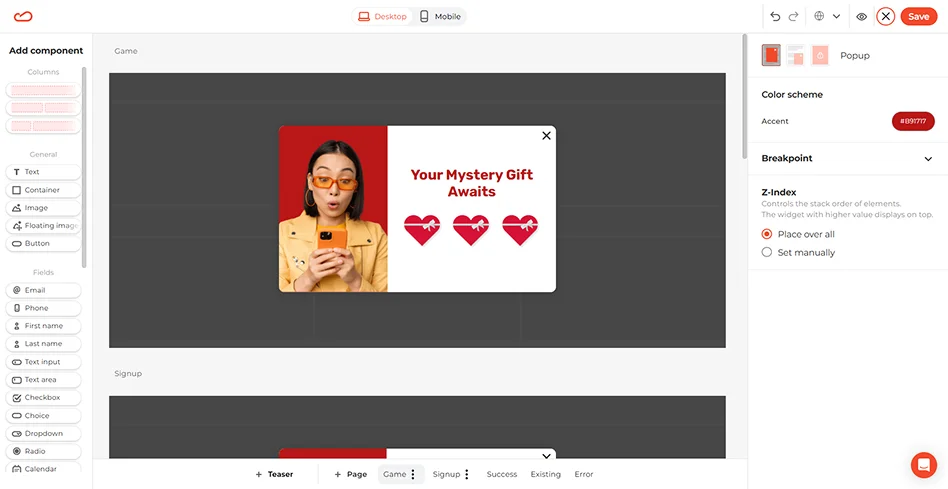
Screen 2. The exchange
Once a user picks their gift, we’ll ask for their email. Following best practices, we’ll keep it simple with only one field to maintain a 3.85% baseline CR. Asking for too much on this screen is the main cause of drop-off.
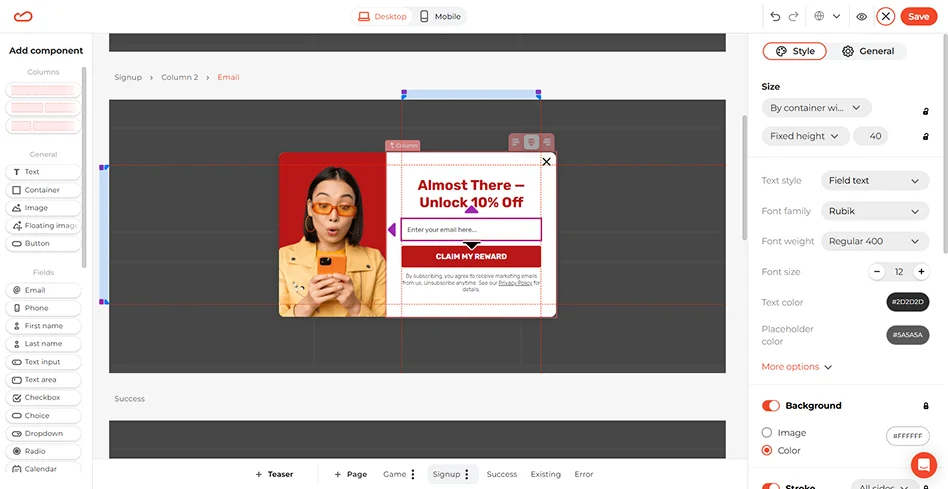
Design Tip: 94% of top-tier widgets use a single, bottom-placed CTA. Make sure your “Open box” and “Claim prize” buttons are the most visible elements on the screen.
Screen 3. The reward
Customize the final screen to display the prize clearly. 90% of elite widgets use immediate rewards like promo codes. Ensure your promo code button is high-contrast to get the user’s attention. Besides, don’t forget to add the click-to-copy icon so that users don’t have to memorize the code.
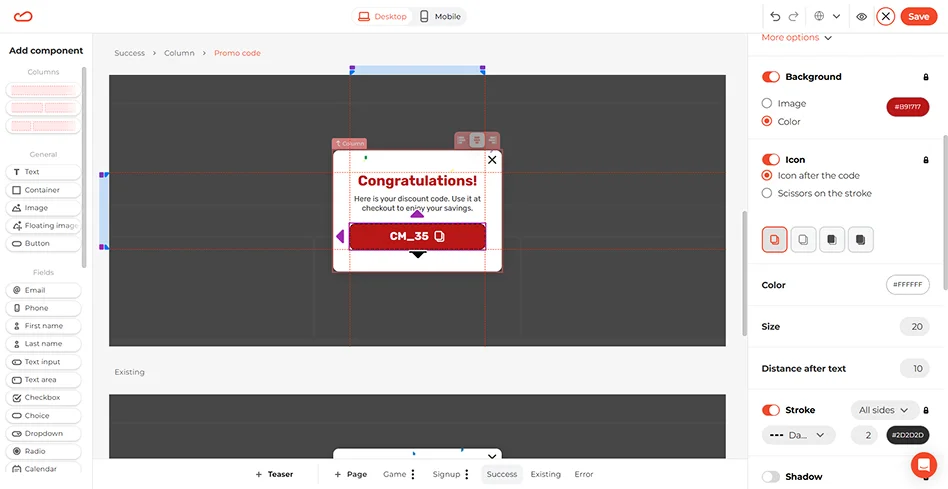
Screen 4. Teaser
Click +Teaser on the panel below to add a small tab that stays on the screen when a user dismisses the main popup. This way, your offer will still be accessible and non-intrusive, so shoppers can return to it when they are ready.
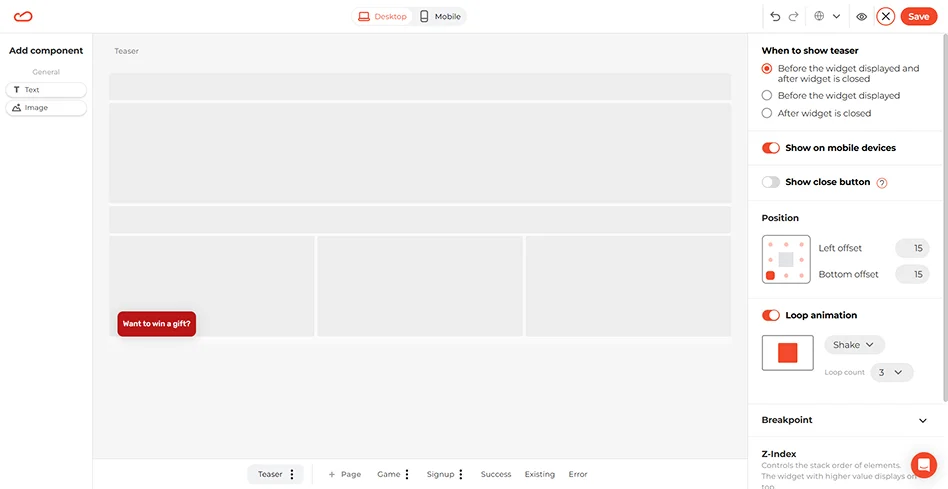
The Teaser element is also customizable and has its own triggering settings. For more visibility, you can even add animation to it.
Step 4: Set smart display rules
Save the popup when you’re satisfied with its look and move on to the Triggering tab.
Remember not to show your game the moment someone lands. A short delay gives visitors a chance to study your brand and goods.
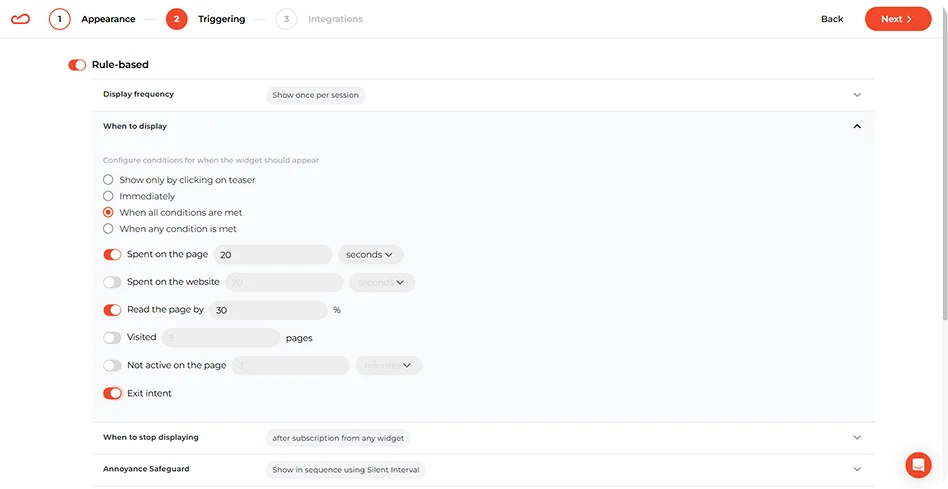
- When to display: Set a 20-second delay or 30% scroll trigger.
- Exit intent: Alternatively, use this as a backup plan for shoppers who want to leave the website, helping you save up to 11.03% of sessions.
- To whom: Toggle “New” so you only offer this first-purchase “win” to people who haven't subscribed yet.
Step 5: Sync with your marketing stack
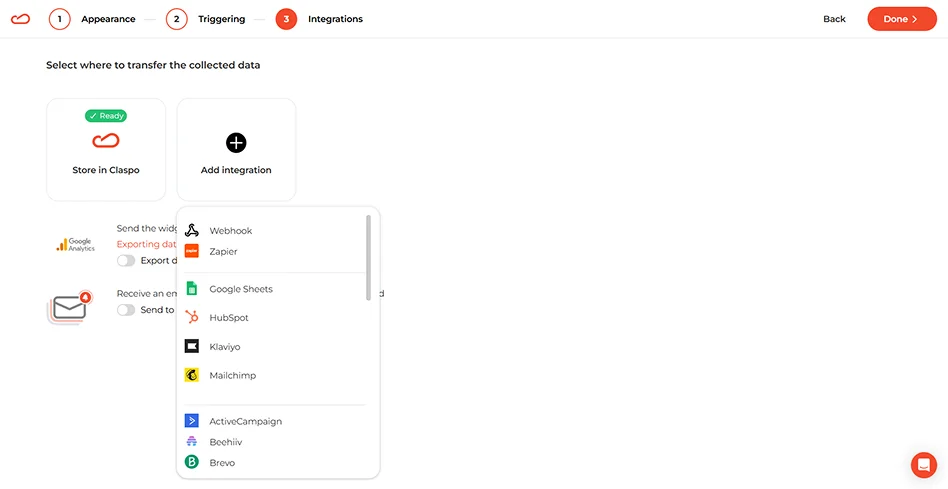
Claspo integrates with dozens of tools like Klaviyo, Mailchimp, HubSpot, Pipedrive, and many others. You can sync your account natively, or use Zapier or Webhooks if you use custom software.
Step 6: Launch your Shopify popup and track its performance
Once you're satisfied with your popups design and functionality, it's time to launch it on your store. Set a start and end date for your campaign, and track its performance using your app's analytics.
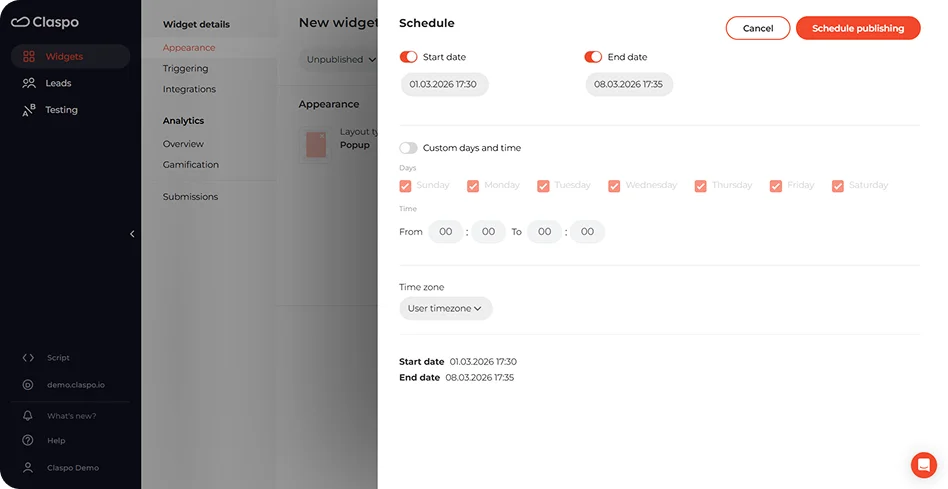
Your script will be automatically injected into your theme – no coding necessary.
Method 2: The native way (How to create a popup on Shopify with the Shopify Forms app)
If you just need a simple popup without gamification, complex multi-step flows, or advanced A/B testing, Shopify’s native solution is a great free starting point.
- Step 1: Install Shopify Forms
In your Shopify admin, navigate to the Apps area, search for “Shopify Forms,” and install the Shopify app.
- Step 2: Activate the theme app embed
This is a mandatory step. Go to Online Store → Themes, click Edit theme on your active theme, and select the App embeds icon in the left sidebar. Toggle the Forms setting to ON and click Save.
- Step 3: Create your form
Return to Apps → Forms and click Create form. Select Popup form. Give it a name to help you track it internally.
- Step 4: Customize display & Styling
Choose between Floating (corner placement) and Overlay (centered). You can edit the headline, button text, and colors, but note that your design options are limited to your theme's basic settings.
- Step 5: Set Behavior & Activate
Set your triggers (on arrival or after a delay) in the Behavior settings. Once ready, click Save and then Turn form on.
Shopify’s native app does not support multi-step forms or conditional logic. If you want to use the high-converting quizzes, "Pick-a-Box" or 3-step gamified flows mentioned in our benchmarks, you will need a specialized app like Claspo.
Method 3: The custom code
Here is how to add a Shopify popup window for developers or merchants who want absolute control over the HTML/CSS/JS and wish to avoid third-party apps entirely.
- Access theme code: Go to Online Store → Themes → Edit Code.
- Create a new section: Under the Sections directory, click Add a new section and name it custom-popup.liquid.
- Insert your code: Paste your custom HTML and CSS for the popup container. Ensure you include a <script> tag to handle the “Close” (X) functionality. Use CSS position: fixed; to ensure it stays centered.
- Add JavaScript triggers: Use a simple setTimeout function or an event listener for mouseleave (to simulate exit-intent).
- Inject into theme: Open your theme.liquid file and add {% section 'custom-popup' %} just before the closing </body> tag.
While this method is “free,” it is often the most time-consuming. Manual coding provides the most control but is the hardest to A/B test. You must manually ensure the popup is GDPR/CCPA compliant and optimized for the 62% of mobile users who will see it, and doesn't block the screen on small devices, which could lead to Google SEO penalties.
Best practices for Shopify popups
Below are the tips on how to move from “basic” Shopify popups to high-converting strategic ones. The tips below have derived from real-world performance benchmarks from 779 million impressions over three years.
1. Master the timing rules
Google penalizes “intrusive interstitials” that block the page instantly when a user opens it. Wait until your visitors look around, finish a task they came for, or start to leave a page.
The Benchmark: Top-performing Shopify popups typically wait for 20 seconds of page time or 30% scroll depth.
Pro Tip: Use exit-intent triggers to catch visitors who are about to leave. This can save up to 11.03% of abandoning sessions.
2. Break banner blindness with gamification
Gamification is a game-changer (sorry for the redundancy). On Shopify popups, gamified elements like Spin-the-Wheel or Scratch cards increase opt-in rates by 10-30%. Our analysis of user popups shows that gamified forms achieve an average 9.18% CR against 3.53% CR for static forms.
Check out our case study with the Polish brand WHOSE, which achieved a 50% opt-in rate. Spoiler alert: they only replaced one component.
3. Keep it simple
Keep your Shopify popup design clear and concise to prevent misleading your visitors. Every new field you add to a form is a potential exit point for the user. Moreover, a complex popup can be overwhelming and confusing.
Email-only forms set the baseline at a 2.48% CR. Adding just one field for preferences decreases conversion slightly (2.38%). But if you pair an email field with a promo code, CR lifts up to 3.85%.
Stick to 1-2 fields (Email + Name). If you need more data, use a multi-step form to gather preferences after they’ve shared their email.
See the field combinations and their performance in the table below.
|
Field combination |
Avr. CR |
|
Phone |
0.44% |
|
Email + Phone |
1.99% |
|
Email + Phone + Promo code |
2.10% |
|
Email + Preferences |
2.38% |
|
Email-only |
2.48% |
|
Email + Countdown timer |
2.56% |
|
Email + Promo code |
3.85% |
4. Leverage margin-safe incentives
Be careful not to erode your margins with deep discounts unless necessary. Match your incentive to your business model:
- Fixed amount ($): Best for stable average order values (AOV) to maintain tight margin control.
- Percentage-off (%): Ideal for variable cart sizes to scale the value with the margin.
- Freebie: Use when a discount doesn’t align with your brand.
Another way to choose incentives is by segmentation:
- New visitors: 10% off.
- Cart abandoners: Free Shipping
- High-value carts: A “Gift with purchase” to increase AOV without a cash discount.
Pro Tip: 90% of elite widgets use discounts, but Free shipping often has a higher psychological value for cart-abandoners than a 10% discount.
5. Mix urgency with value
A discount alone is often not enough to push a user to the finish line. You need to combine incentives with a clear reason to act now. Use timers that reset for each individual visitor, so the urgency doesn’t look fake or evergreen.
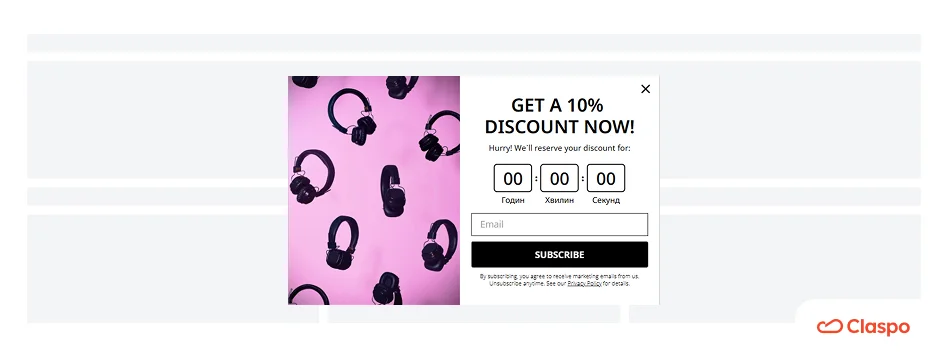
Pro Tip: Build a form with an email field, a countdown timer, and a promo code to achieve 3.42% CR.
6. Run tests
Don’t fall into a subjective trap; always turn to objective data. Try A/B testing, especially since Claspo offers automated A/B testing that runs on its own. Compare:
- Layouts (Popup vs. Floating Bar)
- Copy (“Get 10% Off” vs. “Unlock your secret discount”)
- Triggers (15s Delay vs. 50% Scroll)
- Incentives (discount vs free shipping)
Tests will help you see what works best for your target audience and adjust your Shopify popup accordingly.
7. Optimize for the mobile majority
With 62.54% of traffic coming from mobile, your Shopify popups must be responsive. On mobile, floating boxes often perform better than center popups because they provide value without completely blocking the product view. Besides, consider using Teaser to keep your offer non-intrusive and still available.
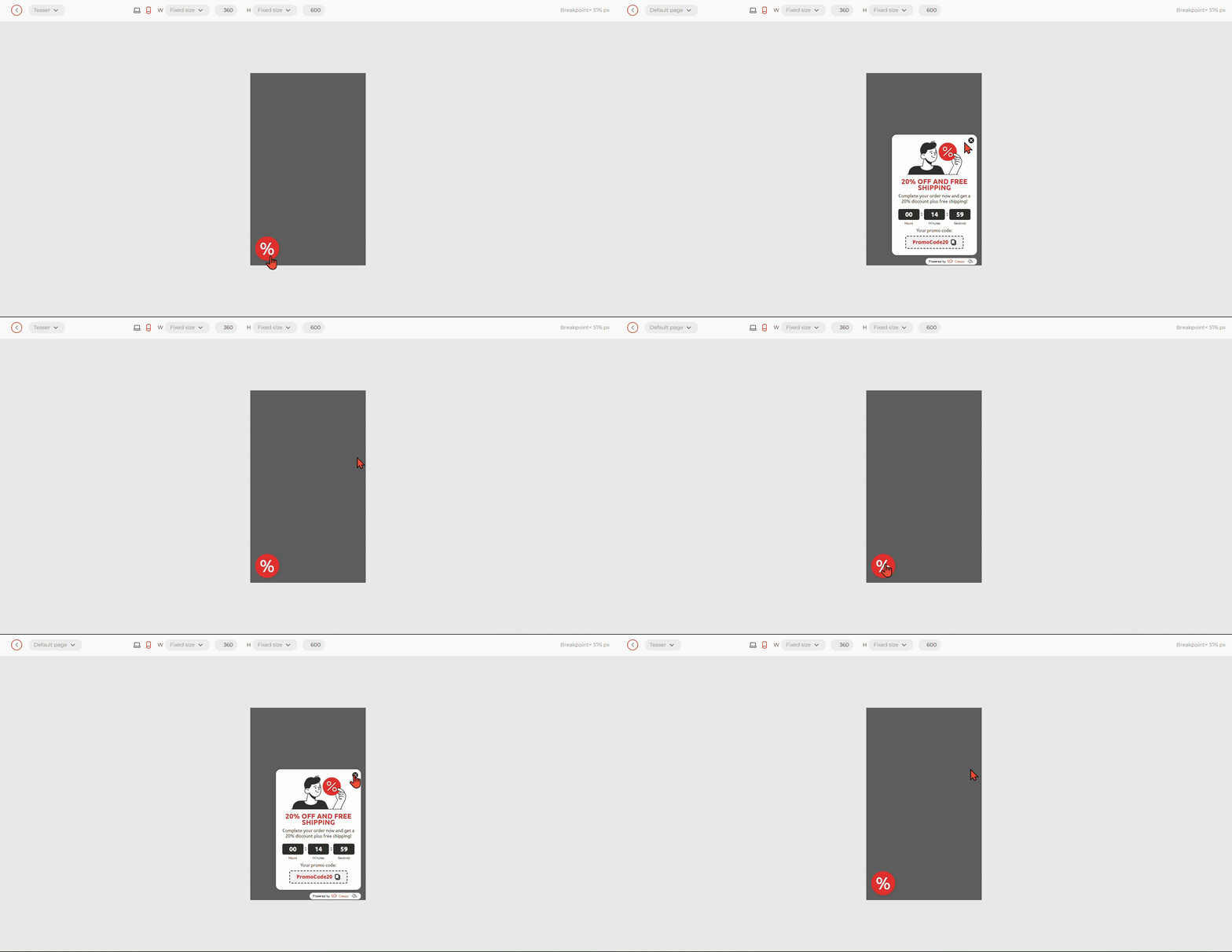
Design Tip: Ensure the “Close” button is easily accessible (at least 48x48 pixels) and the CTA is large enough for thumbs.
8. Segment your audience
Every visitor is unique. Thus, to achieve optimal results, consider dividing your audience into segments and using personalized popups based on their behaviors, location, or interests. According to our study, tailored offers based on behavior or category see a 20-40% conversion uplift.
Pro Tip: Use Merge tags to pull category info from the URL. If a user is browsing Jeans, your Shopify popup should say “Love jeans? Get 10% off,” rather than a generic welcome message. See how easy it is to set up in Claspo in our help guide.
Best practices summary: What moves the numbers
|
Focus area |
Basic setup |
Strategic approach |
Avg. CR uplift |
|
Personalization |
Same for all |
Tailored by category/UTM |
+20-40% |
|
Gamification |
No interaction |
Spin-to-win/Scratch card |
+10-30% |
|
Form complexity |
Single email field |
Multi-step quiz |
+15-25% |
|
Urgency |
Generic message |
Relative countdown tied to a specific offer |
+5-15% |
|
Offer & Incentive |
Subscribe to our newsletter |
Interest-based: discount, free shipping, or FOMO |
+15-25% |
|
Triggering |
Immediate on-load popup |
Behavior-based (scroll depth, time, exit intent) |
+10-20% |
|
Design & UX |
Clunky or off-brand |
Mobile-friendly, brand-aligned, polished design |
+5-15% |
Summary
Popups are one of the few tools in your Shopify toolkit that can deliver a 10x lift in engagement. They can increase conversions, help you collect key information about your customers, drive new product sales, and leverage clever marketing tactics. But, as our data from 2026 clearly indicates, the key to success is not to be the “loudest” voice on the page, but the most relevant.
Key takeaways for your 2026 strategy:
- The 20-second rule: Avoid the “door-slam” effect. Wait for users to engage before asking for their data.
- Simplicity is profit: Stick to 1–2 fields. Every extra input field is a leak in your conversion funnel.
- Games win: If your list growth has plateaued, gamification is your most predictable path to a 9%+ conversion rate.
- Mobile first: With 62% of traffic on phones, your Shopify popups must be non-intrusive and thumb-friendly to satisfy both users and Google.
By following the thresholds of the Top 10% elite, you move away from guessing and start building a sustainable, owned audience that isn't dependent on rising ad costs.
Next steps: Launch your high-converting Shopify popup
Ready to move your store into the Elite tier? Here is how to start today:
- Audit your current setup: Check your current CR/CTR. Are you sitting at the 3.53% CR average? If so, you have room to grow.
- Install the Claspo Shopify App: Access over 1,000 CRO-curated templates and advanced features like annoyance safeguards and automated A/B testing.
- Launch an exit-intent campaign: Start with the safety net. Create a Shopify popup that triggers only when users are about to leave with a “Free shipping” or “Save my cart” offer.
- Test one variable: Use our A/B testing tool to compare a static form against a gamified wheel. Let your customers' data guide your next move.
FAQ on Shopify popup apps
Which is the best popup app for Shopify?
Claspo is the leading choice for Shopify merchants who prioritize measurable revenue results over basic features. Unlike “all-in-one” tools that treat popups as an afterthought, Claspo is a dedicated Conversion Rate Optimization (CRO) platform that drives top-level performance through behavioral relevance.
Why Claspo:
- CRO-focused library: Choose from over 1,000+ templates with swift integration and precision page-level targeting.
- Gamified engagement: Access an arcade of seven unique, high-converting gamified components (like Spin-to-Win or Pick-a-Box) to replace static forms with interactive experiences.
- Advanced optimization: Leverage multi-step flows, built-in automated A/B testing, smart AI website theme sync, mobile optimization, dynamic personalization, and many others.
- Behavioral triggers: Easily deploy exit-intent logic to reduce bounce rates and capture customers exactly when they are most likely to leave your site.
If your goal is to move from the 3.5% average conversion rate to the Top 10% elite threshold, Claspo provides the specialized depth in triggers and targeting that “all-in-one” tools lack.
Can I add a popup to Shopify for free?
Yes, you can build and publish a Shopify popup with Claspo for free. Claspo offers a free plan with all features included, and a 14-day free trial for any PRO plan. While native Shopify options are also free, third-party apps like Claspo usually provide more advanced features like exit-intent and basic analytics, which are essential for improving conversion rates.
Do Shopify popups affect page loading speed?
They can if you use multiple single-purpose apps. To maintain a fast Largest Contentful Paint (LCP), use a single, well-optimized app that handles multiple functions (popups, timers, and bars) through a single script. Claspo, for instance, doesn’t slow down your website, as the script loads asynchronously. Besides, the Claspo popups constantly score on Google PageSpeed Insights.
Is it better to use a native Shopify popup or a third-party app?
To find the best Shopify popup app for your business and budget, it's important to consider your specific needs and preferences. Take into account the following:
- the features offered by each app,
- the pricing options available,
- the level of customization and control you require,
- and the feedback from other users.
Test out a few different apps before making a final decision to determine which one works best for you.
- Use native if you only need a basic, static footer form or a simple overlay without behavioral triggers.
- Use a third-party app if you want to reach Elite (Top 10%) benchmarks. Native forms do not support gamification or multi-step quizzes, which our data shows can increase opt-in rates by 10–30%.
Can I track and analyze the performance of my Shopify popups?
Yes, many Shopify popup apps come with tracking and analytics features to monitor the performance of your Shopify popups. A built-in real-time dashboard in Claspo shows the performance of each popup individually and compares A/B test results to help you identify the best approach.
How to avoid SEO penalties from Google when using Shopify popups?
Google’s 2026 guidelines focus on “Intrusive Interstitials.” To stay safe:
- Avoid full-screen popups on mobile.
- Use floating boxes that cover less than 30% of the screen.
- Make your “Close” (X) button clearly visible and at least 48x48 pixels.
- Set up for a 20-second delay or 30% scroll before showing your first widget.
Can I integrate Shopify popups with my email marketing tool (e.g., Klaviyo, Mailchimp)?
Yes, Claspo has a direct integration with a broad marketing stack to help you focus on performance, CRO, and seamless flows. Such one-click sync ensures that when a user “wins” a discount on your site, their data is instantly synced to your CRM, triggering your automated welcome email flow without manual export.
How do I disable a popup on mobile devices in Shopify?
In most advanced apps, you can find Display Rules or Targeting settings. You can toggle “Show on Desktop” and “Show on Mobile” independently.
Expert Tip: Rather than disabling it entirely, our research suggests switching the layout to a Teaser or a Floating Bar for mobile users. This keeps the offer available without blocking the shopping experience.