21 Hello Bar Examples & Announcement Bar Ideas for 2026


Summarize
Hello bars are incredible at drawing users’ attention in the most noninvasive manner. They stay in place (at the top or bottom of any page) without blocking the visitors’ view of the page and are a great choice if you want to share a message with your visitors. It is only the tip of the iceberg.
If you seek to learn more about how to use this instrument effectively, let’s proceed with a detailed review. This blog post covers 21 hello bar examples from ecommerce stores, SaaS websites, and other businesses to show how brands use these compact banners for different goals.
Key takeaways
One clear message wins. Focus on a single offer, announcement, or action. Don’t squeeze multiple promotions into a narrow bar.
Match the bar to the page and visitor. Product-specific deals, regional updates, and signup invitations work best when the context makes sense.
Make the benefit visible. Show the discount, eligible orders, free-shipping threshold, or real deadline upfront.
Use CTAs when there's a logical next step. A product launch might need a “Shop now” button, while a delivery update may only need a short message.
Keep the mobile experience comfortable. Use readable copy, appropriate bar height, and an accessible close button.
Test the offer, not just the design. Compare messages, incentives, CTAs, top vs bottom placements, and targeting rules. Measure clicks for promos and signups for lead capture.
What is a hello bar?
So what is a hello bar? Also known as a floating bar or sticky bar, a hello bar is one of the least intrusive types of popups: it sticks to the top or bottom of a web page. Its main benefits:
Visibility: Appears on selected pages to attract the audience’s attention to your message.
Exposure: Can stay in place while scrolling and keep the offer or announcement in view.
Less disruption: Uses relatively little space and can include a close button; whether it overlaps content depends on the setup.

Despite its size, a hello bar can serve several purposes. Some creative hello bar examples may contain:
Personal offers and discounts for customers
Limited-time offer examples or flash sales
Offers dedicated to certain holidays
New products, collections, features, or events
Invitation to subscribe to your newsletter
Warnings about temporary inconveniences
Notifications about changed store opening hours
Call for donations and participation in charity
Whatever the purpose of your hello bar, you can start with a fully customizable announcement bar template and adapt it in Claspo's simple drag-and-drop editor.
It is also common to find such terms as announcement bar, sticky bar, and floating bar. They're often used interchangeably, but the idea behind them differs:
Announcement bar refers to the functionality of the bar: communicate news, promotions, or updates.
Sticky bar and floating bar describe the behavior: they remain visible as visitors scroll.
In this article, hello bar refers to the website design pattern, not Hello Bar, the separate popup and lead-generation software product.
21 hello bar examples to charm and induce your visitors
Floating bars are unbelievably multidimensional. Explore a wide selection of them, and you will find out-of-the-box layout designs, inspiring promotion materials, creative announcement bar ideas, appealing CTA buttons, truly delicate display settings, and more. Of course, it is impossible to mention all the examples that deserve praise. Thus, let’s look at the few that are practical and spark your creative flame. We've grouped these 21 examples by marketing goal so you can find ideas relevant to your website and see which design choices are worth testing.
Sales, discounts & limited-time offers hello bar examples
Sales-focused hello bars put an offer in front of visitors as they browse and communicate the benefit immediately, whether it's a percentage discount, a promo code, or a limited-time promotion.
MUJI — Countdown timer flash sale
Goal: Encourage shoppers to take advantage of a time-limited luggage discount.

Message and placement: $30 off luggage during an online flash sale, with a countdown timer. A black bar above the navigation.
Why it works: MUJI does two great things: it informs about the deadline, and it provides the exact time remaining until the end of the promotion using the countdown. It’s much easier for visitors to understand the promotion when they see both elements — discount and timer — in one bar.
What to test: Comparing the countdown timer and static information about the deadline.
Munk Pack — Subscription discount
Goal: Encourage shoppers to start a subscription with a first-order incentive.

Message and placement: 20% off the first two subscription orders with a promo code. A bright red bar above the navigation.
Why it works: A discount offer is always a good start to buyer-seller relations. Especially when it is implemented in such a creative manner. The hello and navigation bars look so similar to the levels of a delicious snack that it makes you crave a bite. The text also mentions that the offer includes a discount on two subscription orders, so the offer is more concrete than a generic welcome discount.
What to test: Compare the current percentage-based offer with copy emphasizing the savings across the first two subscription orders.
Perfect Keto — Weekly deals promotion
Goal: Direct visitors to the store's weekly deals and encourage purchases.
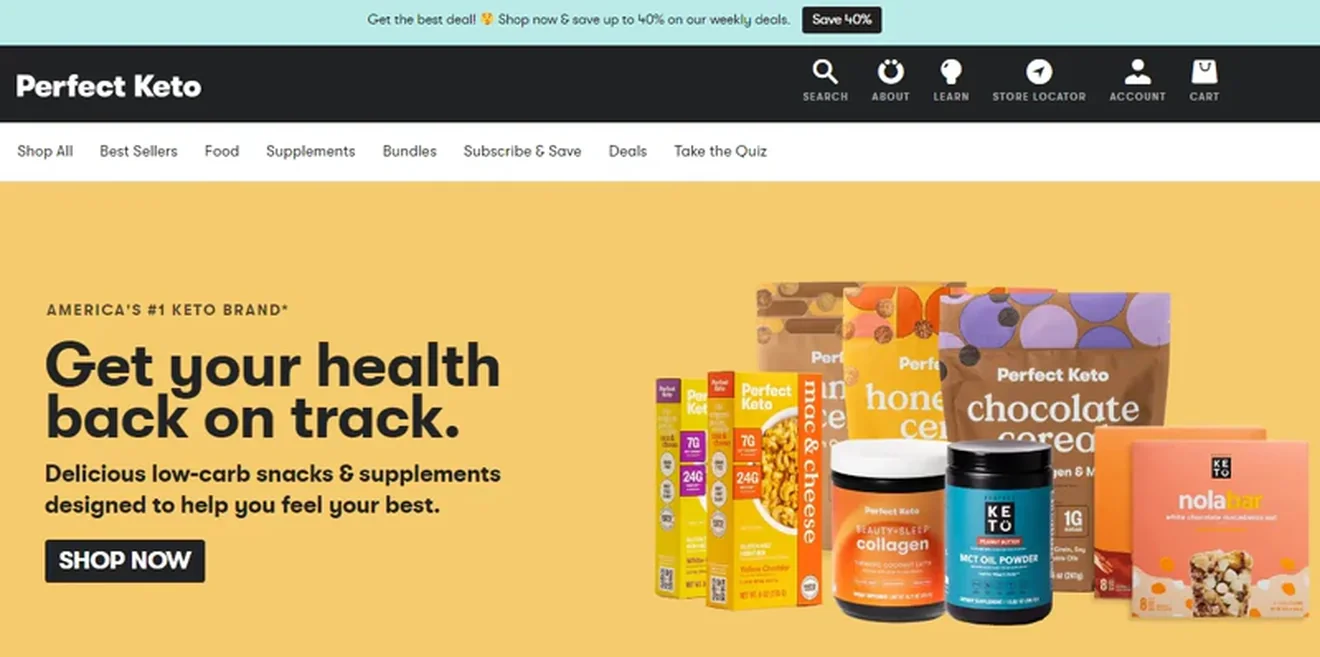
Message and placement: Up to 40% off weekly deals, with a "Save 40%" CTA. A light turquoise bar above the navigation.
Why it works: This platform turns to scarcity marketing and highlights that the deal is limited. It also makes the offer a bit more intimate and exclusive by including a shushing face emoji. Besides, animation spices things up for the CTA and makes it more visible.
What to test: Compare the “saving-oriented” CTA with a more descriptive one like "Shop Weekly Deals."
Liquor Loot — Limited-time discount
Goal: Encourage shoppers to use a discount before the promo ends.

Message and placement: 20% off with a promo code that ends at midnight Sunday. A bright red bar at the very top of the website. A separate black strip below highlights members-only pricing.
Why it works: Who said you can have only one floating bar? This online liquor store designed one pop-up for their regular perks like member-only pricing, Buy Now, Pay Later option, and free shipping. Then they accompanied it with a red alert for the urgent proposal that triggers the viewers’ fear of missing out.
What to test: Compare the deadline-based message (ends on Sunday) with one highlighting the discount and promo code alone to see whether urgency improves engagement.
Tropicfeel — Limited-time product promotion
Goal: Drive traffic to a specific product category during a limited-time sale.

Message and placement: Travel pants starting at 35% off, with a "Discover now" CTA. A light-colored bar above the navigation.
Why it works: Three things: attractive offer, CTA button, and an X button to dismiss the bar if it interrupts the shopping process.
What to test: See how a more purchase-oriented CTA, such as "Shop Travel Pants," performs in comparison to "Discover now".
Are you thinking of launching your own seasonal sale campaign? Check out Claspo's sale announcement popup options to highlight discounts, limited-time deals, and special offers on your website.
Free shipping, returns & purchase reassurance
Free shipping, easy return policy, and different ways of paying may become another factor in motivating customers to make purchases. Below are some examples of website announcement bar examples featuring those elements.
Apolis — Free shipping threshold hello bar
Goal: Encourage shoppers to add more items to their carts to qualify for free US shipping.

Message and placement: Free US shipping conditions with simple wording “Add €X for free shipping”. A light-colored bar above the navigation with support links and a currency selector on the right
Why it works: This customizable market bag store illustrates that your bar’s layout does not have to be conventional. Naturally, you place your discounts and offers in the center. Yet, when you place them in the left upper corner, right above the logo, you might even increase their visibility. In addition, you can use the other corner to add some site features, such as contact links & currency preferences, to save space and mask the pop-up as an inherent page element.
What to test: Compare the personalized remaining-spend message with a static free shipping threshold announcement.
Lunar Beauty — Free shipping promotion
Goal: Encourage shoppers to reach the minimum order value for free shipping.

Message and placement: Free US shipping on orders over $75. A soft purple, star-speckled bar above the navigation.
Why it works: A free shipping offer is always irresistible. Especially when its design matches the brand’s concept and looks truly “out of this world”. The banner fits the visual identity of the brand and keeps the shipping threshold easy to spot. The message is short, easy to understand, and doesn’t even need an additional CTA button.
What to test: Compare the current free shipping message with one that emphasizes the remaining amount needed to qualify.
Peel — Minimalist free shipping bar
Goal: Motivate shoppers to reach the free shipping threshold.

Message and placement: Free shipping on all US orders over $40. A contrasting green bar above the navigation.
Why it works: Just a very lucrative deal, nothing excessive or over the top. This represents minimalism and efficiency at their best.
What to test: Compare the simple shipping announcement with a version that adds a CTA, such as "Shop Cases," to see whether it drives more product-page visits.
Rothy's — Free shipping and returns
Goal: Reduce purchase hesitation by highlighting shipping and return benefits.
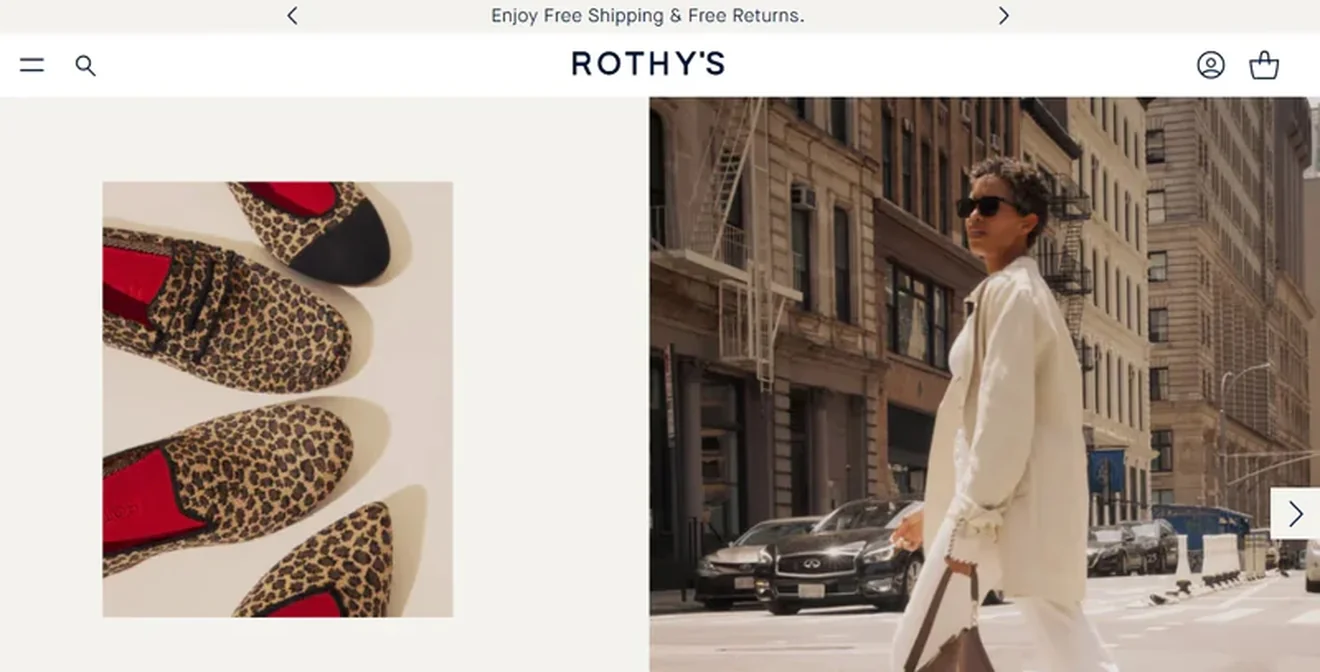
Message and placement: Free shipping and free returns. A light-colored bar at the very top of the website.
Why it works: Many businesses forget how attractive free returns can be, but not Rothy's. The bar also includes navigation arrows, allowing visitors to browse other announcements.
What to test: Compare the combined message with separate announcements for free shipping and free returns to see which attracts more engagement.
Soon Skincare — Buy now, pay later announcement
Goal: Inform shoppers about a flexible payment option that may make purchases more accessible.
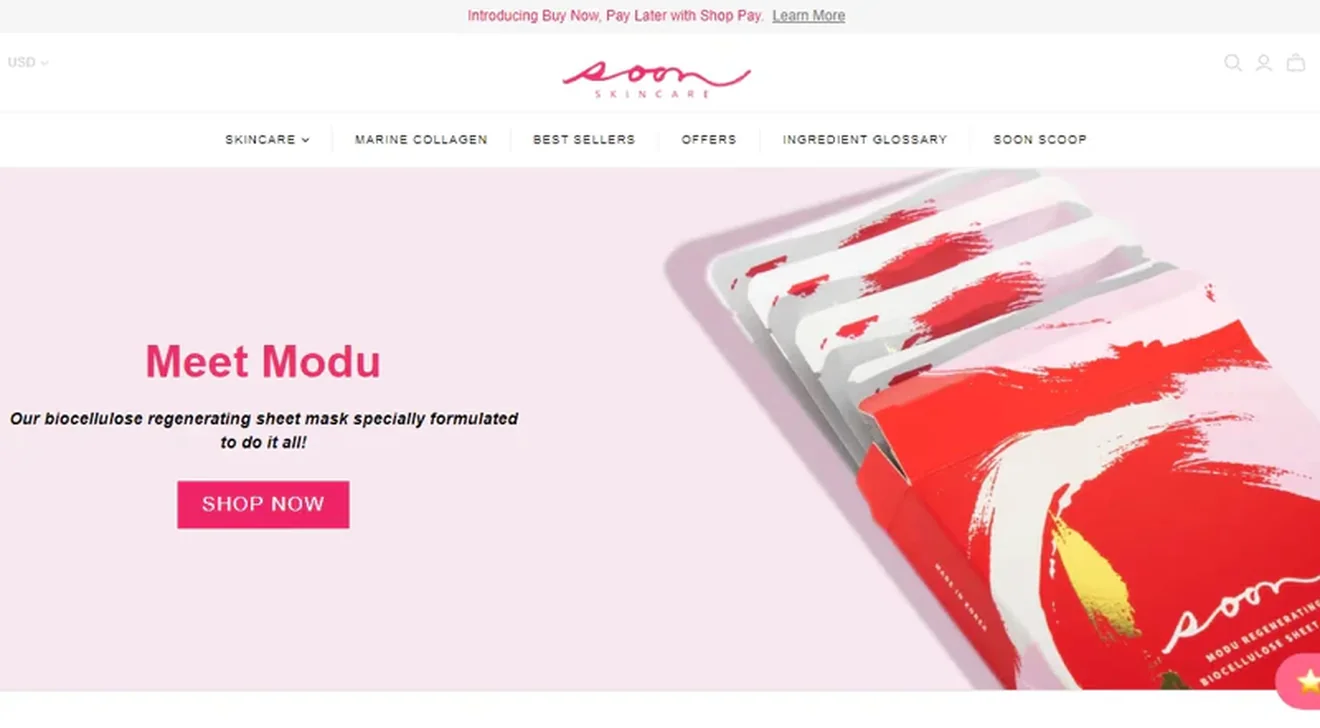
Message and placement: Buy Now, Pay Later with Shop Pay, accompanied by a "Learn More" link. A grey bar at the top of the page.
Why it works: The store smartly markets their new Buy Now, Pay Later option without distracting visitors from the main page. Instead of squeezing financing details into a narrow space, the brand adds a "Learn More" link for shoppers who want to explore the offer.
What to test: Compare the current announcement with a benefit-led version that explains how the payment option works.
Casper — Multiple purchase reassurances
Goal: Reduce purchase hesitation by communicating several shopping benefits at once.
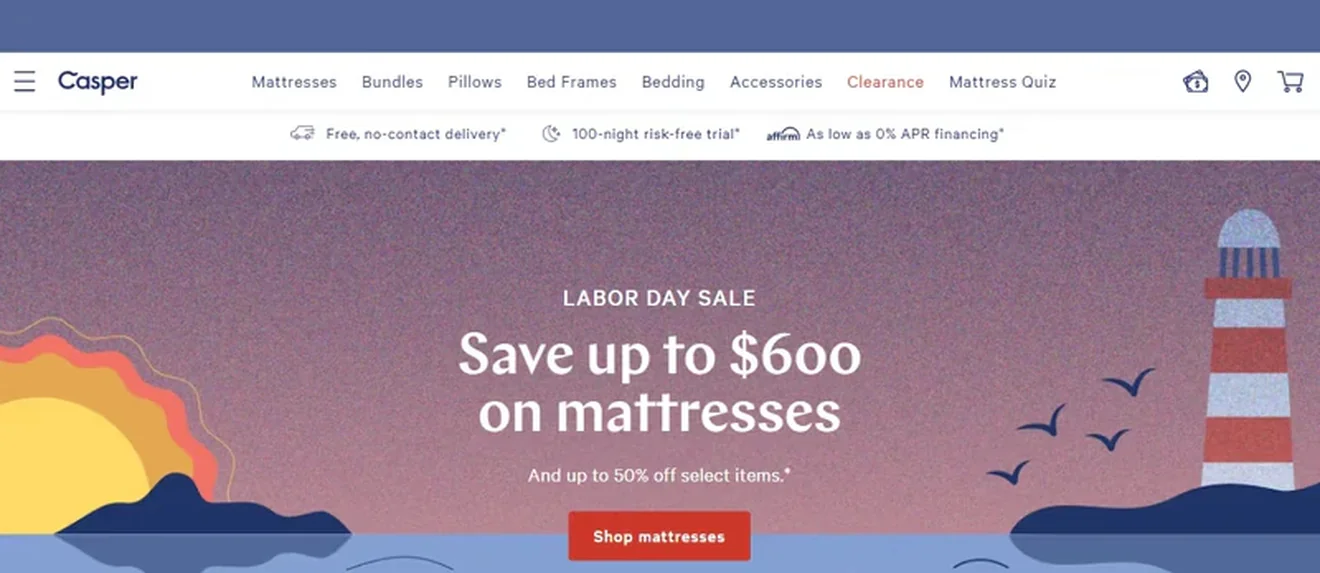
Message and placement: Free contactless delivery, a 100-night risk-free trial, and financing options. An additional section under the navigation.
Why it works: Would you like to place everything that tempts the customers in one bar? Follow this bed store’s lead. It has free delivery, a risk-free trial, and a Buy Now, Pay Later option all in one place. Plus, this pop-up nests with the navigation bar perfectly.
What to test: Compare the three-benefit bar with a rotating single-message version to see whether shoppers engage more with one focused reassurance or several displayed together.
Product, feature & campaign announcements hello bar examples
Hello bars aren't just for discounts. They can also help you introduce new products, promote special collaborations, or draw attention to features visitors might otherwise miss. These examples show how to make an announcement stand out without taking over the page.
Drop — Limited-edition product announcement
Goal: Draw attention to a special product collaboration and encourage visitors to explore the collection.
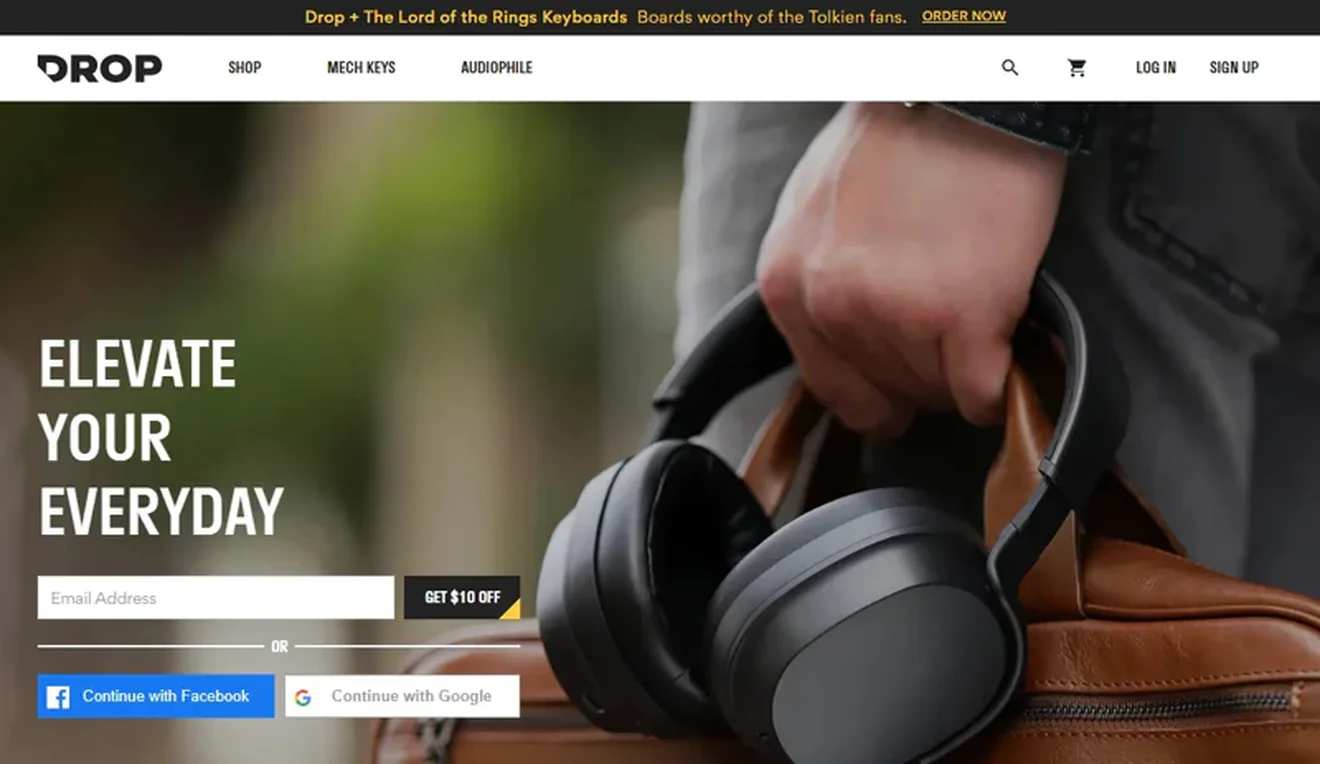
Message and placement: Drop + The Lord of the Rings keyboards with an “Order Now” CTA. A narrow black bar above the navigation.
Why it works: Naturally, a free shipping offer is a classic; almost everyone has it. Whereas capitalizing on the hype-generating Amazon Prime series The Rings of Power by promoting limited-edition Drop + The Lord of the Rings Keyboards is a bold and relevant move. Worthy of the Tolkien fans or not, they still look stunning. Plus, using them won't be easy unless you are a devotee of the Professor’s work or know Elvish and Dwarvish.
What to test: Compare the fandom-focused tagline with a more product-specific message highlighting the keyboards' design or features.
GoHydrate — Scrolling product announcement
Goal: Introduce a new product flavor and draw attention to its launch.

Message and placement: An announcement about the new flavor. A bright yellow, ticker-style bar below the navigation.
Why it works: Who said an announcement bar has to be static? GoHydrate uses a scrolling message to repeatedly bring the new flavor into view. The vivid yellow color makes the announcement easily noticeable, while the emojis perfectly match the brand’s dynamic image.
What to test: Compare the scrolling announcement with a static version to see whether movement increases engagement without distracting visitors.
FullContact — Feature promotion
Goal: Introduce visitors to the Verify API and encourage them to learn more about it.

Message and placement: Verify API for fraud and identity verification, with a “Learn More” CTA. A blue bar above the navigation.
Why it works: Getting acquainted with the new platform can be a bit disorientating. That is why offering your newcomers a link to the most popular product or service can turn into a real helping hand. The blue background also distinguishes the announcement from the darker website header.
What to test: Compare the product-focused message with one highlighting a specific benefit, such as reducing fraud or simplifying identity verification.
CookiePro — New tool and free trial announcement
Goal: Promote the Consent Rate Optimization tool and encourage visitors to try it.

Message and placement: A new Consent Rate Optimization tool with a one-month free trial. A light-colored bar below the navigation.
Why it works: The opportunities to land media elements inside a sticky bar are quite limited. Still, this company managed to fit in an attention-grabbing megaphone to its free trial promotion gracefully. They even added a close button to be less intrusive.
What to test: Compare the free trial-focused message with one that emphasizes what the tool helps users achieve, keeping the trial offer as a secondary incentive.
Promoting an upcoming webinar, launch event, or special occasion? Start with Claspo's event announcement bar template and customize the message, date, and CTA for your campaign.
Lead capture, newsletter & referral hello bar examples
Hello bars can also help turn website visitors into subscribers or members. They can promote newsletter signups, free accounts, referral programs, or exclusive benefits without interrupting the browsing experience.
Spotify — Free account signup
Goal: Encourage visitors to create a free Spotify account.
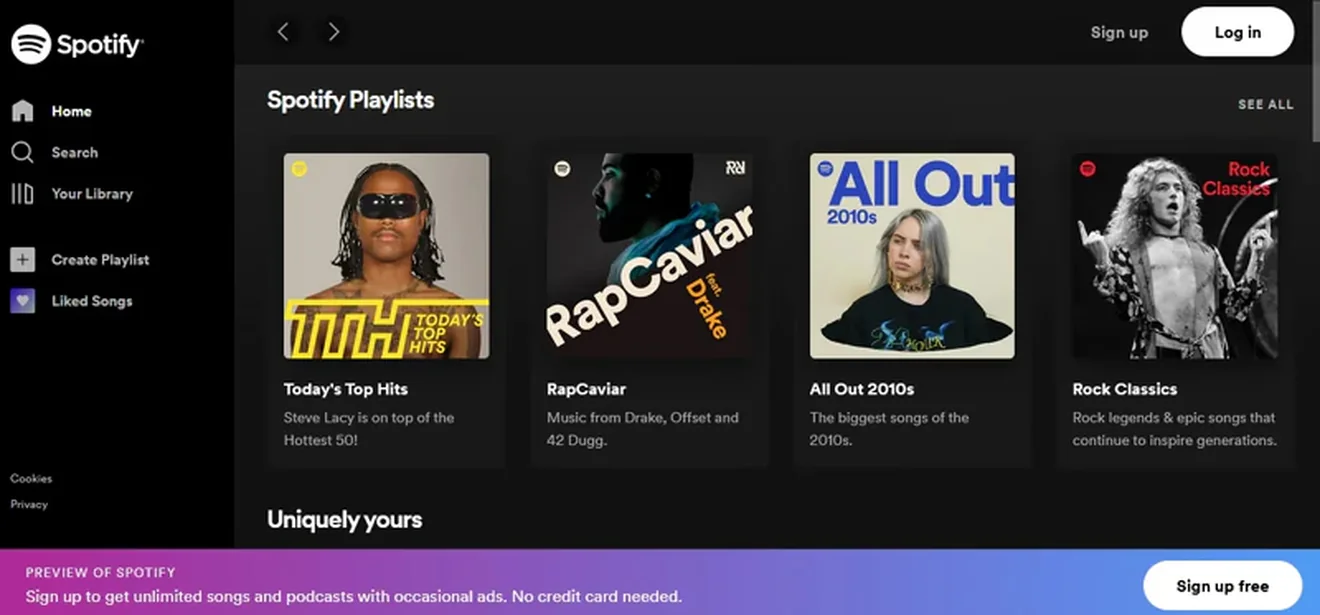
Message and placement: A free signup invitation highlighting access to unlimited songs and podcasts. A colorful gradient bar fixed to the bottom of the screen.
Why it works: Who said floating bars must be attached only to the top of the page? If it does not suit your layout, do not hesitate and place it at the bottom. The message emphasizes what visitors get for signing up, while the contrasting "Sign up free" button makes the next step clear.
What to test: Compare the benefit-focused message with a shorter invitation emphasizing the free account.
Three Spirit — Quiz-based discount
Goal: Encourage visitors to take a product recommendation quiz and share their preferences.

Message and placement: An invitation to take a quiz and get 10% off. A light blue bar above the navigation.
Why it works: Three Spirit encourages visitors to interact with the brand and share a discount in return for zero-party data. The quiz can help shoppers discover products that match their preferences, and at the same time, the brand gets more relevant data for marketing.
What to test: Compare the discount-led invitation with a personalization-focused message, such as "Find Your Perfect Drink," to see which attracts more quiz participants.
Italic — Membership and referral promotion
Goal: Encourage visitors to explore Italic's membership and referral programs.

Message and placement: Links to the Italic Bold membership and referral program, alongside other shopping information. A slim, light-colored bar at the top of the website.
Why it works: This shop’s hello bar design is quite informative, yet it remains completely minimalistic and noninvasive to your personal space. Here you can find their tagline, mention the most exquisite product, and link to new arrivals, accompanied by an invitation to join their referral program or Italic Bold club membership (a little off-topic, but their slogan “It Pays to Be Bold” is a real jewel).
What to test: Compare the current text links with a more prominent membership message that highlights a specific benefit of joining.
Looking for more ways to grow your email list? Explore these newsletter signup examples for ideas on offers, messaging, and signup form designs.
Operational updates, localization & privacy hello bar examples
Not every website banner needs a promotional message. Some help visitors navigate temporary changes, choose the right regional website, or manage their privacy preferences. Here are three examples of how brands communicate important information without taking over the page.
Dahlias Flower Truck — Temporary business update
Goal: Inform customers about temporary changes to business operations and explain how they can still place orders.

Message and placement: A maternity leave announcement with details about limited order availability and how to get in touch. A text-heavy bar at the top of the homepage.
Why it works: Hello bars are unmatchable in their capacity to let your visitors know right away that some important shifts have taken place in your operating mode. For instance, you are on maternity leave, but still are open to administering selected types of orders. Plus, because the pop-up is always visible on the front page, there is no chance that the visitors will accidentally forget about the important information.
What to test: Compare the detailed announcement with a shorter message linking to a dedicated page with ordering details.
Apple — Country and region selection
Goal: Help visitors access the appropriate regional version of the website.

Message and placement: A prompt to confirm the visitor's country or region, with an option to continue to the relevant website. A light-colored banner at the top of the page.
Why it works: This is an example of effective display rules and personalization. Are you from Germany? The site will identify it and change the message’s language. Now you can confirm the location to get a more relevant experience. But if you still want the visitors not to miss out on your special deals, you can nest another pop-up below the navigation bar.
What to test: Compare the current country-selection prompt with a shorter message that emphasizes the benefits of switching to the local website.
Birchbox — Cookie consent and privacy preferences
Goal: Inform visitors about cookie usage and allow them to manage their preferences.

Message and placement: A cookie notification explaining the use of cookies, with options to accept or customize settings. A banner displayed along the bottom of the page.
Why it works: Birchbox explains that cookies are used and offers controls to accept or customize preferences. The banner keeps the page visible, but it is a consent interface, not a standard promotional hello bar; the screenshot alone cannot establish legal compliance.
What to test: Test the clarity and accessibility of the consent wording and controls through usability testing, while preserving legally required information and choices.
Note: Cookie consent banners serve a different purpose from promotional hello bars. They require appropriate consent controls and shouldn't be treated as interchangeable with marketing announcements.
Patterns that work: Hello bar best practices
Creating a floating bar is relatively easy, especially when using intuitive pop-up software. However, a few critical aspects must be considered before launching it on your website. A clear message, relevant offer, and thoughtful display settings can make a difference. Here are seven practices worth following:
1. Be concise. Hello bars have limited space, so use it wisely. Focus on one benefit, not a detailed product pitch. Peel’s shipping announcement and Munk Pack’s subscription offer both make the value easy to understand.
Claspo's CRO-ready floating bar templates give you a starting point, with copy and design elements you can customize.
2. Focus on design. Your bar should stand out while remaining consistent with your website. Lunar Beauty's star-speckled banner is a good example: it attracts attention and fits naturally into the brand's design.
With Claspo, you can automatically match your Shopify store's colors or choose from balanced color palettes. You can also preview your bar on desktop and mobile before publishing.
3. Give visitors a clear next step. If you're promoting a product or campaign, add a relevant call-to-action button or link, for instance, “Shop Weekly Deals.” Informational announcements may not need a CTA at all.
In Claspo's analysis of 779M+ popup impressions, 87% of the top-performing ecommerce promotional popups used a single, high-contrast CTA.
4. Add a real deadline. Use a countdown announcement bar template for a limited-time offer to highlight when a promotion ends. MUJI's flash sale is a good example. Just make sure your timer reflects a genuine deadline instead of resetting for every visitor.
5. Match the message to your audience. A discount for a specific product category may work better on relevant product pages. Try URL targeting, traffic sources, or geolocation to show different offers to different visitors. For more ideas, explore these ecommerce popup targeting strategies.
6. Follow mobile popup best practices. Check that your message remains readable, buttons are easy to tap, and the bar doesn't cover important navigation or shopping controls. Adjust the layout for smaller screens and include an accessible close button when appropriate. Alternatively, Claspo allows you to display the floating bar only on the selected device type.
7. Test your copy, timing, and placement. Compare offers, CTAs, immediate versus delayed display, and top versus bottom placement. Claspo supports tests with up to five variants, including comparisons between floating bars and traditional popups.
In Claspo’s study of 779M+ popup impressions, ecommerce promotional floating bars averaged 7.49% CTR, while ecommerce signup bars averaged 2.12% subscription CR.
How to create a hello bar in Claspo
You don't need coding skills or a designer to create a hello bar for your website. Claspo offers ready-made announcement bar templates that you can customize and publish in a few steps.
1. Choose a template
Browse the template library and pick a floating bar that fits your goal: to promote a sale, announce a product launch, offer free shipping, or collect newsletter subscribers. You can also start from scratch.
2. Customize the message and design
Use the drag-and-drop editor to change the copy, colors, and CTA. Add elements like a countdown timer, promo code, or signup field if your campaign needs them. If you struggle with copy, Claspo’s AI agent can help you create one based on your website’s voice and tone. For Shopify stores, Claspo can also suggest color palettes based on the website's design. Preview the result on desktop and mobile screens.
3. Set targeting and display rules
Decide where, when, and to whom your bar appears. You can target specific pages, traffic sources, geotargeting, or visitor segments. Adjust the display timing and frequency, and use Claspo's overlap protection to prevent your bar from interfering with other popups.
4. Publish, measure, and optimize
Launch your hello bar and track its performance. Depending on your goal, monitor clicks, signups, or other conversions. Run A/B testing with up to five variants to compare offers, messages, and designs, then refine your campaign based on the results.
Ready to try it? You can start with Claspo's free plan and upgrade as your traffic and campaign needs grow. Check Claspo pricing to compare plans and usage limits.
FAQ
What is a hello bar and what does it do?
A hello bar is a narrow website banner that displays a short message at the top or bottom of a page. Businesses use it to promote discounts, announce new products, highlight free shipping, collect newsletter signups, or share important updates. Unlike traditional popups, hello bars can remain visible as visitors browse without covering most of the page.
Is a hello bar the same as an announcement bar?
The terms are often used interchangeably. Hello bar is a general name for a compact website banner, while announcement bar emphasizes its purpose: sharing promotions, news, or updates. A sticky announcement bar remains visible as visitors scroll, whereas a static bar may disappear from view. Hello Bar is also the name of a separate marketing software product.
What should an announcement bar say?
Keep the message short and focused on one benefit or action. For example, "Free shipping on orders over $50," "New collection just dropped," or "Flash sale ends tonight." Include important conditions, such as minimum order values or deadlines. If visitors need to take another step, add a relevant CTA like "Shop the Sale" or "Explore the Collection."
Should a hello bar appear at the top or bottom?
Top placement works well for promotions, shipping offers, and important announcements because visitors can see them near the navigation. Bottom placement can be useful for signup invitations or secondary offers, as Spotify demonstrates. Neither position is universally better. Test both placements and check that the bar doesn't obstruct navigation, content, or other website elements.
Are hello bars mobile-friendly?
Yes, provided they're designed for smaller screens. Keep the message concise, use readable text, and make CTA and close buttons easy to tap. A mobile hello bar design shouldn't take up too much vertical space or interfere with navigation and checkout controls. Preview the banner on different screen sizes before publishing.
How do you measure hello bar performance?
Start with the campaign goal. For promotional bars, track click-through rate (CTR) and the purchases or other actions that follow. For lead capture, measure completed signups relative to impressions. Also monitor dismissals and engagement across devices.
Use A/B testing to compare copy, incentives, targeting, and placement. Don't judge success by clicks alone: a bar that generates fewer clicks but more qualified purchases may be the better option.
Find the right hello bar for your website
The best hello bar examples have a few things in common: a clear message, a relevant offer, and a design that fits naturally into the website. Some use discounts or countdown timers to encourage purchases. Others promote new products, collect leads, or keep visitors informed.
Whatever your goal, keep the copy concise, make the next step obvious, and test different placements and messages to learn what works for your audience.
Ready to put these ideas into practice? Browse Claspo's announcement bar templates and create your own.