How to Add a Newsletter Popup in Shopify [+Templates]

![How to add a newsletter popup in Shopify [+Templates]](https://framerusercontent.com/images/wKWaTIvHk3efsDf4RzhZot1tNEI.png?width=780&height=528)
Summarize
A newsletter popup on your Shopify store opens new horizons for your business. Instead of losing visitors after one session, you build an email list you control and can use to generate repeat sales and promote new launches.
An average store with passive Shopify email popups has a nice, but modest 3.53% conversion rate. What if we tell you that you can triple this metric? We’ve analyzed 779 million popup impressions to figure out a formula behind the top-performing Shopify newsletter popup. Go on reading this guide to see what a high-converting newsletter popup looks like and how to add a newsletter popup in Shopify.
What is a Shopify newsletter popup
At its core, a Shopify newsletter popup captures visitor data such as an email address or phone number. But at Claspo, we see it as more than just a form. It’s your first handshake. A simple way to invite people into your world — to sign up for your email list, hear about new drops, or unlock special deals that only insiders receive.
A Shopify newsletter popup helps you build something you own — a list you control, free from algorithms or ad budgets. These popups generally fall into two categories:
1. By format:
Static popup. A classic Shopify email popup with a value proposition, input fields, and/or an image.
Interactive popup. Engaging Shopify newsletter popups like “Spin-the-Wheel” that turn the signup process into a game.
2. By trigger:
Welcome popup. A first-visit Shopify mailing list popup that appears after a user lands on the site.
Exit-intent popup. An offer that appears only when a user is about to close the tab.
Time-sensitive popups. A popup that triggers after a user has spent some time on the page.
Scroll-triggered popup. A Shopify newsletter popup that shows after a user scrolls down a specific percentage of a page.
Shopify newsletter popup conversion benchmarks (2026)
Our benchmark data shows that signup forms tend to convert at around 3.53% on average, which already makes them a dependable way to collect visitors who are genuinely interested in your products. But when the messaging is clear, and the timing feels natural, the results of your Shopify newsletter popup can jump dramatically — the top 1% of forms reach about 27.53% conversion rates.
Anatomy of the top 1% of signup forms | |||
|---|---|---|---|
Element | Top 1% pattern | Why this works | Performance impact |
Layout | 74% are popups | Popups are immediately visible and keep attention. | 10.6% CTR |
Complexity | ~90% use 1-2 fiels | Fewer fields reduce effort and speed up the decision to submit. | 2.48% CR for email-only focus |
Incentive | 69% offer discounts | A clear discount gives an instant, concrete reason to sign up. | 3.85% CR (vs. 2.4% for “Join newsletter”) |
Mechanic | Gamified components | Turn a transaction into a fun win. | 9.18% avg CR |
Timing | On exit or scroll | Reduces interruption. | 5.76% CR |
Trust | 71% have a visible close button | An easy dismissal reduces resistance and makes the popup feel less intrusive. | |
Focus | 94% use one clear CTA | A single action removes hesitation and decision fatigue. | Maximizes click intent |
Types of Shopify newsletter popups and how to place them for higher CR
Where a Shopify email popup appears matters as much as what it says. On Shopify, email collection usually happens through a mix of inline forms and overlay formats. Each type works best in a specific context and for a specific user intent.
Shopify newsletter popup
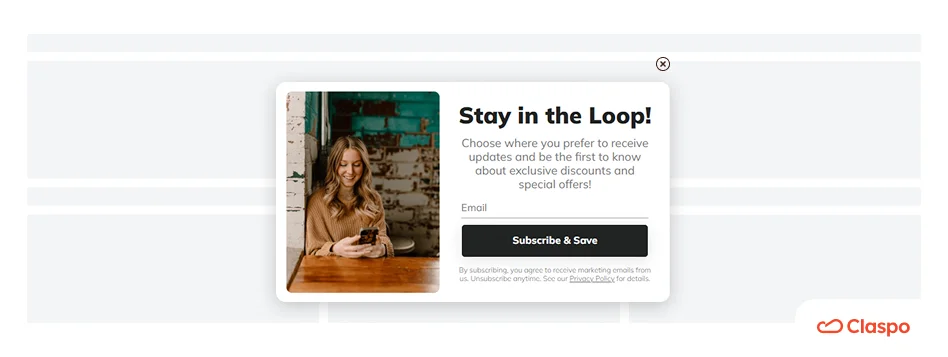
Popup forms interrupt the flow, so timing matters more than placement. A Shopify newsletter popup shown too early feels intrusive. Shown later, it often converts better.
Popups are the undisputed layout champions, driving an average CTR of 10.6%, outperforming all other layouts.
Common triggers that work:
Time on page (usually after 15-20 seconds).
Scroll depth, once someone has engaged with the content.
Exit intent, right before the visitor leaves.
Click triggers, when users actively choose to subscribe.
Best placements: High-traffic pages where intent builds over time (Homepage, main category landing pages).
Gamified email popup for Shopify
This is a subset of the Shopify email subscription popup. Components like Spin-to-Win wheels, Scratch Cards, or Gift Boxes add engagement and fun to regular actions, like sign-up.
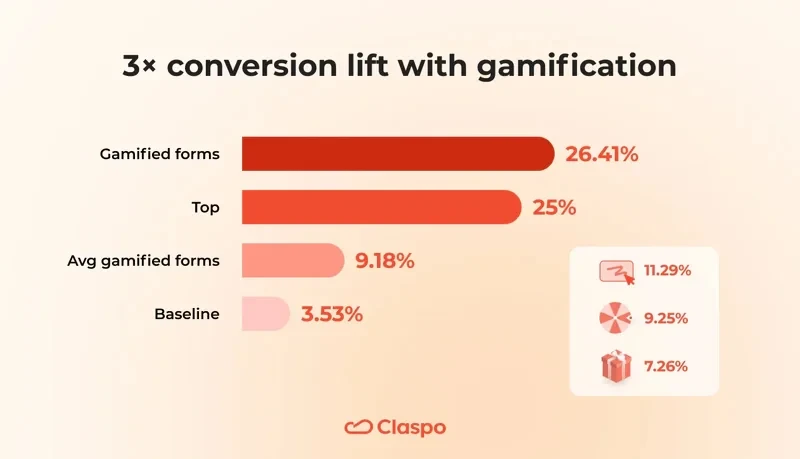
Gamified forms consistently outperform traditional ones. Standard popups have an average CR of 3.53%, while gamified forms average 9.18% (with Scratch Cards leading at 11.29%). Moreover, our data shows that the top 25% of gamified popups reach a stunning 26.41% CR.
Common triggers that work:
Scroll-based (>40% of the page)
Exit-intent to get the attention of the “quitters”, let them play to win, and trigger dopamine.
Best placements: Homepage (for cold or mixed traffic) and dedicated promotional landing pages.
Floating boxes
Unlike Shopify email subscription popups, floating boxes stay visible without fully blocking the page. They don’t distract in an aggressive way, which is why they work.
For Shopify, floating boxes have a reliable average CTR of 5.13% and a 4.78% subscription CR (almost equal to popups, but with much less friction).
Best use cases:
Product or collection pages, where users browse for longer.
Blog posts or guides with extended reading time.
Mobile views, where full popups can feel heavy.
Common triggers that work: Scroll-based or delayed triggers usually work better than immediate display.
Floating bars
Floating bars are persistent and minimal. They work well for simple offers and long sessions.
With an average CTR of 7.49%, floating bars are highly effective at capturing attention. Because their direct conversion rate is only 2.12%, they work best as click drivers to landing pages rather than as standalone Shopify email sign up popup forms.
Best placements:
Homepage and top-level category pages.
Mobile-first layouts, where screen space is limited.
Common triggers that work: Floating bars rarely need complex triggers. Visibility over time does the job.
Embedded forms
An embedded Shopify popup signup form sits inside the page content. Because they are passive, inline forms have a bit lower sitewide conversion rate (4.37% average CR). However, they show incredibly strong performance when placed in high-intent zones where the user is actively looking to connect. See our roundup of the best Shopify popup apps for embedded and overlay signup forms.
Best placements:
Footer areas, for low-pressure signups.
Product pages, especially for restock alerts or product updates.
About us or brand story pages, where visitors are more open to subscribing.
Dedicated newsletter pages linked from blogs or social profiles.
Embedded Shopify email popup forms don’t rely on timing or triggers; they convert when the page itself does the work.
Summing up
A high-performing Shopify newsletter popup form isn’t about choosing one format. It’s about matching the format to the intent — and letting placement and timing do most of the work.
Buyer journey stage | Page type | Goal | Format | Performance |
Discovery | Homepage | First handshake | Centered popup (Static or Gamified) | 3.53% – 9.18% CR |
Consideration | Product / Collection | Soft reminder | Floating Box or Bar | 5.13% – 7.49% CTR |
Hesitation | Cart / Checkout | Abandonment save | Exit-Intent popup | 5.76% CR |
Loyalty | Footer / About Page | Passive connection | Embedded form | 4.37% CR |
How to add an email popup on Shopify
Let’s build a Shopify popup signup form that offers an incentive in exchange, since this is a very popular way to build an email list in ecommerce.
Step 1: Install the Shopify newsletter popup app — Claspo
To ensure your popup loads lightning-fast without slowing down your store, you must configure the background script correctly.
Find Claspo in the Shopify App Store and click Install. In less than 30 seconds, you’ll securely link the app to your store’s API.
Now, go to your Shopify Admin → Online Store → Themes → Customize.
On the left sidebar, click the App Embeds tab.
Toggle the Claspo script to ON and click Save in the top right corner.
Step 2: Choose a template
No need to start from scratch — Claspo provides more than 1,000 pre-made CRO-ready subscription forms and Shopify email popup templates. Just select one that corresponds to your use case, and you will be halfway there.
Step 3: Customize your Shopify email popup
Here comes the fun part — customizing! Claspo’s drag-and-drop editor makes it super easy.
First, apply brand colors. Use the smart Theme setting to instantly recolor the entire Shopify newsletter popup template to match your brand palette, or input your exact hex codes manually.
Next, optimize the number of input fields. Stick to the top 1% tactic: use 1-2 fields (Email or Email + Name).
To edit text, click on any text block and type in your own message. Alternatively, use the Claspo AI agent to write the high-converting copy tailored to your business specifics.
If you want to swap out images on your Shopify email popup, just click on the image, then either upload your own (PNG, JPEG, WebP, or even GIF) or choose one from Claspo’s image library.
You can add a rolling text component to your Shopify newsletter popup template — it’s like a news ticker but cooler.
Double-click it to open the settings.
In the Style tab, you can change the color, add a background, or border.
In Options, add your own messages that you want to scroll through.
It’s a great way to highlight deals, tips, or announcements via an email popup on Shopify.
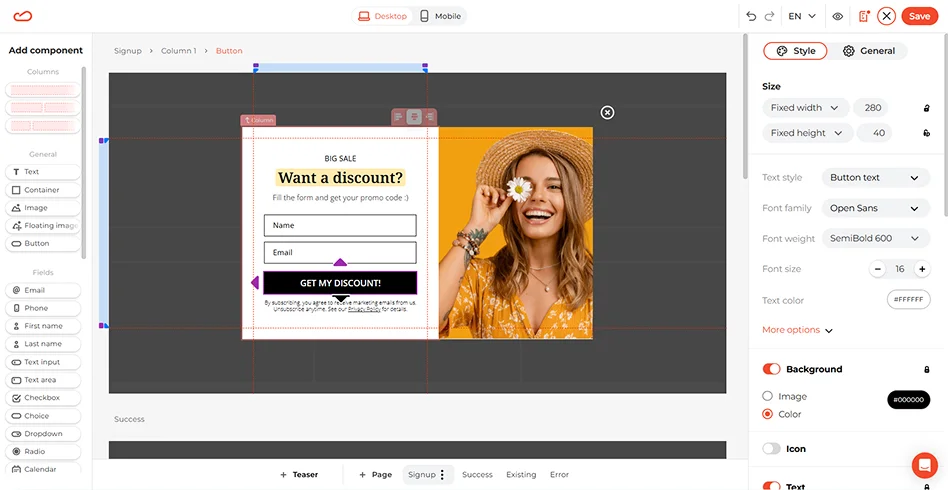
And don’t forget your CTA button — that’s your main driver for action. You can customize how it looks, how it reacts when someone hovers over it, and of course, what it says. A simple “Get Started” or “Yes, I want this” on a Shopify email popup can do wonders.
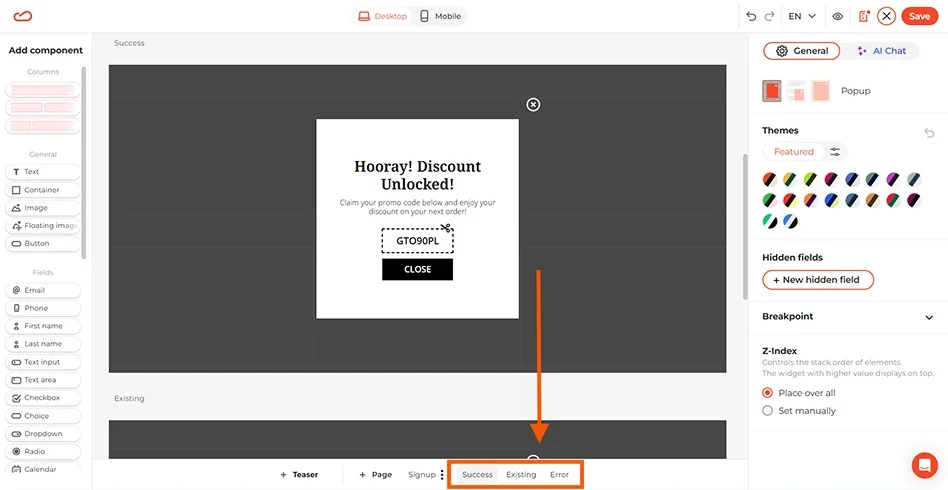
Before moving on, scroll down to check the built-in confirmation screens. There are three: success, already subscribed, and error. Give each one a quick update to make sure they align with your tone and message.
Step 4: Set display rules
With Claspo's advanced triggering and targeting, you can set your Shopify newsletter popup to appear after a visitor has spent some time on the website, scrolled a little, or even attempted to leave. To target people who are obviously interested, you could, for instance, display a Shopify email subscription popup only after a user has viewed three pages.
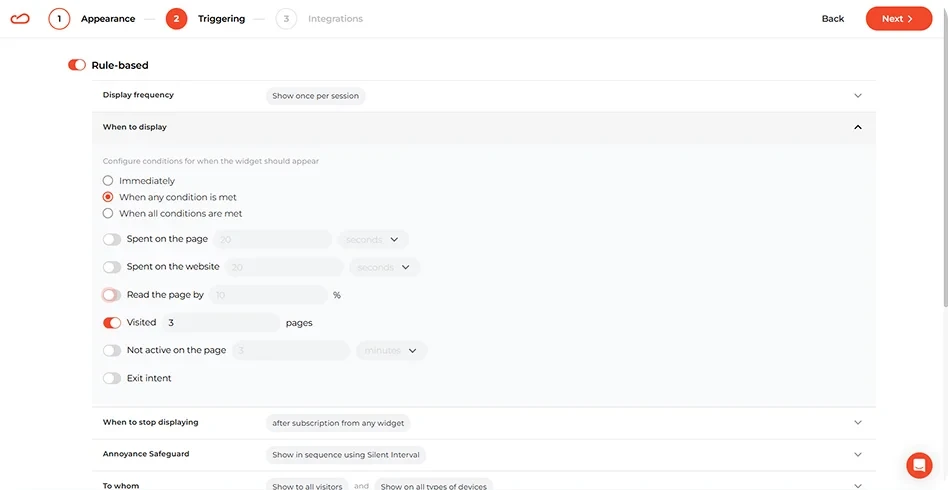
For sharper targeting, choose who sees your Shopify email popup: first-time visitors, returning users, desktop or mobile audiences, or even those browsing specific pages.
Use Claspo benchmark rules to set up your triggers based on your specific marketing goals:
Marketing goal | Trigger | Audience | Why it works |
Grow subscriber base | 20-second delay or 30% scroll | New visitors only | Avoids immediate “door-slams” and protects margins from loyal buyers. |
Cart abandonment recovery | Exit-intent (Desktop & Mobile) | All visitors with active carts | Captures attention at the moment they decide to leave. |
Paid traffic lead capture | 10-second delay | UTM targeted traffic (Social media) | Connects the popup copy directly to the ad they just clicked. |
Localized promotions | 15-second delay | Geotargeting (Country/City) | Shows localized offers for instant trust. |
Step 5: Sync with your stack and go live
Now, we need to transfer the information from the Shopify newsletter popup into your marketing suite for a smooth consumer experience. Claspo has native integrations with major tools on the market, so it will take you a second to sync it with your tools. Make sure the subscriber is tagged and added to your automated welcome mailings as soon as they submit their email address.
Finally, click “Publish” to set your conversion engine live.
Shopify newsletter popups: best practices & strategy tips
Not every visitor is ready to buy — but many are ready to connect. A thoughtfully placed Shopify newsletter popup helps you capture the attention of those people while they’re still browsing. Apart from that, a well-designed Shopify popup email sign up form helps you build relationships with both new and returning customers.
Design best practices
A Shopify newsletter popup doesn’t need bells and whistles. It needs clarity, relevance, and strong design. A great form typically includes:
A headline that clearly explains the value.
Minimal fields — name and email are enough.
A call to action that’s specific, like “Get early access”.
Mobile optimization — most web traffic is on phones.
Design that matches your store’s brand — fonts, colors, and spacing matter.
If you are setting up your layout inside the editor, stick to the following layout to create a high-performing Shopify newsletter popup as seen in our benchmarks:
Element | The baseline | The top 1% tactic | Expected performance |
Mechanic | Static text fields | Gamified components (Wheels, Scratch Cards) | 9.18% Avg CR (vs. 3.53% for static) |
Layout | Floating bars / Footers | Centered popups | 10.6% CTR |
Complexity | 3+ fields (asking for phone, age, gender) | 1–2 fields max (Email or Email + Name) | 2.48% baseline (Every extra field drops CR sharply) |
Incentive | Generic “Join our newsletter” | Clear financial reward (Percent-off vs. Fixed sum) | 3.85% CR |
Trust | Hidden or delayed close buttons | Visible close button (71%) | Lower bounces |
Focus | Multiple competing links/buttons | One clear CTA button (94%) | Zero decision fatigue |
Legal compliance best practices
Make sure your data collection methods do not violate privacy laws. While Claspo handles data security at the platform level, you — as the Shopify store owner — are responsible for configuring your Shopify email popups to protect your brand and build customer trust.
Be transparent: Use Claspo’s editable text blocks below your CTA to clearly explain how contact information will be used (for example, “By subscribing, you agree to receive promotional emails and text messages…”).
Link to your legal policies: Add direct links to your store’s Privacy Policy and Terms of Service so visitors can review the details before submitting their information.
Use explicit consent checkboxes: To align with regulations such as the General Data Protection Regulation (GDPR) and the California Consumer Privacy Act (CCPA), include a separate unchecked checkbox in your Shopify popup newsletter sign up that users must actively select to opt in to your marketing communications.
Conclusion
Overthinking button colors or relying on marketing guesswork won’t fix a leaking funnel or increase CRO for Shopify. But a move from basic, passive forms to behavior-triggered, gamified popups backed by data can.
Start your own conversion experiment today with Claspo’s Lifetime Free plan or a 14-day free Pro trial. Test your best ideas against each other with automated A/B testing and watch your metrics climb to the top.