Multi-Step Popup: How to Increase Conversions [Examples & Setup Guide]

Summarize
In Claspo’s latest popup conversion benchmark, multi step popups averaged a 4.94% conversion rate, compared with 3.67% for standard email popups. Yet, the multi step format alone is not enough: the offer, first interaction, and order of the steps all influence the result.
This guide explains when to use a multi step popup, whether to ask for email first or last, what we can learn from real examples, and how to create and test the flow.
What is a multi step popup?
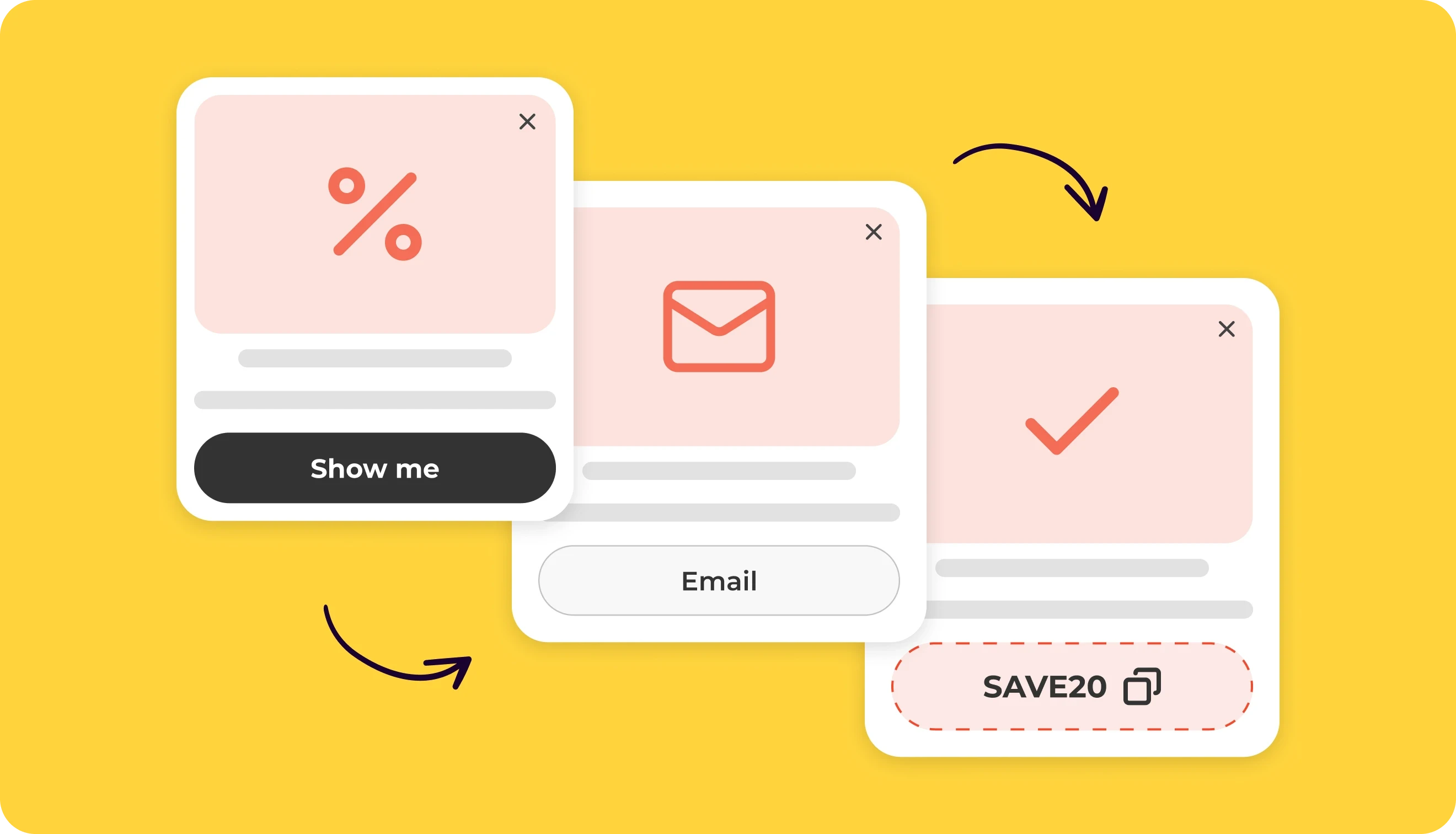
A multi step popup divides an interaction across two or more screens and guides visitors through a short sequence. Each screen can include an offer, ask a question, collect phone numbers or emails, or show the final result. For example:
Product preference → email address → relevant promo code
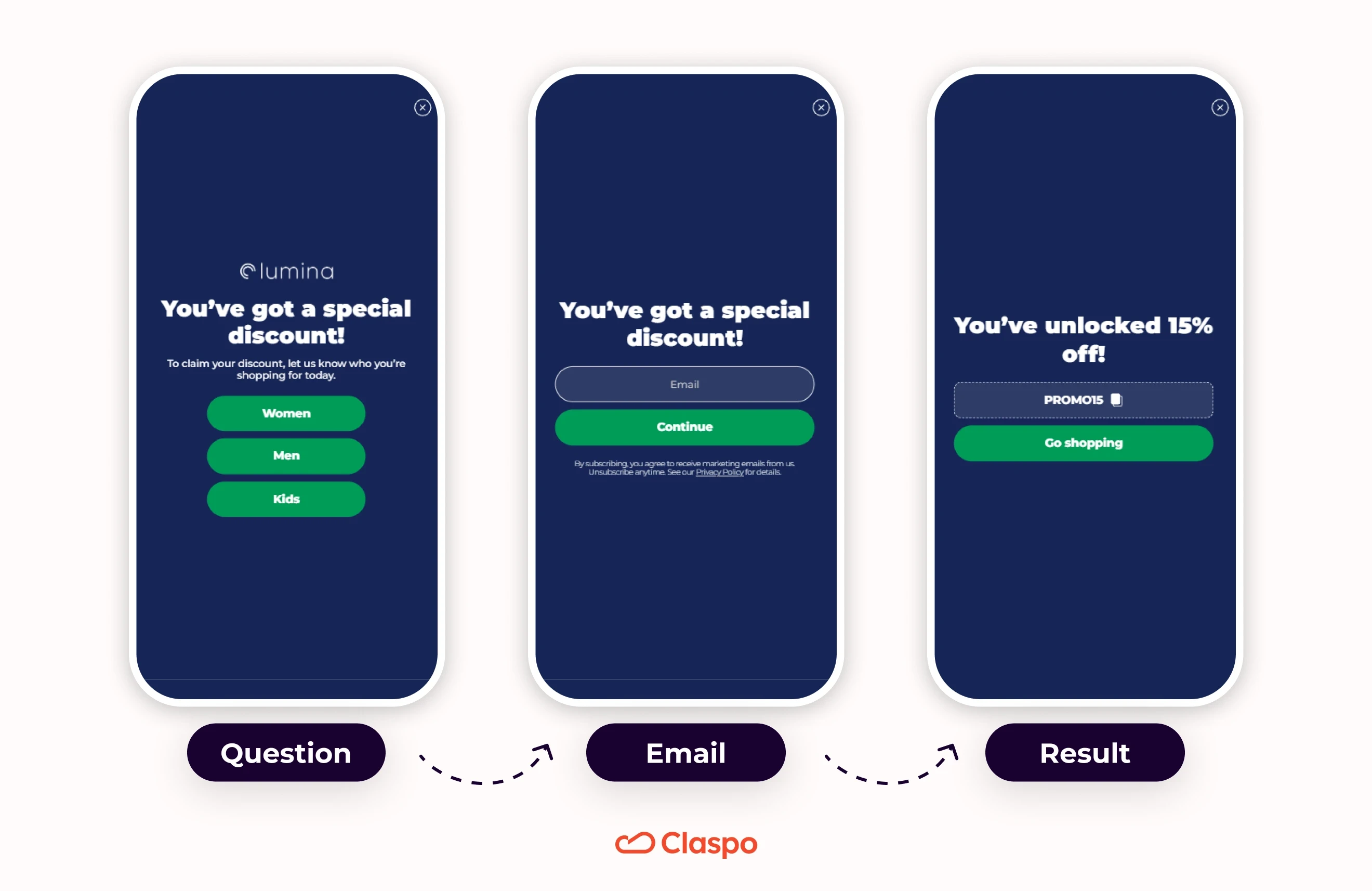
Apart from multi step popups, there are multi step forms. These terms are related, but they describe different things:
A popup describes how the content appears: in a window over the webpage.
A form collects information through fields such as email, phone number, or preferences.
A multi step form can appear inside a popup, be embedded in a page, or have its own page.
When a multi step form appears inside a popup, it can also be called a multi step form popup. However, not every popup screen needs to contain form fields. One screen may present an offer, another may contain the opt-in forms, and the last may show the result, like on the illustration above.
What is the average conversion rate for a multi step popup?
Standard email popups have a 3.67% avg CR, while multi step popups average a 4.94% CR, according to Claspo’s latest popup conversion benchmark, based on widgets with around 170 million impressions. This means the multi step format gets about a 35% higher average conversion rate.
Performance | Standard email popup | Multi step popup |
Average CR | 3.67% | 4.94% |
Top 10% | 22.43% | 28.01% |
Top 1% | 79.14% | 70.92% |
However, these benchmarks don’t mean that multi step popups always perform better than the standard ones. A short and sweet single-step subscription form can still win when the offer, timing, targeting, and design are strong. Adding another screen helps only when it makes the signup easier or more relevant.
Five multi step popup examples and what to test
Skull Bliss: Multi step popup with a preference-based discount
Flow: Product preference → email → discount confirmation
Why it works: On its multi step popup, Skull Bliss pairs an offer of up to 40% off with a simple choice: wall sculptures, animal carvings, or freestanding sculptures. The first click captures a shopping interest the brand can use for relevant follow-up emails. The next screen asks only for an email address, and the confirmation explains that the discount will apply automatically at checkout, so visitors don’t need to memorize or copy anything.
What to test: Test a category-specific final CTA, such as “Shop Wall Sculptures,” against “Back to Site.” Another good idea is to compare immediate display with a short delay of 15 sec. Give visitors time to explore the products, and they’ll be more likely to choose a category and subscribe.
Duluth Trading: Multi step popup for email and SMS list growth
Flow: Pick a badge → email → optional SMS → confirmation
Why it works: This multi step popup by Duluth Trading gives the pick-a-box mechanic a branded twist with three thematic badges. The badge reveals a 15% discount before the email request, so visitors know what they will receive. The third screen offers a bigger benefit for joining the SMS list: an upgrade to 20% off. This increases chances of getting a phone number from your visitors. A visible “I’ll skip the texts for now” link gives visitors freedom of choice, lets them continue with the original offer, and keeps the two signups separate.
What to test: Show a copyable coupon code on the confirmation screen alongside the existing email delivery. Immediate access could encourage more purchases after signup because shoppers would not need to leave the store to check their inbox.
Le Lian: Multi step popup with a product recommendation quiz
Flow: Introduction → three questions → email → bracelet recommendations
Why it works: Sometimes, the product range can feel overwhelming for newcomers. That’s why the promise of bracelet recommendations gives visitors a reason to answer three questions before sharing their email. A step counter and Back buttons make the sequence clear. The signup screen offers a 15% discount and explains what future emails will contain. Results appear inside the multi step popup with product images, prices, and links, which is really thoughtful and connects the quiz directly to shopping.
What to test: Compare the current product grid with a shortlist of three bracelets, keeping the card design unchanged. Fewer recommendations may make choosing easier and increase clicks through to product pages.
FlavCity: Gamified multi step popup
Flow: Scratch card → claim offer → email → SMS → product preference → discount code
Why it works: This multi step popup by FlavCity greets visitors with a branded scratch card to introduce its offer, showing how gamified popups can lead into an email signup. Email is collected before SMS signup and product preferences. The SMS screen offers extra — recipes and early access — as separate reasons to subscribe. The preference answer can support relevant follow-up, while the final screen provides a copyable discount code and a shopping CTA.
What to test: Show “15% off” immediately after scratching instead of “mystery discount,” keeping the remaining flow unchanged. Revealing the reward upfront may increase completed email signups per popup viewer.
Ciele Athletics: Multi step popup with a giveaway entry
Flow: Giveaway invitation → email signup → entry confirmation
Why it works: The chance to win $200 of running gear gives Ciele’s audience a relevant reason to subscribe. The email screen keeps entry simple with one field, and “Subscribe and enter” clearly connects newsletter signup to the giveaway. A link provides access to the terms, and the confirmation explains the monthly giveaway and tells entrants to watch their inbox.
What to test: Compare the current flow with a version that opens directly on the email screen, where the prize is already explained. Removing the initial click could increase completed entries per popup view.
When does a multi step popup increase conversions?
We recommend testing a multi step popup format if an extra screen in a popup reduces the effort for your visitors, makes the offer more relevant, or separates a higher-friction request from the main signup. If the task is already simple, another screen may only add friction.
Your goal | Recommended flow | Why it’s a good idea |
Collect one email for a clear discount | Offer + email on one screen | Another screen may add friction to this simple task. |
Collect email and phone | Email → discount → optional SMS → bigger discount | The email signup happens before the higher-commitment phone request. |
Segment new subscribers | Choice → email → relevant result | The first click captures a useful preference. |
Recommend products | Questions → email → recommendation | The answers help create a result the visitor values. |
Qualify a service or B2B lead | Need → relevant follow-up → contact details | Visitors only see questions relevant to their needs. |
Recover an exiting visitor | Offer → email | Exit intent leaves little time for a longer flow. |
Give the first step a clear job
The first screen of a multi step popup should explain the offer, let visitors reveal a reward, or ask a useful question. For survey popups, that question might uncover what stopped someone from buying.
Weak: “Ready to continue?” → Continue
Better: “Who are you shopping for?” → Women / Men / Kids
The first example does nothing but adds one more click. The second one gives the brand information it can use. If an answer changes nothing in the popup or later communication, the question probably does not need to be there.
Separate the primary conversion from enrichment
In multi step popups, email is usually the main conversion. A phone number, birthday, preference, company size, or purchase timing adds more detail to the subscriber’s profile.
If this information is not needed for the main offer, ask for it on a later screen. Explain why it is useful and add a clear “Skip” or “No, thanks” option when the step is optional.
When to ask for an email: on the first screen or the last?
In short, ask for email first when your goal is list growth. Ask a preference or quiz question first when the answer makes the visitor’s result or your follow-up campaigns more relevant.
A simple way to choose the order is to ask: If the visitor closes your multi step popup halfway, what information would you most want to have already collected?
Sequence | Best fit | Main tradeoff |
Preference → email → result | Segmentation and relevant follow-up | Visitors may leave before contact capture |
Email → preference → result | List growth | Fewer subscribers may complete the preference step |
Questions → email → personalized result | Lead magnet in the form of a recommendation, estimate, or plan | The result must justify the extra effort |
Email → optional SMS → offer | Grow email and SMS lists separately | The SMS step needs its own benefit and clear consent language |
Use an email-first flow for list growth, and a preference-first flow to make the signup more relevant.
Use a longer questions-first flow only when the final result (a recommendation or estimate) is valuable enough to justify the extra effort. Treat SMS signup as a separate conversion with a clear extra benefit and optional skip.
Test email-first against preference-first by comparing email signups, completed profiles, and later campaign performance.
How to create a multi step popup in Claspo
Let’s create a multi step popup with a Choice → email → optional phone → relevant offer sequence. Visitors choose who they shop for (women, men, or kids), enter their email, and receive a discount. The popup sends their contact details and shopping preference to the connected marketing platform.
The template contains five pages:
Page with Choice to collect a shopping preference
Email form to complete the main signup
Phone field page to offer an optional SMS signup
Success page to deliver the discount
Error page to explain a failed submission and let the visitor retry
The Phone page is optional. If SMS list growth is not part of the campaign, connect the Email page directly to Success.
1. Choose a multi step popup template
Sign in to your Claspo account, go to the Widgets dashboard, and click New widget → Create new widget → Template library. Here, there are hundreds of popup templates for various use cases that fit different industries, from beauty and health to home and decor.
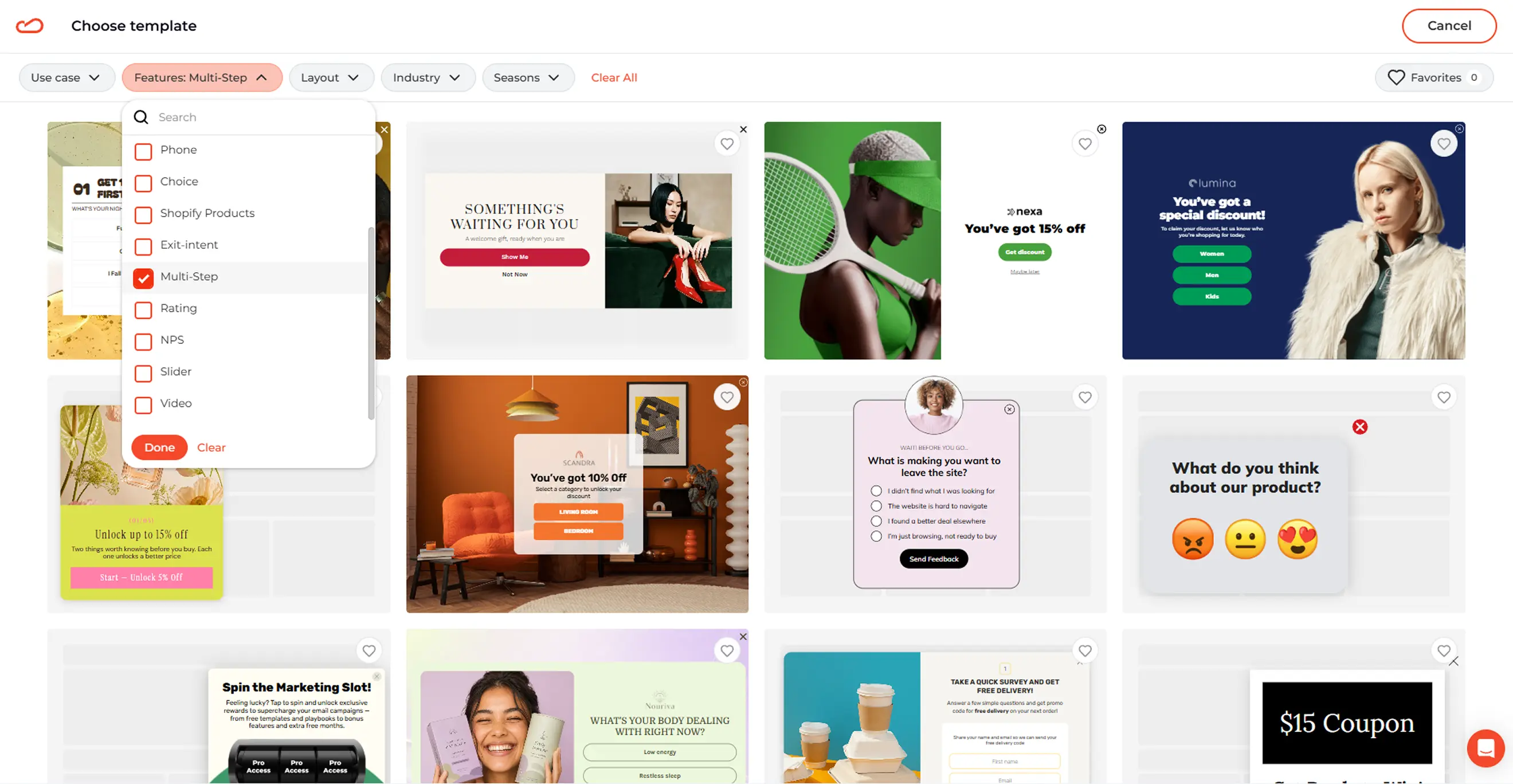
Browse multi-step form templates, choose the popup you like, then open it in the editor.
2. Customize the multi step popup flow
In Claspo, you can use a template as a regular popup or adapt it to a full-screen layout, a floating box, or an inline form. We’ll go with the full-screen layout, since it leads all layout types with a 7.17% avg CR (compared to 4.96% for popups, 2.57% for floating boxes, and 1.28% for floating bars).
Now, let’s check the screen sequence before tweaking the design. For this campaign, the main route is:
Choice (Women, Men, or Kids) → Email → (optional) Phone → Discount
The Error page supports the flow but is not part of a successful signup.
Use one shared route for all three answers if everyone receives the same discount. The selected preference can still be sent to your marketing platform for future segmentation.
3. Set up the Choice question
The template starts with a simple question: Who are you shopping for today?
The available answers are:
Women
Men
Kids
These options are simple to answer and useful for your future marketing campaigns. Save them as consistent values such as women, men, and kids.
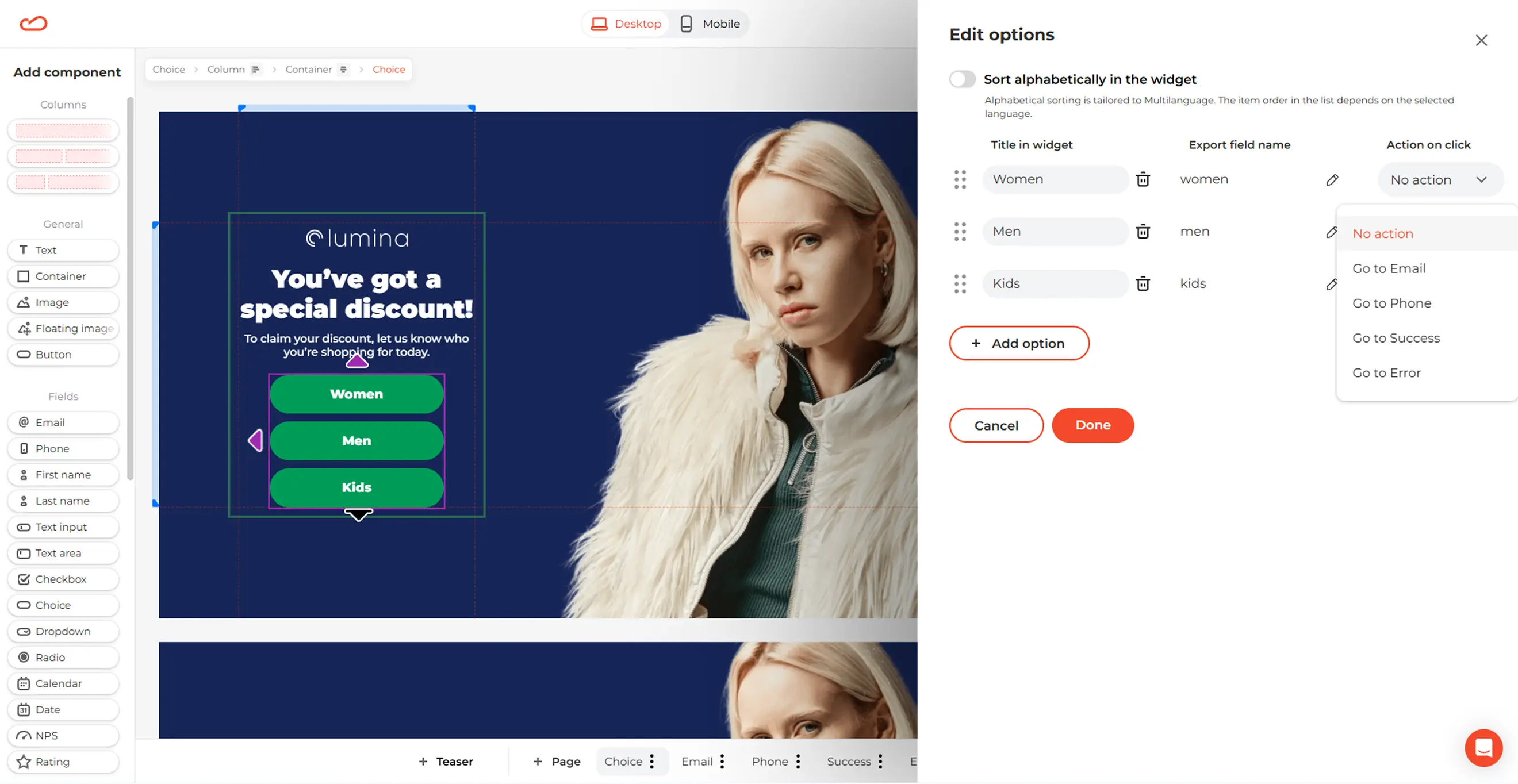
Select a Choice button and go to:
General → Action on click → Go to X popup page
Set each button to open the Email page to keep the flow simple.
4. Create the Email and optional Phone screens
Keep the Email page focused on the main conversion. Use one email field and connect the CTA to the promised discount.
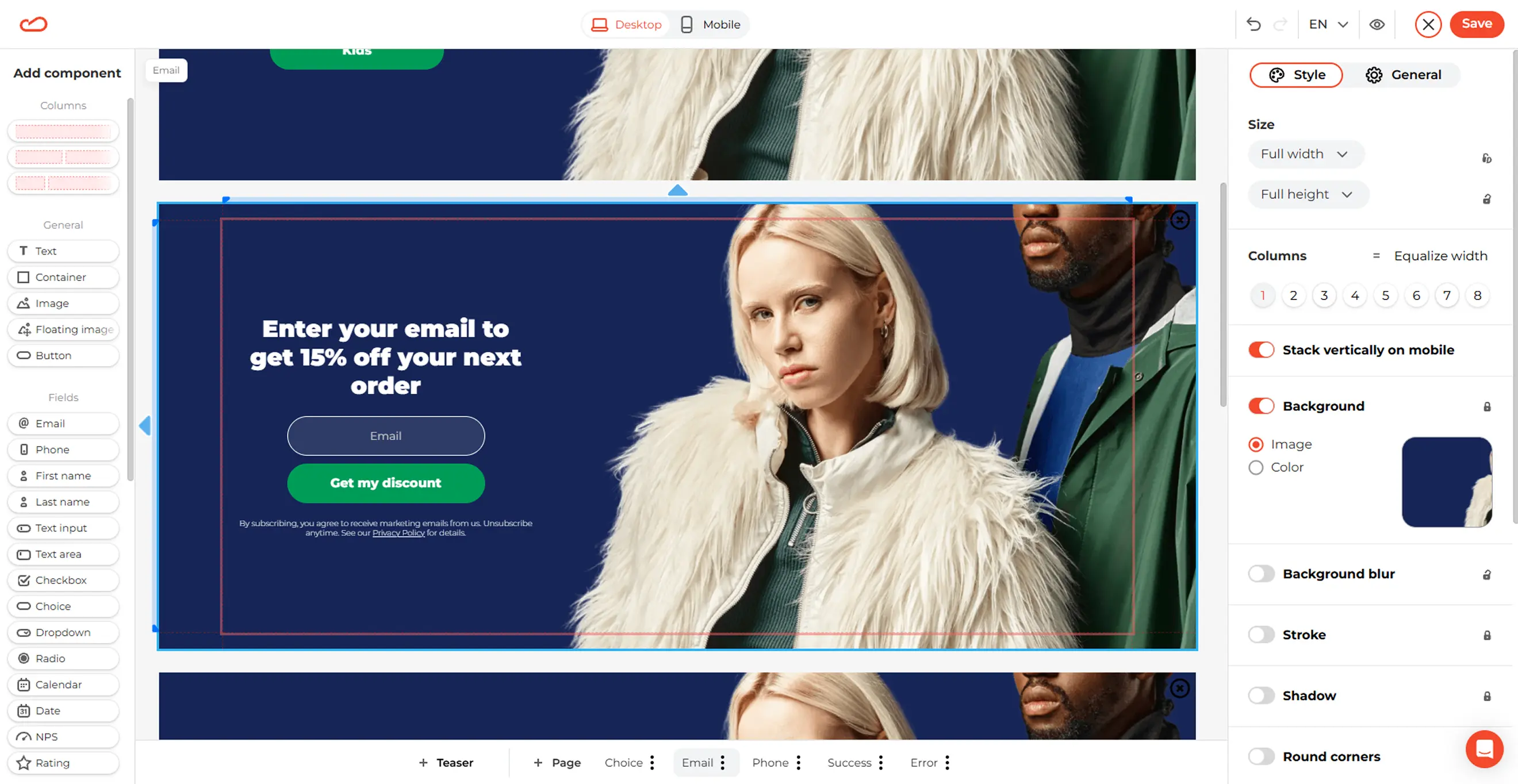
For this campaign, the copy could say: “Enter your email to receive 15% off your next order.” A CTA such as “Get My 15% Off” is clearer than a generic “Submit” button.
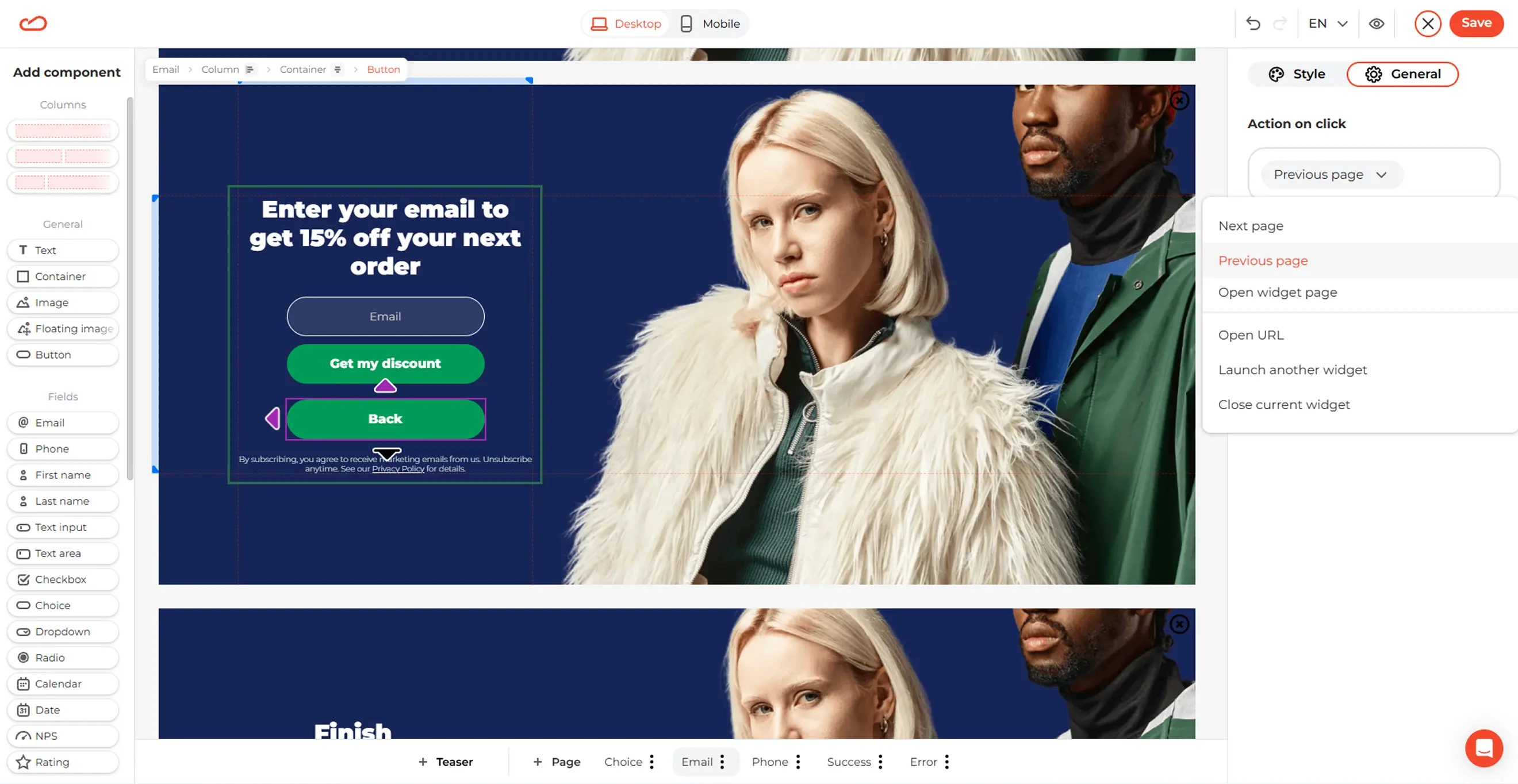
You can also add a Back button in case your visitors want to change their selection. Set its click action to the Previous page of your multi step popup.
Keep the Phone page separate from the email form, as it represents a separate signup. Explain what visitors receive for joining the SMS list and include clear consent language.
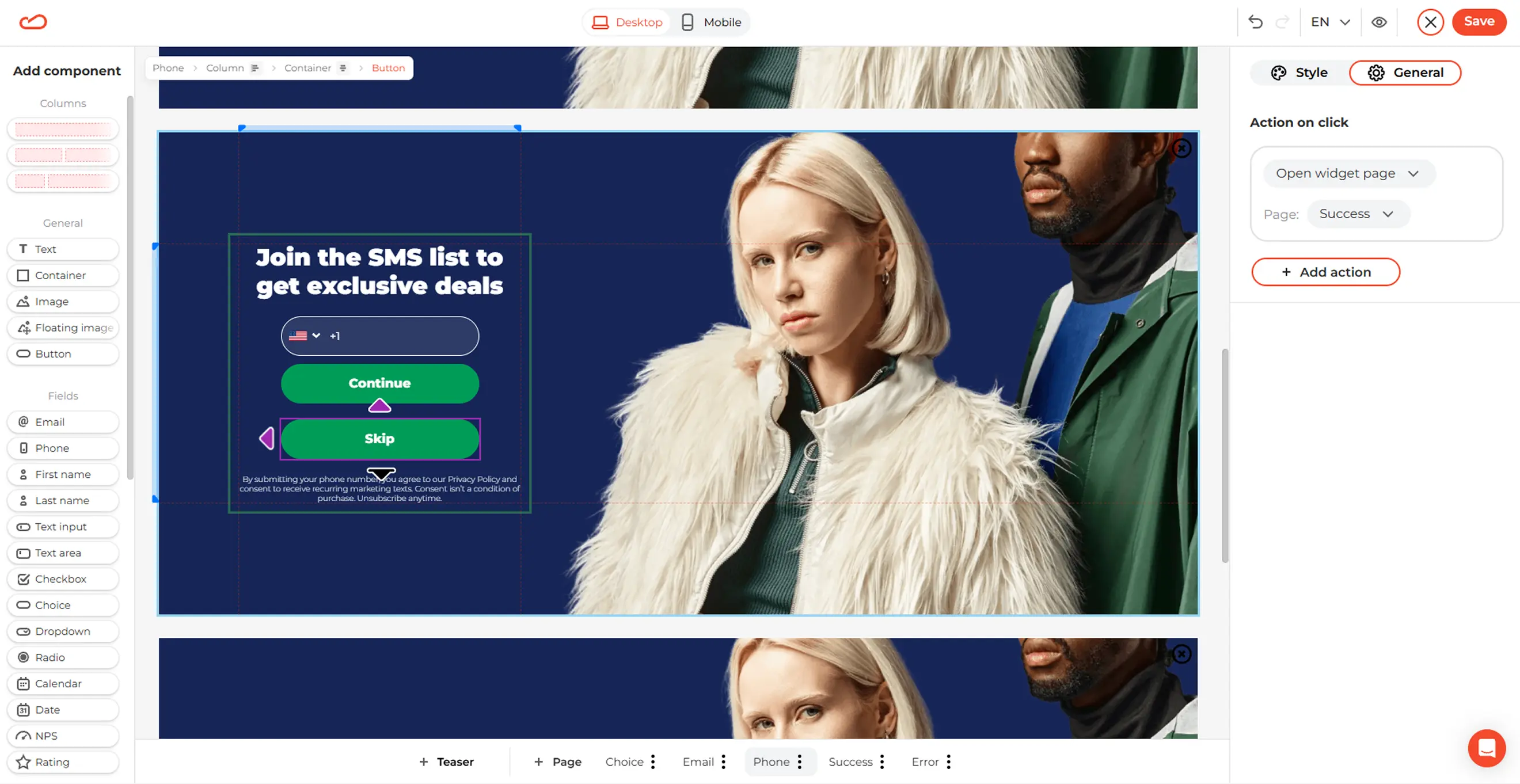
If the phone number is optional, add a Skip button that leads to the Success page. If the campaign does not include SMS at all, link the Email CTA directly to Success and remove the Phone page from the route.
5. Build the Success and Error pages
The Success page should immediately deliver the promised discount. Display the code clearly, add a click-to-copy icon, and include a CTA that guides visitors to a relevant next step.
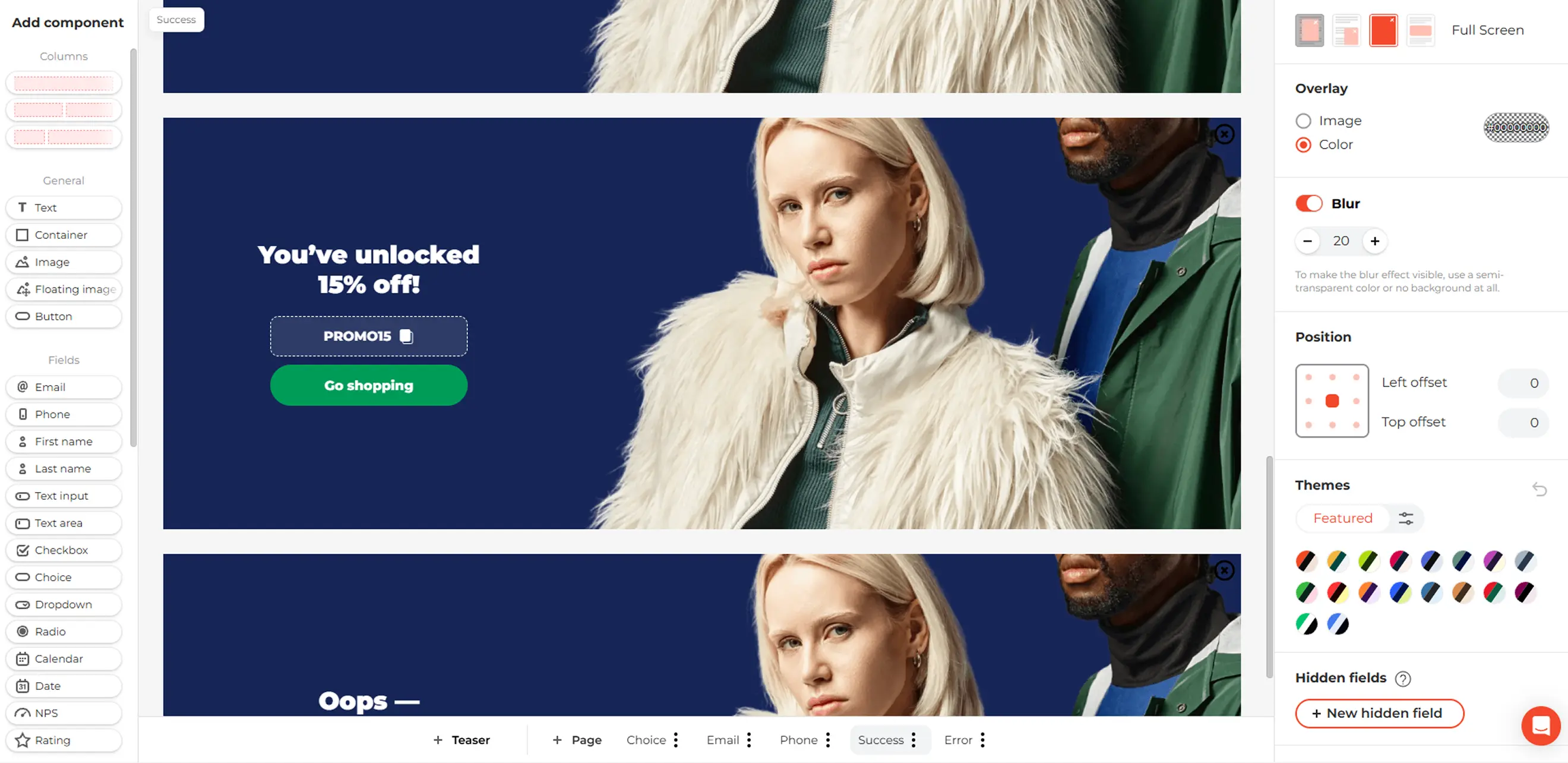
A shared result could include:
the code PROMO15;
a Go Shopping button;
a short note explaining any discount conditions.
Review the Error page as well, explain that the submission could not be completed, and provide a button to try again.
These pages may receive less attention during setup, but they still affect the visitor’s experience.
6. Add a Teaser
A popup teaser is a small tab that lets visitors reopen the popup after closing it. This keeps the discount accessible without showing the full popup again.
To add one, click +Teaser at the bottom of the editor. Now, you can customize its text and design to match the main popup. For this campaign, the teaser could say Get 15% Off or Unlock Your Discount.
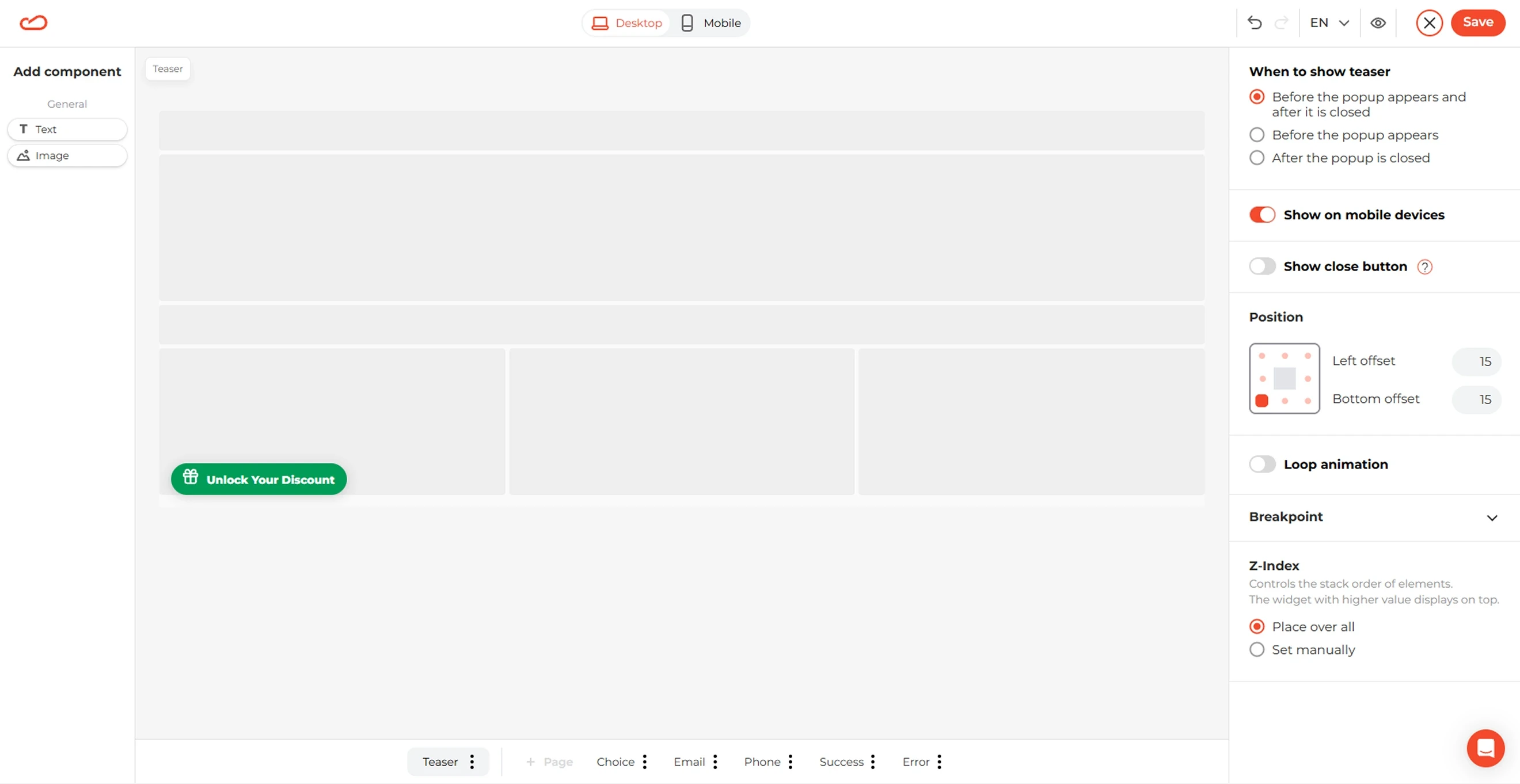
In the Teaser settings, you can choose where and when to show it, whether it appears on mobile, whether visitors can close it, its animation, and loop count.
If you set the teaser to appear after the popup closes, visitors can then return to the offer when they are ready.
7. Set display rules
Next, save your multi step popup and use Claspo’s popup targeting rules to control who sees the popup, where it appears, and how often. By default, we offer the most suitable targeting and triggering rules for various use cases, but you can always tweak them to your liking.
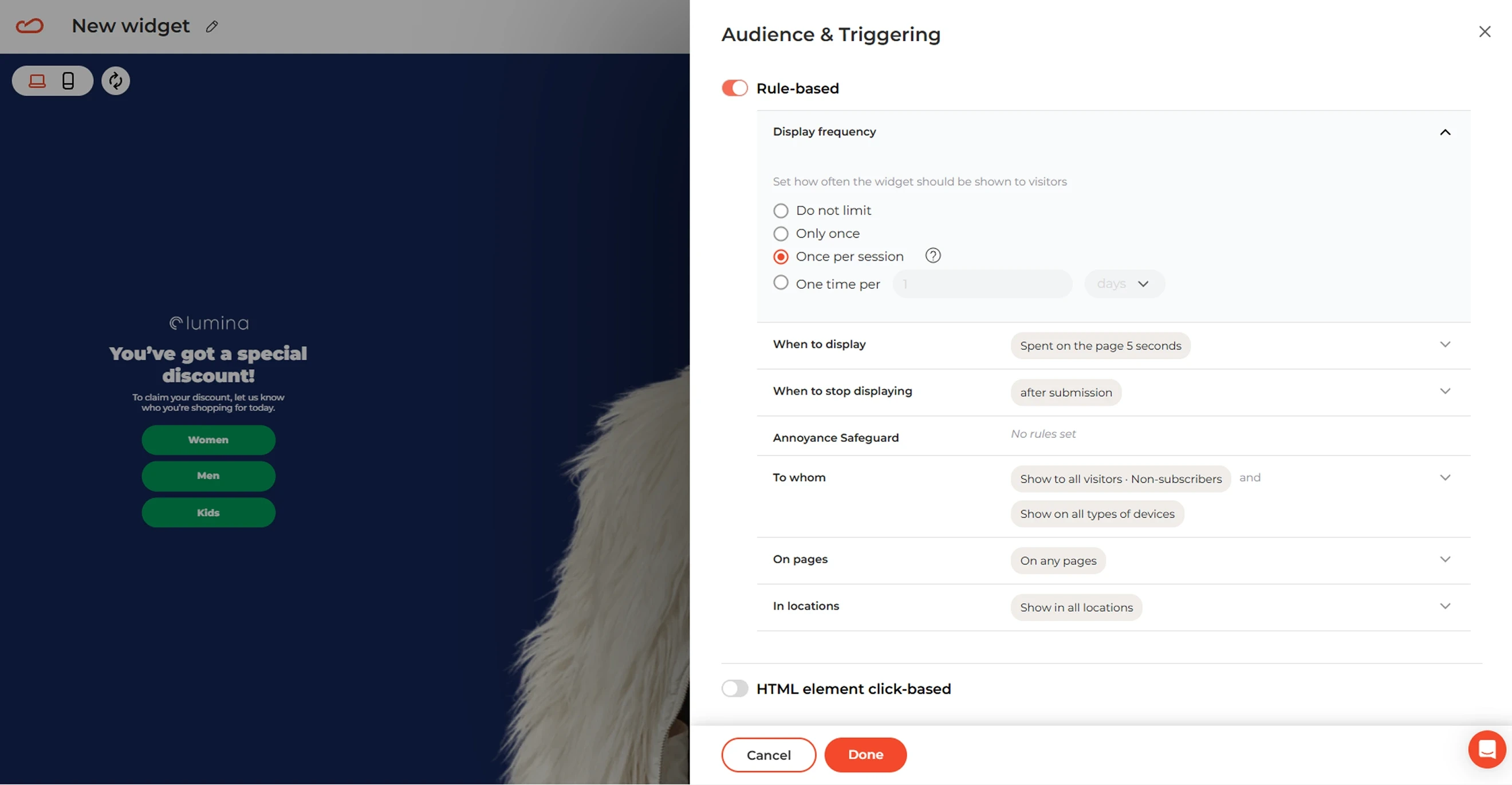
Frequency: Limit how often the popup appears. Once per session is a reasonable starting point for a signup campaign.
Trigger: Choose a time delay, scroll depth, inactivity trigger, or exit intent based on when the offer will be most useful.
After submission: Suppress the popup after a visitor signs up.
Audience and page targeting: Show the popup to new visitors on relevant store pages. Exclude existing subscribers if the campaign is designed to collect new contacts.
Location: On which pages to show or not to show your multi step popup.
Geo: Pick regions, countries, or cities where you want your multi step popup to appear in case you have location-specific campaigns.
Keep the trigger appropriate for the length of the flow. A visitor who sees the popup immediately before leaving may be less willing to complete the Choice, Email, and Phone screens.
8. Map the collected data
Connect your multi step popup through Claspo’s integrations and map each field to the matching field in your ESP or CRM.
For this campaign, the mapping might look like this:
Popup data | Destination field | Possible values |
Choice answer | Shopping interest | Women, Men, Kids |
Email field | Submitted email address | |
Phone field | Phone | Submitted phone number |
You may need to create a custom field such as shopping_interest in the destination platform first. Besides, check that each Choice button sends the intended value. Small inconsistencies such as Kid, Kids, and kids_clothing can divide similar contacts across different segments.
9. Preview and publish
Preview the Choice, Email, Phone, Success, and Error pages on desktop and mobile.
Complete the flow from each Choice answer. Test the Back and Skip buttons, submit incorrect data to check validation, and send a real test submission.
Confirm that the discount appears correctly and that the contact’s email address, phone number, and shopping preference are saved in the right fields. Once everything works as expected, publish your multi step popup.
Multi step popup checklist
Before publishing, test the full flow on desktop and mobile, including skipped steps and incorrect inputs. Here’s a handy checklist for you to follow:
Flow and value
Every screen has one clear job.
The first action takes one tap or a short input.
Every question produces data you plan to use.
Visitors understand the benefit and what they’re signing up for before sharing contact details.
The final screen delivers the promised result or next action.
UX and navigation
Optional steps have a clear skip option.
The progress indicator matches the actual flow.
The X button is visible.
Keyboard navigation and focus order work.
The field, CTA, and close control remain visible and usable on mobile.
Targeting and data
Email and SMS are measured separately.
Existing subscribers and recent converters are excluded.
Other widgets cannot overlap the popup.
Test submissions save contact details and preferences in the correct ESP or CRM fields.
Test contacts receive the intended follow-up for their selected preferences.
Test which popup gets more signups
Compare a single-step and a multi-step version of the same offer. Keep the audience and display rules unchanged, and compare completed email signups per popup viewer — not just first-screen clicks.
If the longer flow collects preferences, also check whether those answers improve your follow-up campaigns. Keep the extra steps only when they support your goal.
Frequently Asked Questions
What is a multi step popup?
A multi step popup guides visitors through two or more screens within the same popup. For example, it might ask for a shopping preference, collect an email, and then show a discount. Visitors move between steps without leaving the webpage.
What is a multi step form popup?
A multi step form popup collects information across several screens inside a popup. One screen might ask about product preferences, while another requests contact details. Unlike an embedded form or a standalone quiz page, the form appears over the webpage.
What is the average conversion rate of a multi step popup?
In Claspo’s 2026 benchmark, multi step popups averaged a 4.94% conversion rate, compared with 3.67% for standard email popups. The results may vary for your business since your offer, audience, timing, and design influence performance.
Are multi step popups better than single-step popups?
Not always. Extra screens can help organize multiple requests, collect useful preferences, or separate email and SMS signup. A single-step popup may work better for a straightforward discount with one email field
How many steps should a multi step popup have?
Use the fewest steps needed to deliver the offer. A simple preference-based flow could contain a choice screen, an email form, and confirmation. Add more questions or an optional SMS step only when they have a clear purpose and benefit.
Should a multi step popup ask for email first or last?
Ask for email first when list growth is the priority, and additional details are optional. Ask questions first when the answers improve the recommendation, offer, or follow-up. If you collect email early, make sure that step submits it before visitors reach optional screens.
Can I create a multi step popup with no code?
Yes. Claspo’s multi step templates let you customize screens, navigation, and design in a visual editor. Our AI assistant can help you match your brand design and voice in a click. Next, you can connect your marketing platform, set display rules, and test the flow. Your website needs the Claspo script or a supported platform integration, but you do not need to write the popup code.