12 Best Popup Software Tools for Websites in 2026

Summarize
One popup tool includes A/B testing for free. Another makes you pay $69 a month before you can run a test. A third charges $30 just to remove its logo — more than its entry subscription.
That is why “starting at” prices tell only part of the story. Popup software may be billed by pageviews, visitors, conversions, contacts, or email sends, while the feature you actually need may sit two plans higher.
We put 12 tools side by side to see which could be the best popup software for different kinds of teams. The comparison follows the questions that come up once a campaign is live. Does the bill jump as traffic grows? Can you build the campaign you had in mind? Does the dashboard count actual signups or just clicks? By the end, you should know which two or three products are worth testing — and what each will really cost.
Best popup software comparison table
Popup software can be priced by pageviews, visitors, conversions, or contacts. Check the billing basis alongside the entry price, especially if your traffic is growing.
Tool | Best for | Free access and starting price | Targeting and A/B testing | Key integrations |
Claspo | Running campaigns with an AI CRO agent | Free: 3K pageviews, 1 website, and all features. Pro starts at $39/mo. | Behavioral, source, device, location, page, and Shopify rules. A/B/C/D/E tests are available on Free. | Shopify, WordPress, native marketing integrations, and webhooks |
Wisepops | Multichannel ecommerce engagement | No free plan; 14-day trial. Shopify pricing starts at $299/mo, while plans for other websites start at €599/mo. | Behavior, traffic source, custom properties, and ecommerce data. Tests include control groups, and automatic conclusions. | Shopify, 100+ integrations, API, and webhooks |
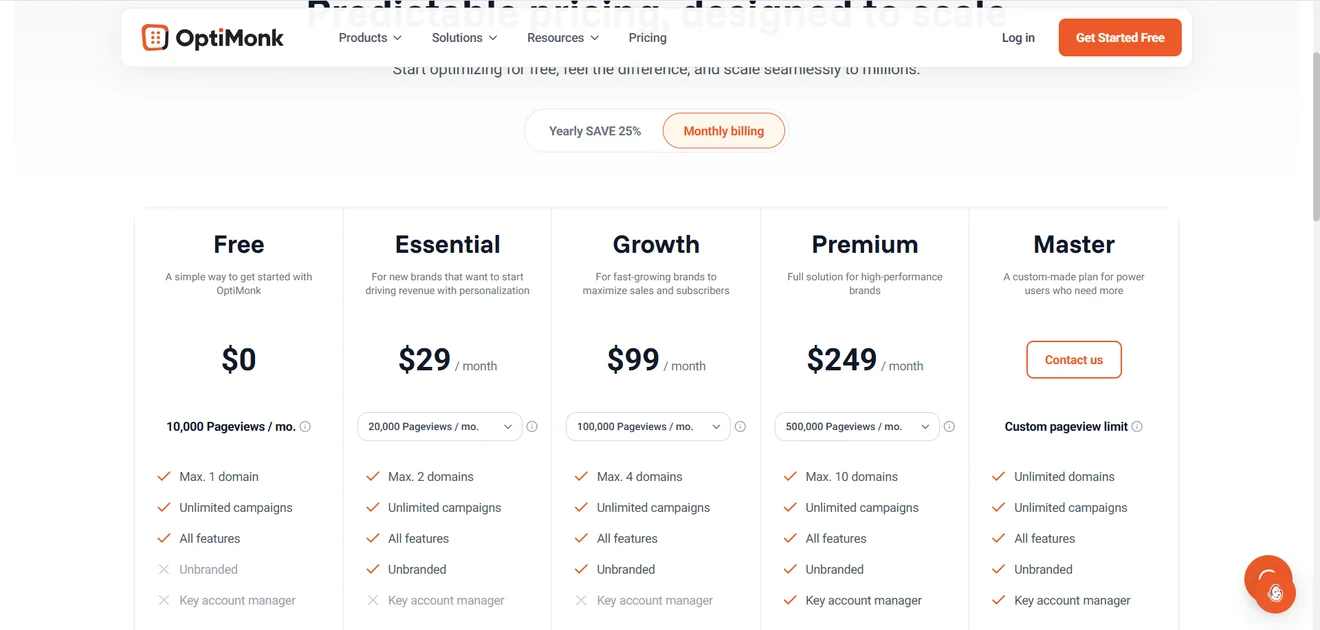
OptiMonk | Product-page and onsite experimentation | Free: 10K pageviews, 1 domain, and all features. Essential starts at $29/mo. | Behavior, traffic source, URL, time on site, and Shopify cart data. Tests support unlimited variants, control groups. | Shopify, email and CRM platforms, plugins, and JavaScript installation |
Sleeknote | Multi-domain ecommerce campaigns | No free plan; unrestricted 14-day trial. Core starts at $62/mo for 25K visitors. | Exit intent, time, scroll depth, location, device, and cart contents. Testing is limited to two campaigns with a 50/50 split. | Shopify, email, CRM, SMS, analytics, and ecommerce platforms |
OptinMonster | WordPress and content-heavy sites | Basic starts at $21/mo for 1 site and 2,5K pageviews. There is no regular trial, only a 14-day money-back guarantee. | Basic includes page, time, and scroll rules. Exit intent and other targeting require an upgrade. Split testing starts on Plus at $57/mo. | WordPress, Shopify, Mailchimp, ActiveCampaign, Omnisend, and other platforms |
Poptin | Free gamification and Shopify tools | Free: 1 domain, 1K visitors, and unlimited branded popups. Basic starts at $25/mo. | Behavioral rules plus Shopify cart, customer-tag targeting. Free users can run A/B/C/D tests. | Shopify, email and CRM platforms, Zapier, and webhooks |
Popupsmart | Fast AI-assisted campaign creation | Free: 5K pageviews, 1 site, and 1 live popup. Website plans start at $39/mo; the Shopify listing adds a $19 plan. | URL, referrer, location, device, behavior, frequency, and Shopify cart rules. A/B testing starts on Advanced at $69/mo. | Shopify, Mailchimp, Klaviyo, HubSpot, Google Analytics, Zapier, Slack, API, and webhooks |
Privy | Shopify capture with native email and SMS | No free plan; 15-day trial. Displays start at $24/mo. Email starts separately at $30/mo. | Customer attributes, shopping activity, page, location, etc. Tests support several variants and custom traffic ratios. | Shopify, BigCommerce, Klaviyo, Mailchimp, GA, Zapier, etc. |
Justuno | Complex ecommerce personalization | Lite starts at $59/mo for 10K visitors, 5 live workflows, and 3 team seats. | Product, cart, order, profile, and workflow data. Tests support up to 10 variants, custom traffic shares, a control group. | Major ecommerce, email, SMS, analytics, and automation platforms |
Picreel | Testing popup ideas on smaller sites | Free: 5K pageviews. Essentials starts at $19.99/mo for 50K pageviews, but exit intent requires the $59.99 Business plan. | Scroll, inactivity, clicks, time, pages viewed, device, source, and other rules, with advanced options gated by plan. | Shopify, Klaviyo, Mailchimp, HubSpot, and Zapier |
BDOW! | Lead capture and simple email from one tool | Free: 1 site, 100 conversions, and 500 email sends. Plus costs $25/mo for 25K pageviews and 6K sends. | Exit intent, scrolling, pages, referrals, cookies, and devices. Paid plans include adjustable A/B testing. | Showit, WordPress, email platforms, Zapier, and webhooks; no Shopify app for now. |
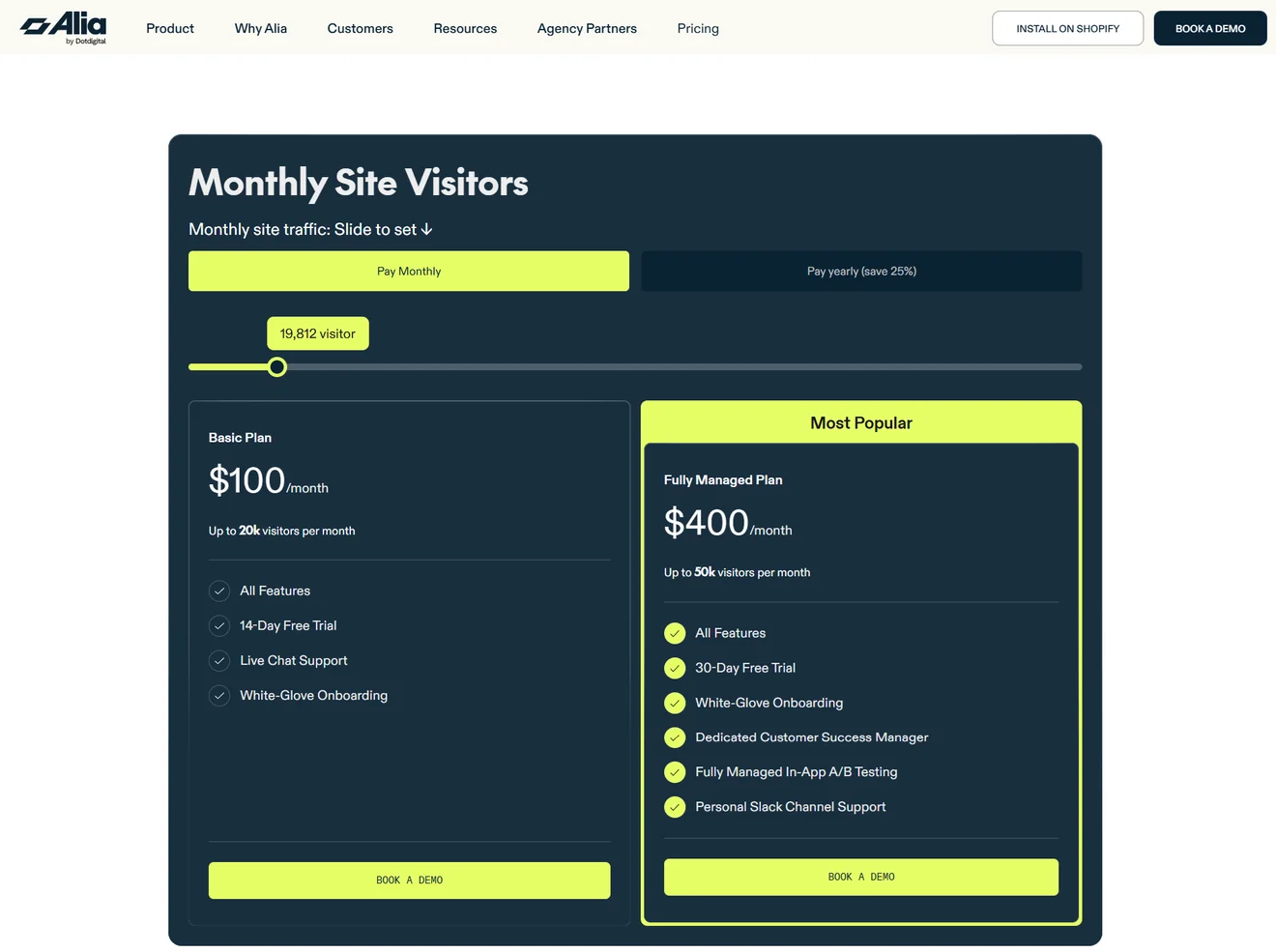
Alia | Revenue-focused Shopify optimization | No free plan; 14-day trial. Shopify plans start at $100/mo for 20K visitors, with all features included. | Behavior, traffic source, location, Shopify data, and Klaviyo segments. Standard A/B tests. | Shopify, Klaviyo, Attentive, Omnisend, Postscript, Sendlane, and Yotpo |
How we evaluated the tools
We checked every price and feature in this guide in mid-September 2026. Official pricing pages, help centers, integration directories, and app-store listings came first. When a company showed different plans on its website and Shopify listing — which happened surprisingly often — we reported both rather than choosing the tidier number.
We did not test every editor hands-on. Instead, we followed feature claims beyond the marketing page and into help documentation, pricing tables, app listings, and available interface screenshots. This helped us see what a feature actually did — and whether it came with the entry plan, required an upgrade, or was quietly sold as an add-on.
We kept coming back to the questions a buyer would actually ask. What can I build? Who can I show it to? Can I test the result, measure it properly, and send the data somewhere useful? We also checked the small print: traffic and domain limits, available support, branding, and paid extras. One provider charges more to remove its logo than it does for the entry subscription. We wish we were joking.
There is no numerical score behind this list. We did not invent a 9.4/10 rating to make the comparison look more scientific. Instead, each tool has a best-for label based on where its feature set and pricing make the most sense.
Claspo publishes this article, and yes, we included ourselves — we have plenty to show. We still checked our own limits and trade-offs the same way we checked everyone else’s.
Our 12 picks for the best popup software
The list runs from free popup builders to ecommerce platforms with revenue tracking and managed testing. Here’s what each tool does well, what it costs, and which limitations matter in practice.
1. Claspo — for running campaigns with an AI CRO agent
Verdict: Claspo is no-code popup builder you can run yourself or use through its AI CRO agent if your store has steady traffic and regular orders. The CRO Strategist finds opportunities in visitor behavior. The Campaign Builder prepares the design, copy, audience rules, triggers, and test variants. The Campaign Optimizer reads live results and proposes what to try next. Nothing launches without your approval.
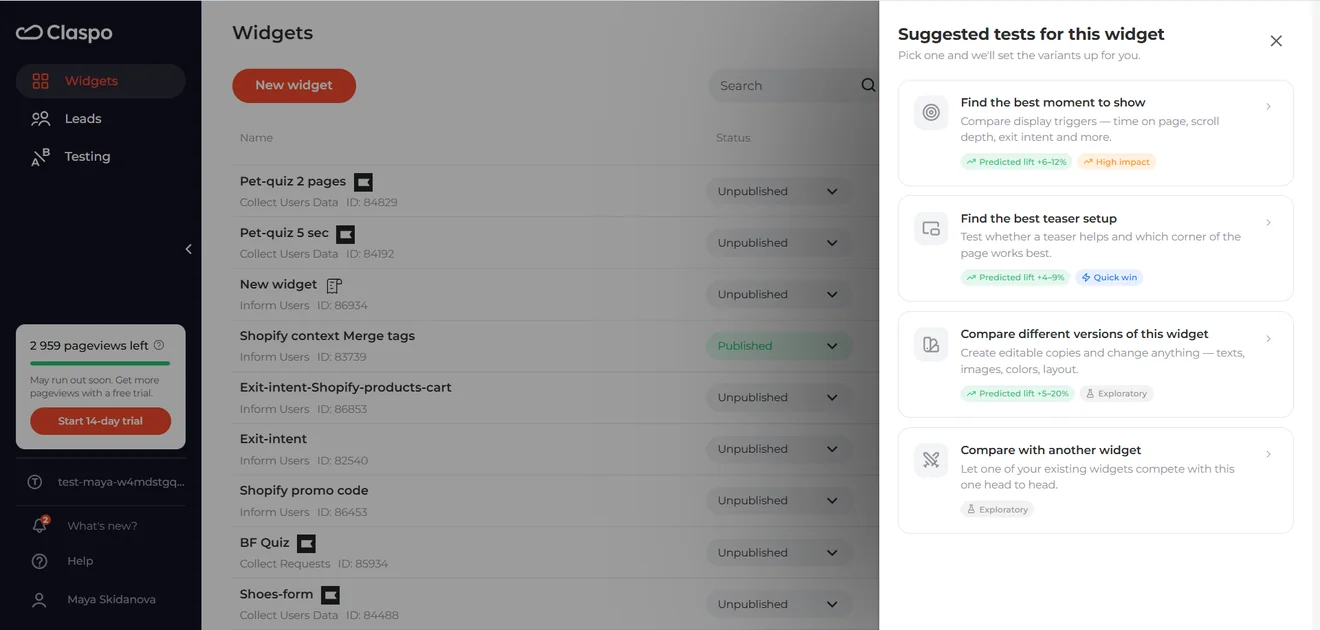
Why consider it: the self-service platform covers modal and full-screen popups, floating boxes and bars, embedded widgets, and teasers. It also includes eight game mechanics, quizzes, multi-step forms, and partial submissions. Targeting can use behavior, traffic source, location, device, page, Shopify data, URL parameters, cookies, or the Data Layer.
Analytics and testing: reports show unique views, target actions, and conversion rates, with desktop and mobile breakdowns. Gamified campaigns add prize-level data.
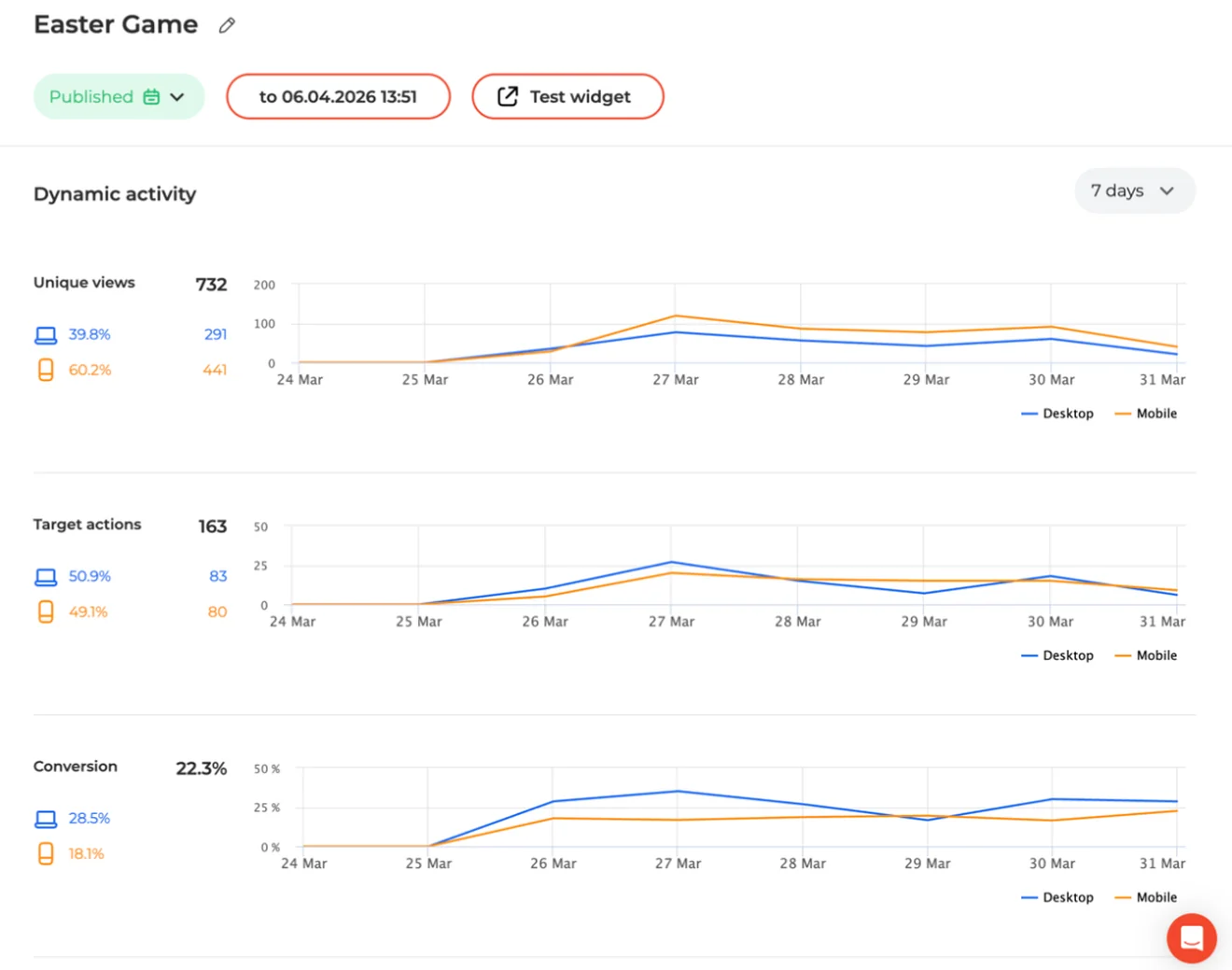
A/B/C/D/E tests support five variants, custom traffic allocation, improvement tracking, and confidence scores. Events can also be sent to GA4.
Integrations: the Shopify app supports product cards, ecommerce targeting, and unique discount codes synced with Shopify. Claspo also offers a WordPress plugin, native marketing integrations, and webhooks.
Claspo pricing: Free goes well beyond a stripped-down demo. You can use every self-service feature, create unlimited widgets, and invite the whole team. The allowance is 3,000 monthly pageviews on one website, and the widgets carry Claspo branding.
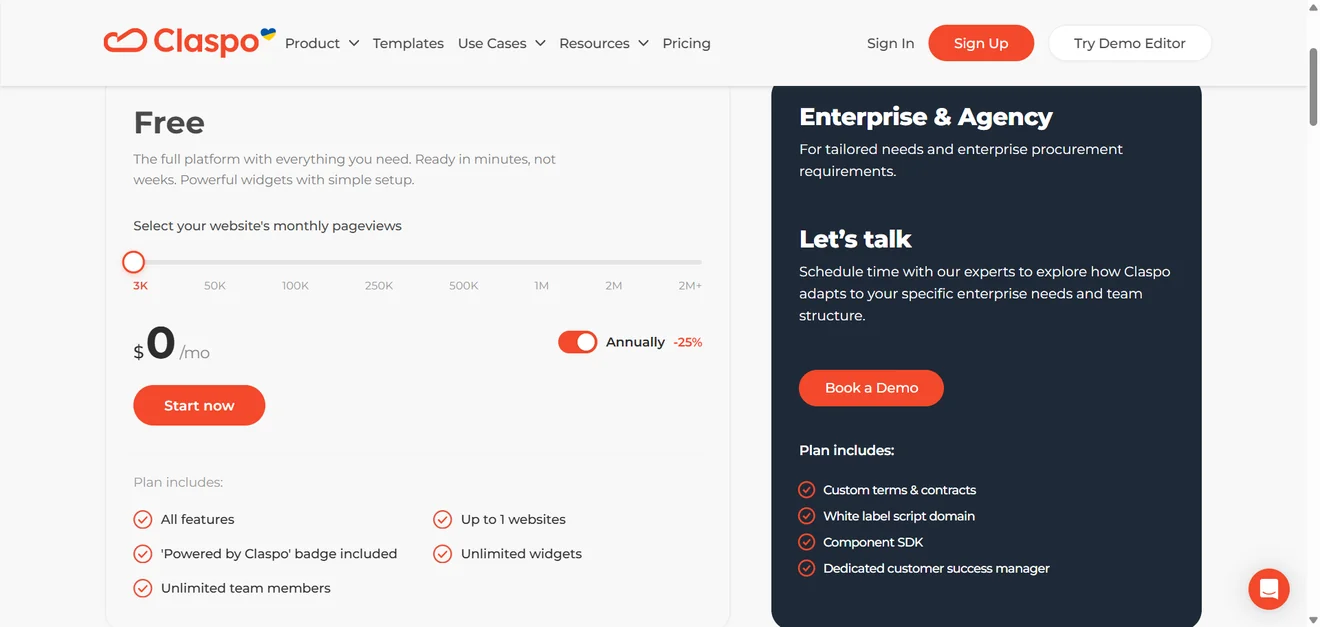
Pro raises that to 50,000 pageviews for $39 a month; you can try it for 14 days.
Keep in mind: Claspo handles the onsite campaign. After someone signs up, a connected email or SMS platform takes over the follow-up. The AI CRO agent currently runs the full cycle for subscriber growth; campaigns for broader sales goals and individual behavioral segments are being developed.
Choose Claspo if you want full self-service freedom now, with an AI team available once your traffic can support continuous experimentation.
2. Wisepops — multichannel ecommerce engagement
Verdict: Wisepops is popup software for ecommerce brands that want to coordinate several onsite channels and measure their effect on sales, not simply collect email addresses.
Why consider it: the platform covers six activation channels: popups, embeds, onsite feed, bars, quizzes, and web push. Its no-code editor includes templates, desktop and mobile views, and CSS or JavaScript customization. Campaigns can use conditional paths, while audience targeting draws on behavior, traffic source, custom properties, and ecommerce data.
Analytics and testing: Wisepops offers advanced A/B testing with control groups, p-values, and automatic test conclusions. Its conservative revenue attribution model uses real order values and a 24-hour window. Product recommendation reports show which items were recommended, clicked, and purchased, while experiments can compare algorithms by order rate, revenue, or AOV.
Integrations: the Shopify native app can target campaigns using cart value, discounts, and product or item IDs. Shopify-only AI recommendations cover best sellers, trending and recently viewed items, upsells, cross-sells, and personalized picks. Recommendations can appear in popups, embeds, or the onsite feed. Wisepops also offers 100+ integrations, plus API and webhook access.
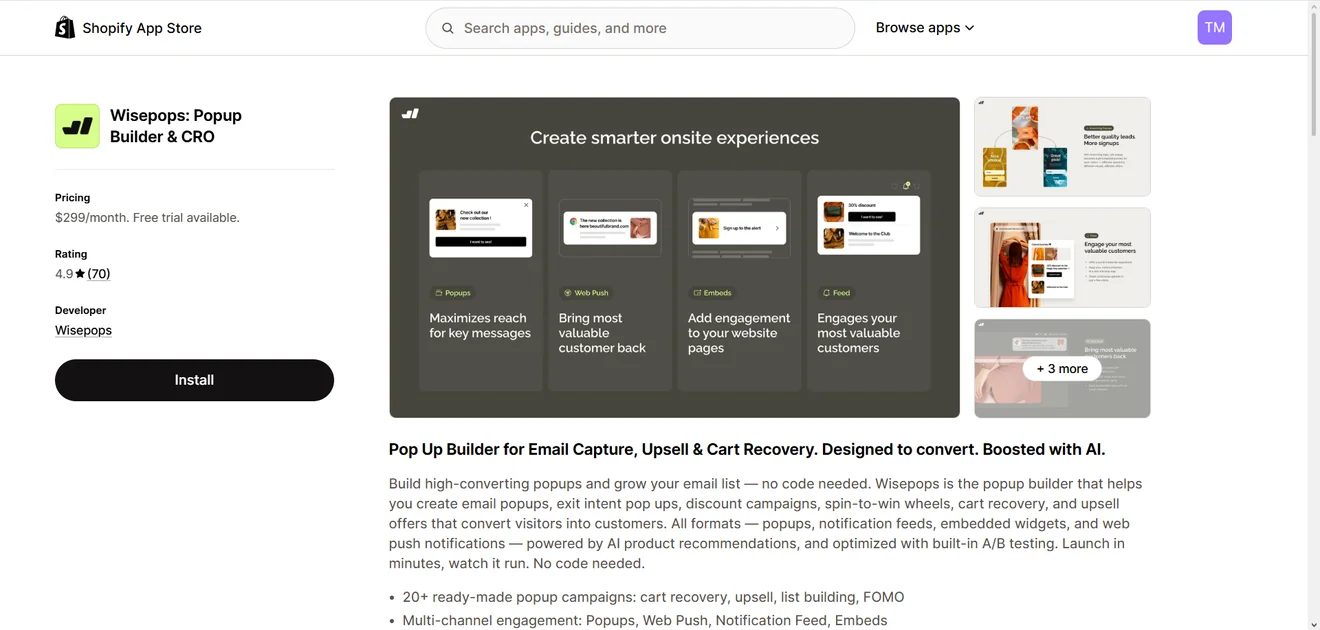
Pricing: the Shopify self-service plan costs $299/month for 500,000 pageviews or $2,990/year and includes a 14-day free trial. There is no free plan.
For other buyers, the pricing page requires a demo and gives conflicting starting prices: €499 in the FAQ and €599 elsewhere.
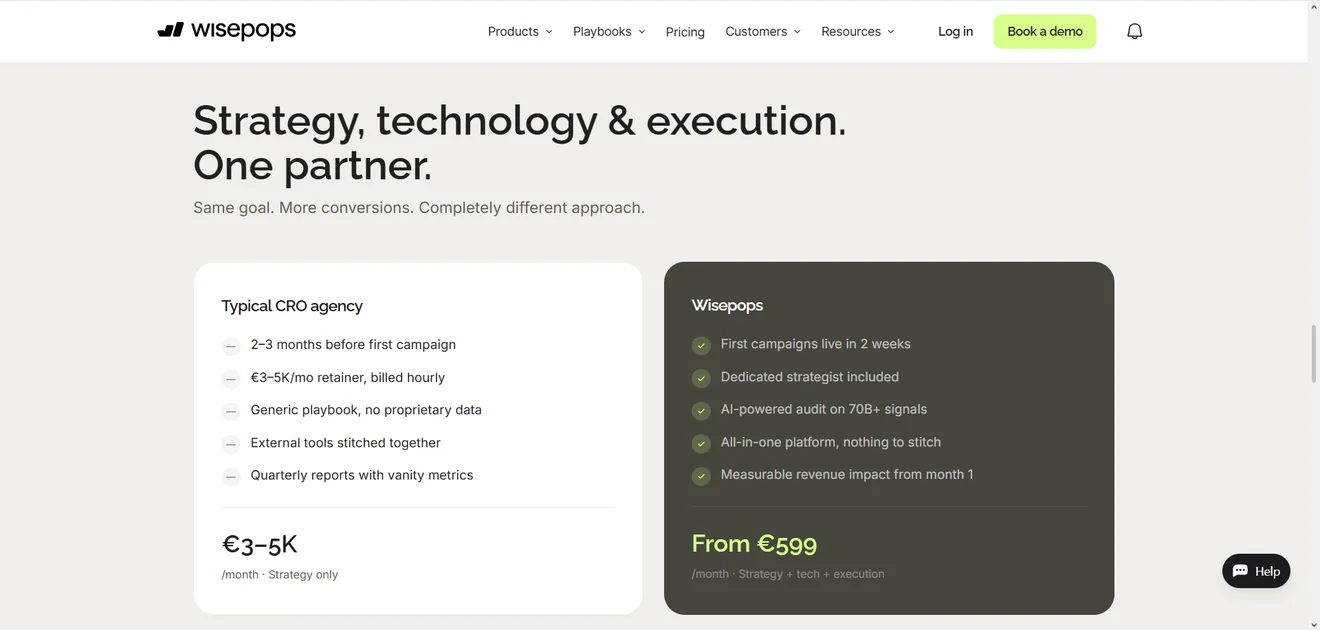
Keep in mind: the high entry price is difficult to justify for smaller teams that need only standard popup campaigns, while unclear non-Shopify pricing makes budgeting harder.
Choose Wisepops if you run a high-traffic ecommerce site and need multichannel campaigns, AI product recommendations, and revenue-focused experimentation.
3. OptiMonk — popup software for onsite experimentation
Verdinct: the platform is best for ecommerce teams testing product-page messaging and cart-aware offers, not only popup designs.
Why consider it: along with popups, sticky bars, embeds, and product recommendations, it can personalize the pages beneath them. With Dynamic content and Smart product page optimizer, marketers can change product-page copy, create variants, and measure Add to cart or Purchase results. Split-URL tests compare complete pages.
Audience targeting uses browsing behavior, traffic source, URL, time on site, and Shopify cart data. This supports offers based on cart value, item count, or specific products. Frequency limits, subscriber recognition, and a user experience protector help stop several messages from competing for the same visitor.
A/B testing is not limited to headline changes. Variants are unlimited. You can also keep a control group, compare whole campaigns, or test timing. Reports show chance to win, conversion uplift, orders, revenue, and AOV.
Integrations: there is a native Shopify app, plus integrations with popular email and CRM platforms. Other websites can use JavaScript or plugins.
Pricing: the free plan includes every feature, unlimited campaigns, one domain, and 10,000 monthly pageviews. Essential starts at $29/month for 20,000 pageviews and two domains. Its 30,000- and 50,000-pageview options cost $39 and $59. Only pages with active campaigns count. There is no separate free trial.
Keep in mind: if all you need is a basic popup builder, OptiMonk is probably overkill.
Best fit: teams that also want to experiment with product pages and other onsite content.
4. Sleeknote — best for multi-domain ecommerce campaigns
Verdict: Sleeknote is popup software for ecommerce teams that run many campaigns across several websites and want control over how each one appears on mobile.
Why consider it: the Core plan allows unlimited campaigns and domains. The popup builder supports popups, forms, surveys, quizzes, and multi-step flows, while desktop and mobile versions can be adjusted separately. Teams can also add gamified formats, such as:
Scratch to win;
Seasonal calendar;
Spin-to-win;
Quizzes;
Learn to earn.
Display rules cover exit intent, time, scroll depth, location, device, and cart contents.
Analytics: Sleeknote covers the reporting basics well. You can see views, leads, conversion rates, traffic sources, visitor locations, and device data as campaigns run. There is also goal tracking, campaign comparison, and revenue tracking. Google Analytics and Google Tag Manager are available if you prefer to keep campaign data in your existing analytics setup.
Support: beyond phone, chat, and email support, Sleeknote offers hands-on campaign setup on request. Its team can help launch anything from a standard popup to a large-scale gamification campaign.
Integrations: Shopify gets one of the deeper integrations. Cart data can be used for targeting, products and collections can be added to recommendation campaigns, and new subscribers can be synced back to Shopify. Beyond that, Sleeknote works with the usual mix of email platforms, CRMs, SMS tools, analytics software, and ecommerce systems.
Pricing: Sleeknote’s Core plan costs $62 a month for up to 25,000 monthly visitors. If you want to add gamified campaigns, the starting price becomes $85.
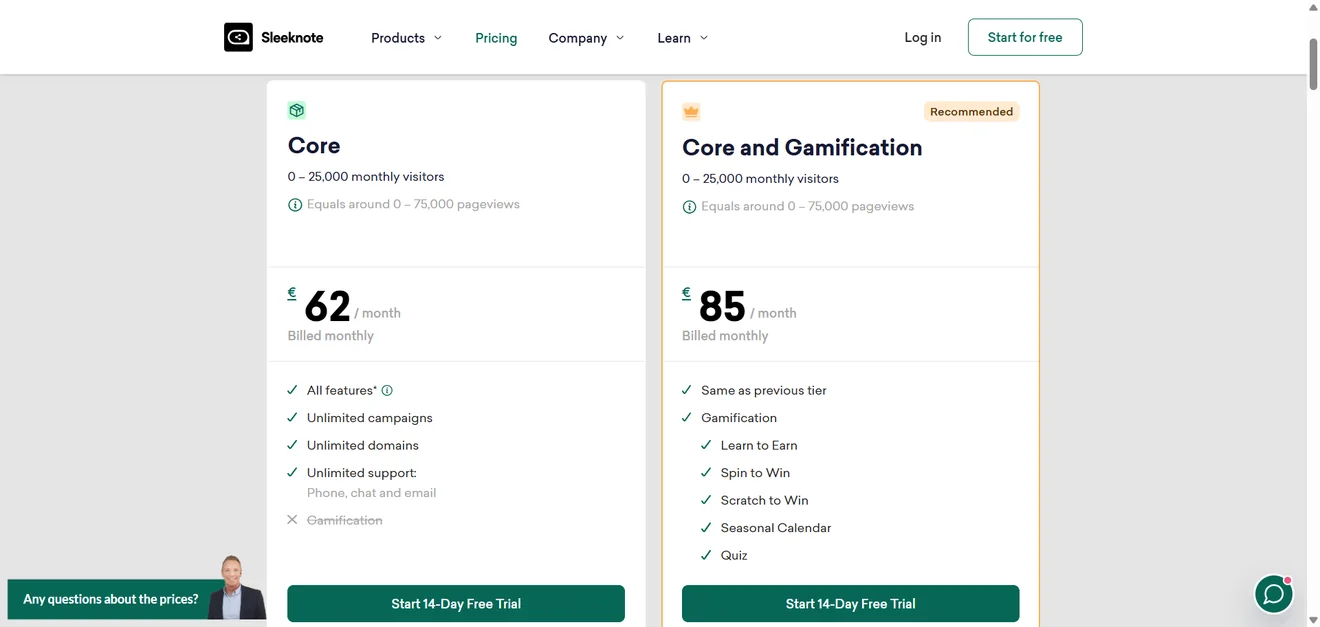
You can try the full product for 14 days without entering card details, but there is no free plan to fall back on afterward. Sites with more than 500,000 monthly visitors receive a custom quote.
Keep in mind: testing is fairly simple. You choose two campaigns, and Sleeknote sends half the traffic to each. The report then compares their conversion rates and shows the improvement. That works for a straightforward A/B test, but teams wanting more control may find it restrictive. Sleeknote’s documentation does not mention custom traffic allocation or a statistical-significance indicator.
Choose Sleeknote if you manage campaigns across multiple ecommerce sites and value independent mobile editing, broad integrations, and accessible campaign design.
5. OptinMonster — for WordPress teams with bigger budgets
Verdict: OptinMonster is an established popup software with a particularly strong WordPress toolkit. It makes sense for blogs and media sites that want to turn content into subscribers, although the entry plan is much more basic than the overall feature list may suggest.
Why consider it: the popup builder covers lightboxes, floating bars, inline forms, scroll boxes, and fullscreen overlays. It also includes 700+ templates and a WordPress plugin. If WordPress is your only platform and exit intent is the main requirement, compare WordPress exit-intent plugins before committing to a broader suite.
Basic users get page-level targeting plus time-on-site and scroll triggers. Content locking, Yes/No forms, device targeting, Exit-Intent, scheduling, UTM and referral rules, and onsite retargeting all require an upgrade. Mailchimp, ActiveCampaign, Omnisend, and several other email integrations are available on Basic.
Testing: split testing starts with the Plus plan. You can create multiple child variations within one test group and compare their visitors, conversions, and conversion rates. Traffic is assigned randomly rather than divided into fixed shares, so impression counts may remain uneven until the test gathers more traffic.
Revenue attribution, available from Pro, reports both click-through and view-through revenue.
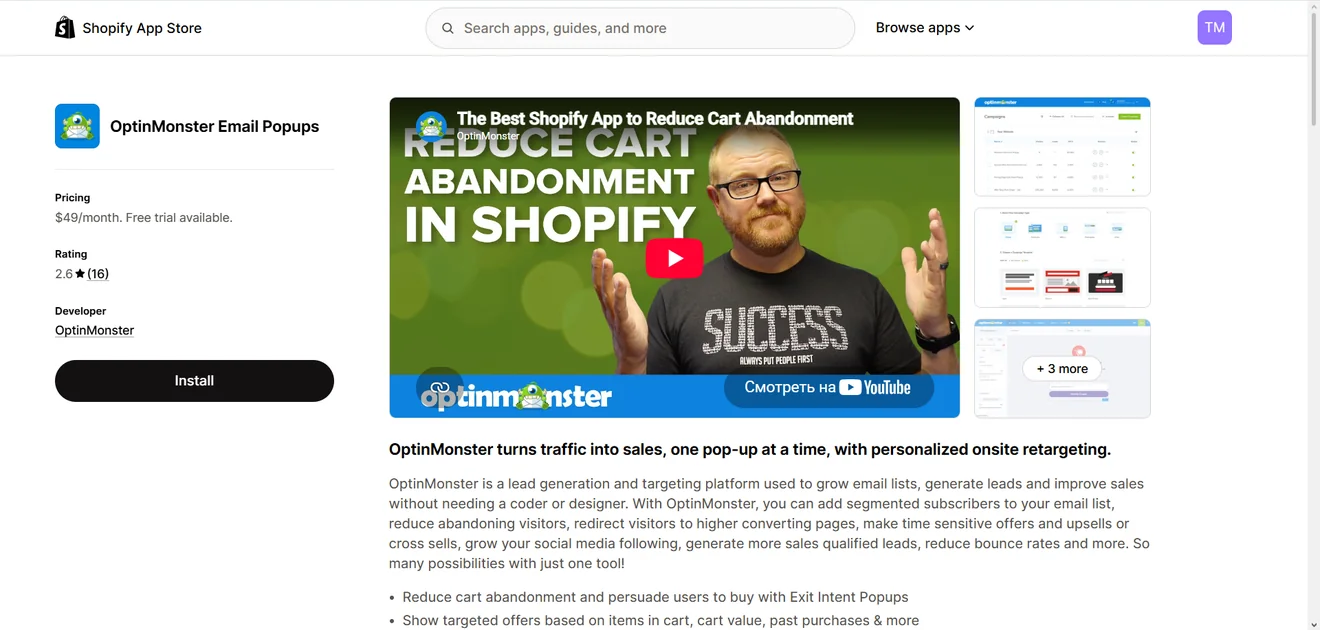
The pricing catch: Basic costs $21 a month for one website and just 2,500 pageviews. Plus costs $57 and unlocks testing. Pro costs $87 and is the first plan that lets you remove OptinMonster branding. There is no regular free trial, only a 14-day money-back guarantee.
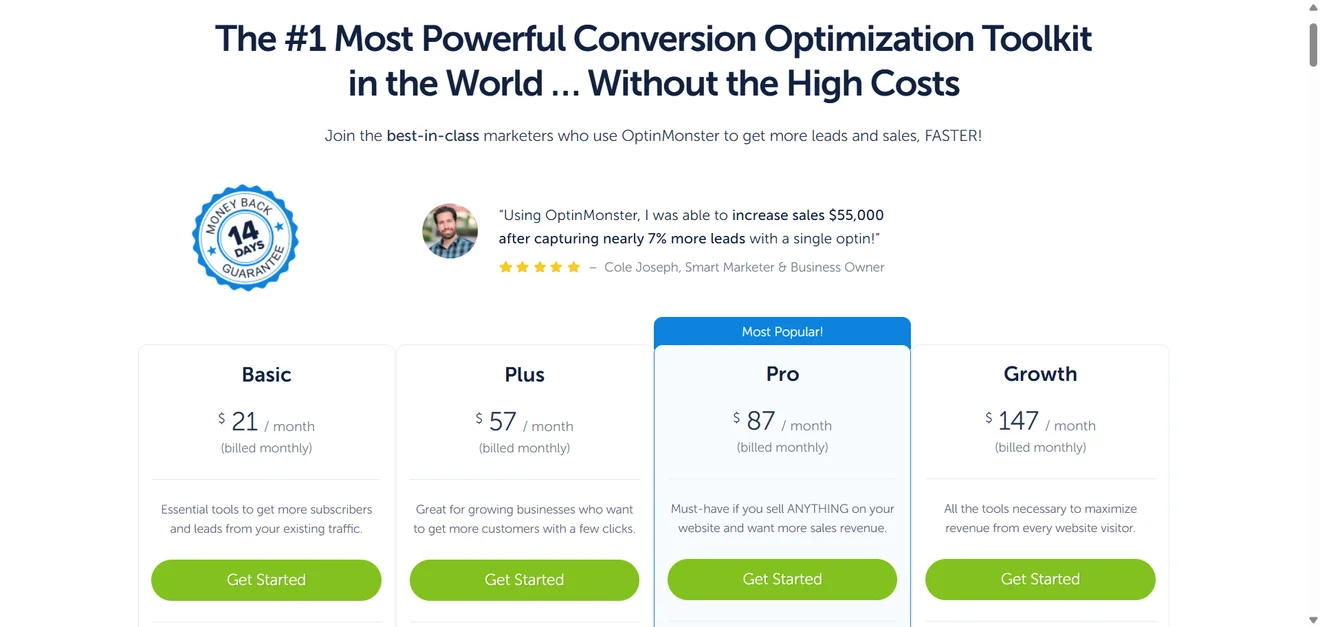
Shopify pricing is less clear. OptinMonster’s integration guide requires the $147 Growth plan.
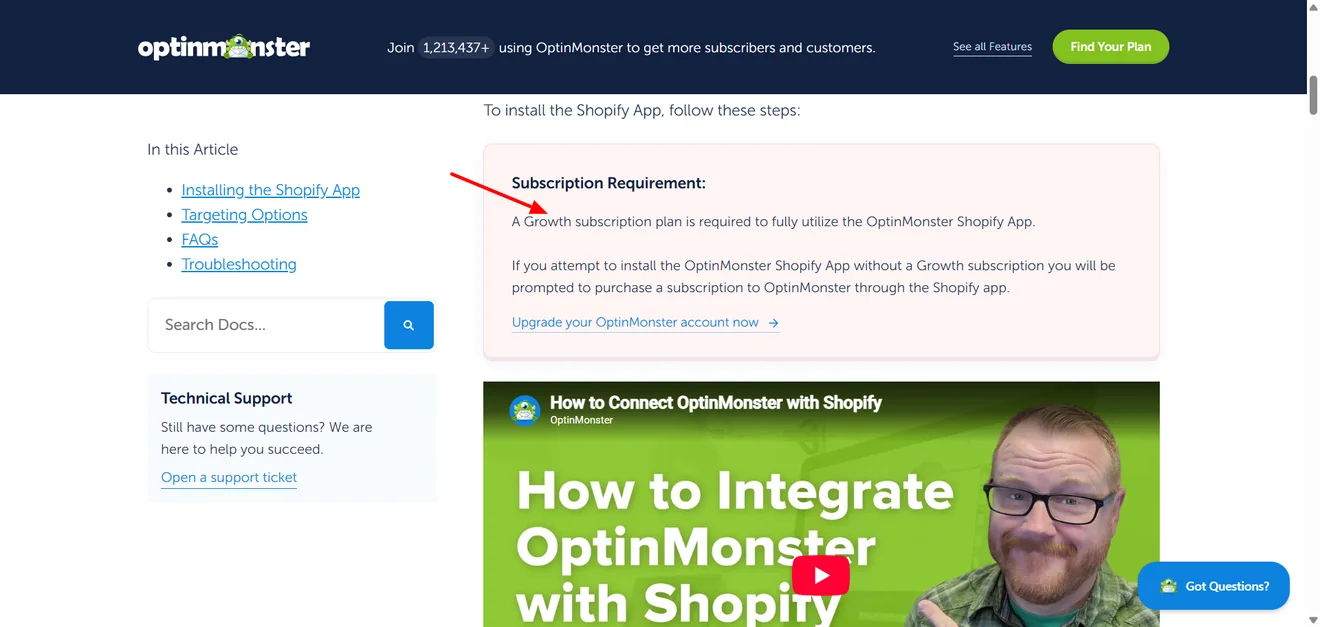
While the Shopify App Store lists $49 a month.
Shopify also prevents campaigns from appearing on its updated checkout, Thank You, and Order Status pages.
Choose OptinMonster if its WordPress publishing features matter more to you than generous entry-level limits.
6. Poptin — for more value at a lower entry price
Verdict: among free popup software, Poptin gives you unusually few reasons to upgrade immediately. The 1,000-visitor limit arrives quickly, but the plan still lets you run lead-capture forms, onsite offers, and gamified campaigns.
Why consider it: the popup builder is not limited to a standard lightbox. A message can slide in from the side, stay visible as a floating bar, take over the screen, or sit directly inside the page. You can also build surveys and quizzes. For gamification, the options are Spin the wheel, Pick a gift, and Scratch card — and none of them requires a paid plan.
Shopify users on Free also get cart and customer-tag targeting, product recommendations, and coupon creation and sync. Order-history and login-status targeting require an upgrade, as do cookie, JavaScript, and Autopilot triggers.
Testing: A/B testing is included on Free and is not limited to two versions. Poptin lets you add A/B/C/D variants, rotates them equally, and keeps the same version visible throughout a visitor’s session. Reports identify the winner by conversions and conversion rate. The documentation does not describe confidence reporting, statistical significance, or revenue-based winner selection.
The dashboard tracks visitors, views, conversions, and conversion rate over time, with desktop and mobile filters. Lead reports break results down by source and device.
Email is a proper part of Poptin, not just an autoresponder added to the popup tool. It comes with a drag-and-drop builder, campaigns, and automations.
Support is fairly open on Free as well. Live chat, email, and the knowledge base are included; only priority support is reserved for paying customers.
The free-plan catch is volume: you get one domain and 1,000 visitors a month. The number of popups is unlimited, but they carry Poptin branding. At $25 a month, Basic raises the allowance to 10,000 visitors and removes the badge.
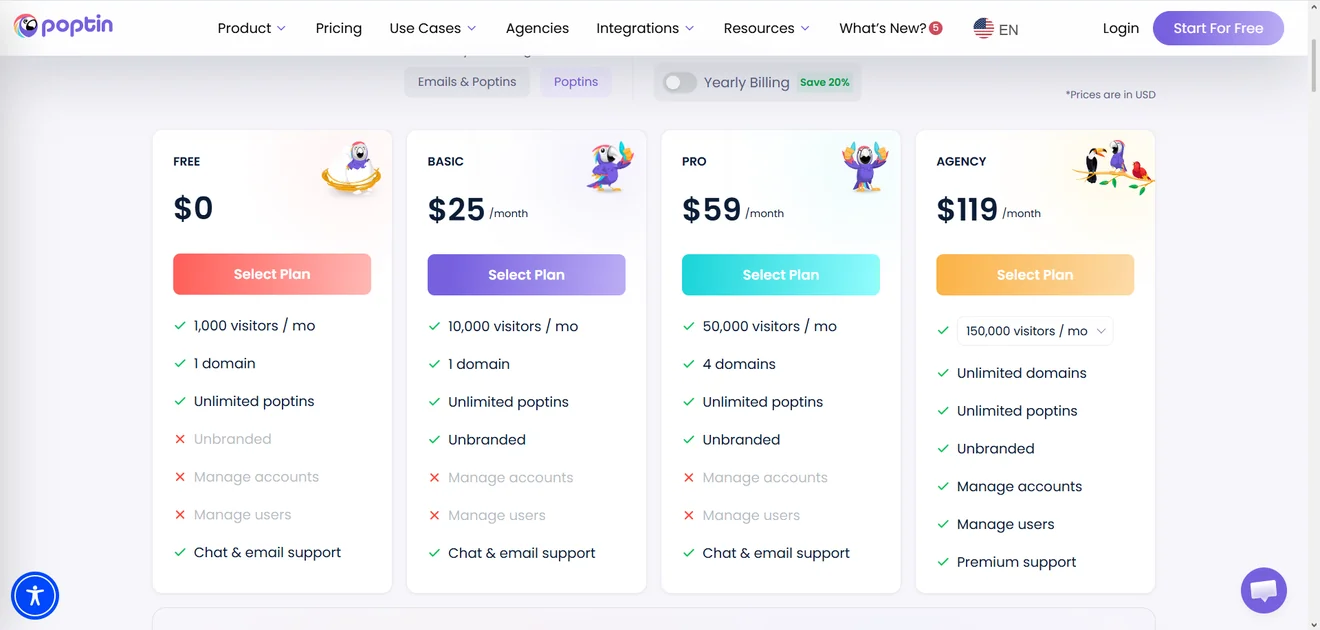
Poptin does not offer a separate trial. The Free plan never expires, so it effectively serves the same purpose.
Choose Poptin if you want to test and gamify campaigns — or use cart-aware Shopify tools — before adding another paid subscription to your stack.
7. Popupsmart — for fast AI-assisted campaign creation
Verdict: among the popup software in this list, Popupsmart gives AI a fairly practical job. A short campaign brief becomes the first draft — copy, image, button, and layout. It is not a locked preview; every part opens in the regular editor.
Why consider it: AI is only the shortcut. You can ignore it, start from a template, and use the same popup builder for lightboxes, floating bars, slide-ins, fullscreen campaigns, or small teasers. Targeting covers URLs, referrers, countries, devices, exit intent, scrolling, frequency, and Shopify cart data.
Smart Mode studies visitor behavior and chooses targeting settings automatically. Shopify users can place cart, collection, or products inside a campaign and sync contacts back to Shopify.
Testing: A/B tests start on Advanced at $69 a month. Tests can contain more than two variants, use custom traffic shares, and end manually or automatically. Automatic tests select a winner by leads, interactions, or conversion rate on a chosen end date. The documentation does not mention confidence or statistical-significance reporting.
Analytics cover views, interactions, leads, conversion rate, geography, referrer, page, device, and browser. Shopify reports add “Driven Revenue,” although the attribution model is not explained.
Integrations: Popupsmart can handle the first email after a signup itself. You decide whether it goes out immediately or after a delay. For everything beyond that, leads can move to Mailchimp, Klaviyo, or HubSpot. Google Analytics, Zapier, Slack, APIs, and webhooks cover the rest of the common connections.
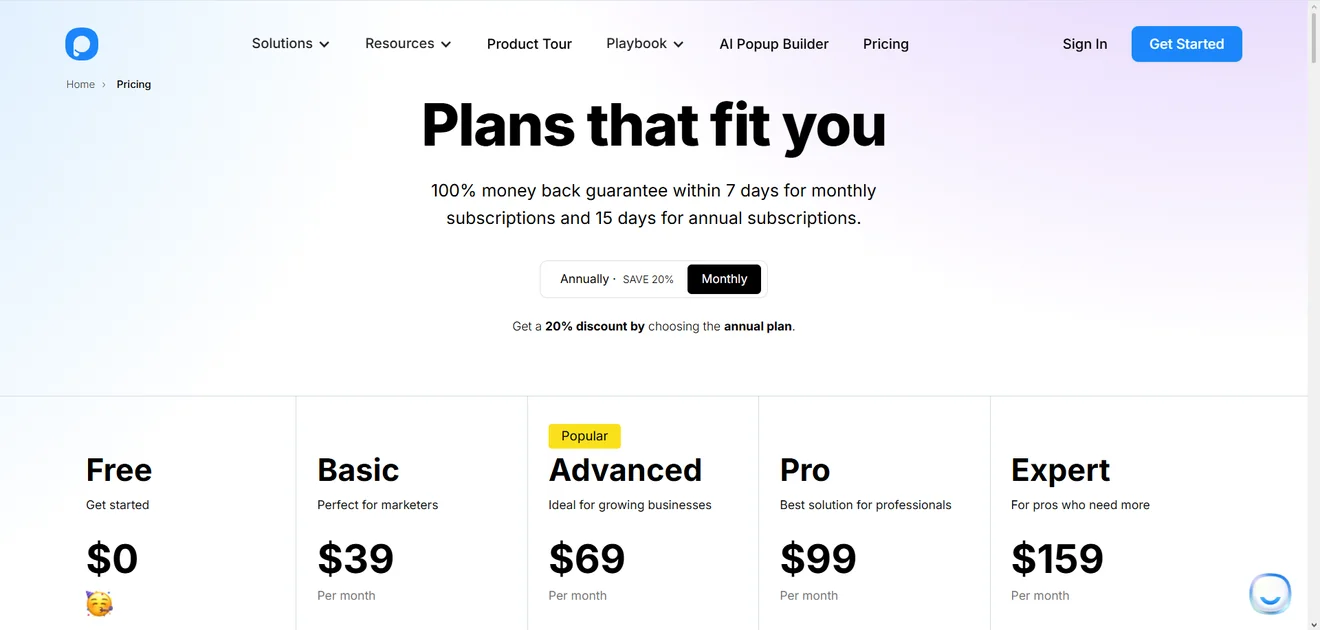
Email support comes with every plan, but the dedicated CRO specialist is reserved for Expert at $159 a month.
Pricing gets confusing once Shopify enters the picture. On Popupsmart’s own website, the first paid option is Basic: $39 a month for 50,000 pageviews across three websites. It includes unlimited popups and removes the branding.
The Shopify listing slips in another option — Starter at $19 a month, with 25,000 pageviews and one website. Same product, different pricing menu. Shopify merchants should therefore check which route they are buying through before subscribing.
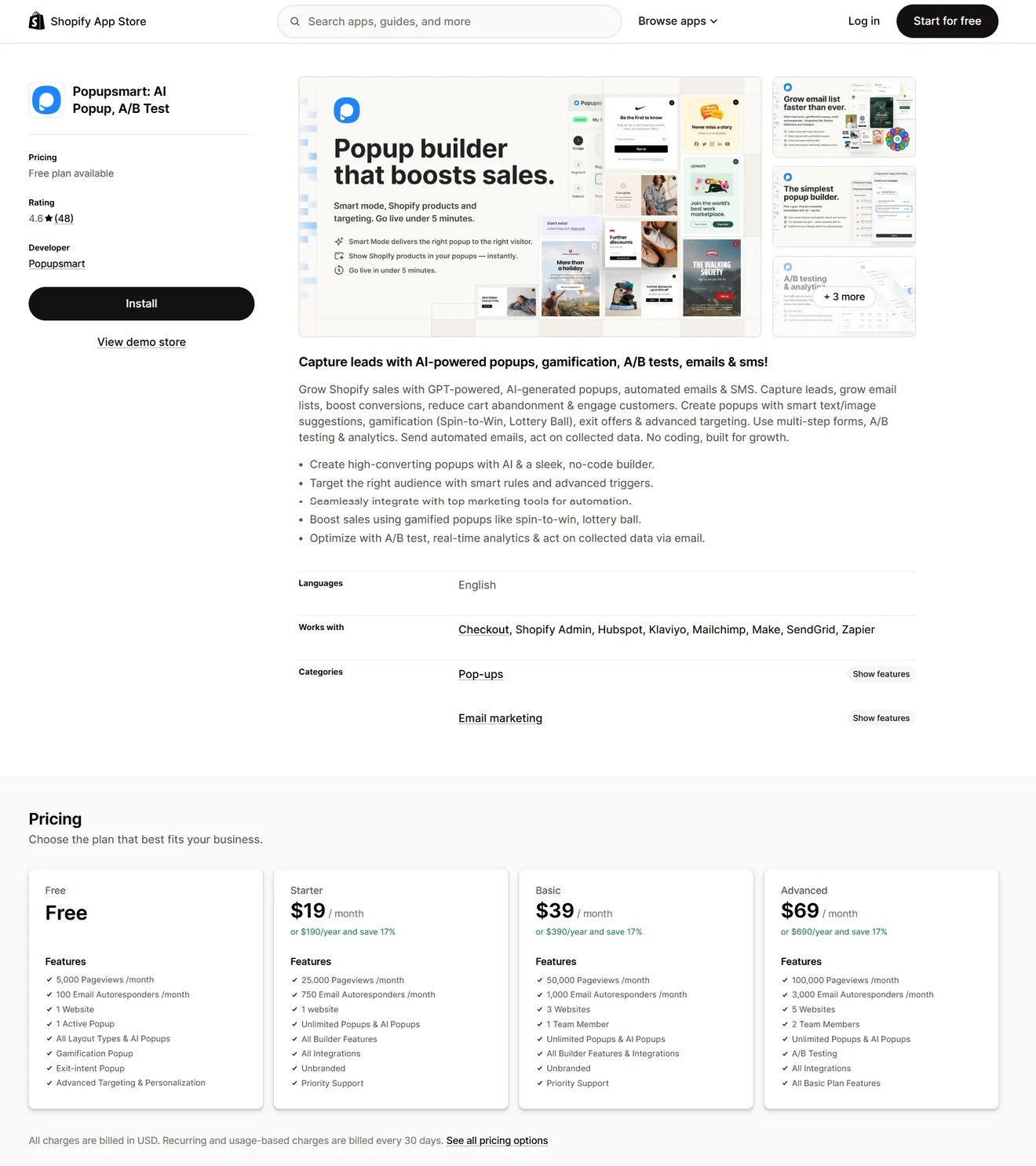
Both show a Free plan with 5,000 pageviews, one website, one live popup, and 100 autoresponder emails per month.
Choose Popupsmart if fast AI-assisted creation matters more than getting experimentation on the entry plan.
8. Privy — for taking signups into email and SMS
Verdict: with Privy, the popup is only the front door. After someone signs up, you can continue the conversation by email or text — perhaps with a welcome first, then a cart reminder, post-purchase note, or win-back offer later.
Why consider it: email and SMS are optional. The Pop-Ups & Displays Only plan is sold separately and covers the familiar lead-capture formats, along with landing pages, Spin-to-win, free-shipping bars, and cross-sell offers. A campaign can respond to something simple, such as a page visit or scroll, or draw on what Privy knows about the shopper — their location, language, customer details, and activity in the store.
Shopify is where the pieces fit together. Contacts sync both ways, while products, collections, cart values, and order events come into Privy. That data can decide who sees a display, which segment they join, and what message follows. WordPress, Wix, and Squarespace are supported too.
Testing: Privy does not stop at one control and one variation. You can add several versions, give them different shares of traffic, and end the test after a set amount of time or once enough people have participated. Reports compare views, signups, and signup rates, then identify the version with the highest conversion rate. The documentation does not mention confidence or statistical significance.
Reporting goes beyond signups for Shopify and BigCommerce accounts. Privy attributes an order and its revenue when someone signs up through a display and later purchases with the same email address.
Support is available by email. Privy also offers one-to-one customer-success sessions and quarterly reviews.
Pricing: Displays start at $24 a month for 10,000 pageviews and reach $1,500 for 3.5 million.
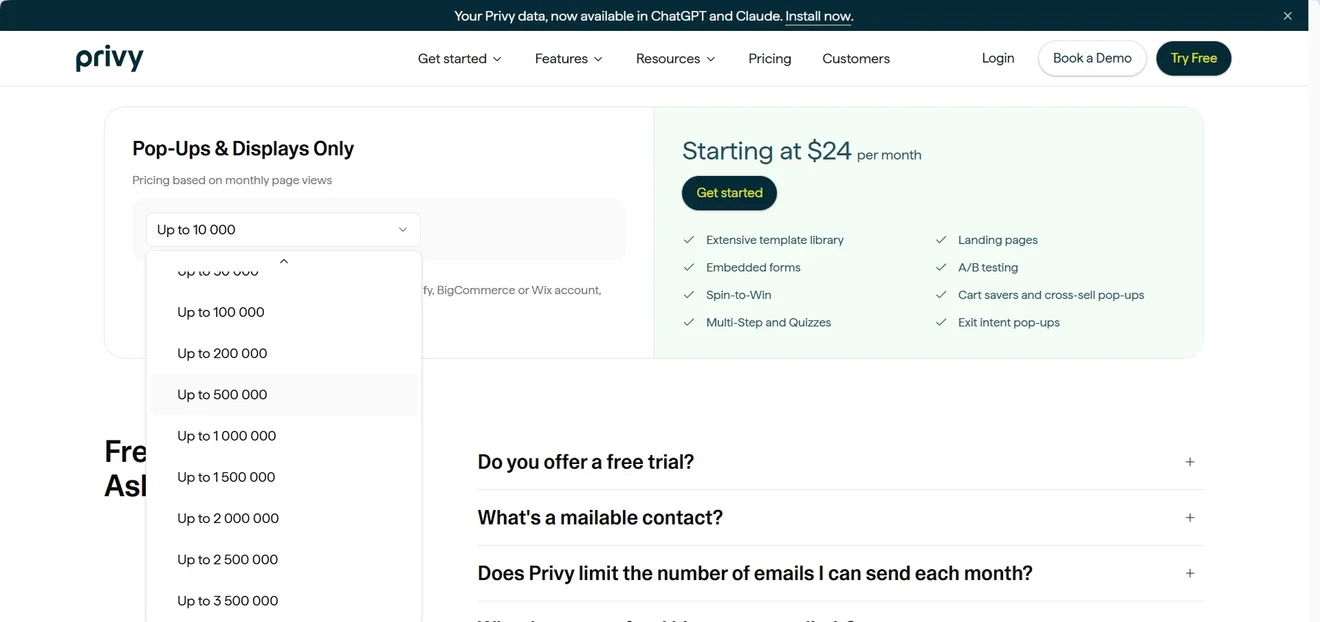
Email starts separately at $30 a month by mailable contacts, with unlimited sends and 250 SMS credits. There is a 15-day trial but no free plan.
Choose Privy if you want onsite capture and follow-up messages to work from the same Shopify data.
9. Justuno — for complex ecommerce personalization
Verdict: Justuno makes sense when a campaign needs more context than a page visit or exit-intent trigger. This popup software can use product views, cart activity, purchases, and earlier workflow steps to decide what a shopper sees next.
Why consider it: сampaign types cover email/SMS popups, embeds, exit offers, games, quizzes, surveys, and landing pages. Justuno combines visitor profiles with a workflow builder and eight recommendation algorithms for upsells, cross-sells, popular or previously viewed products, and current or abandoned carts. Suggestions can be filtered by brand, category, inventory, price, discount, or margin. Spotlight can attempt to resolve anonymous visitors, but it is sold separately.
Testing is unusually flexible even on Lite. One workflow can split into as many as ten variants, with a control group that sees nothing and custom traffic percentages for each path. You choose the goal plus start and end dates. Results become available after 60% statistical significance and report improvement against the control or weakest variant, depending on the goal.
The reporting area separates customer, event, and website-behavior data. Workflow and test dashboards connect designs to conversions and revenue. Custom dashboards are reserved for Done-for-You and Enterprise.
Integrations cover major commerce, email, SMS, analytics, and automation tools.
The Lite-plan catch: $59 a month covers 10,000 visitors, five live workflows, three team seats, and one custom AI recommendation. Chat and standard onboarding are included, personal onboarding, a CRO strategist, and cross-domain reporting cost more.
Done-For-You starts at $299 and hands design, setup, QA, publishing, and testing to Justuno’s team.
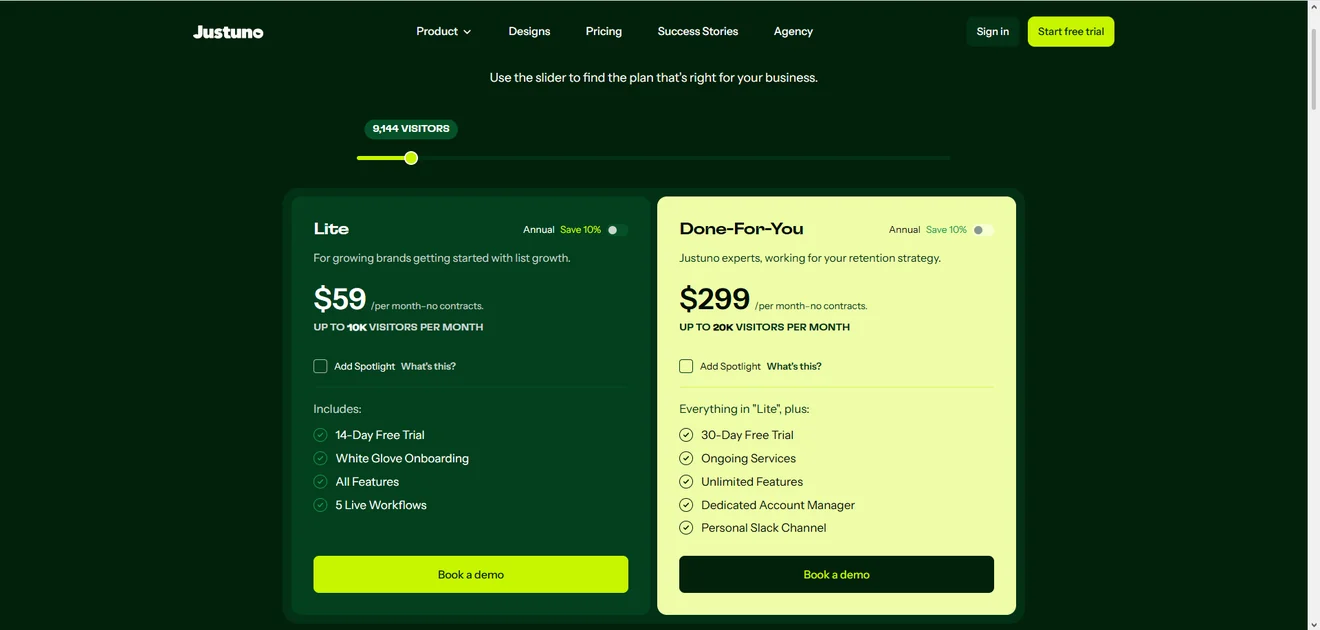
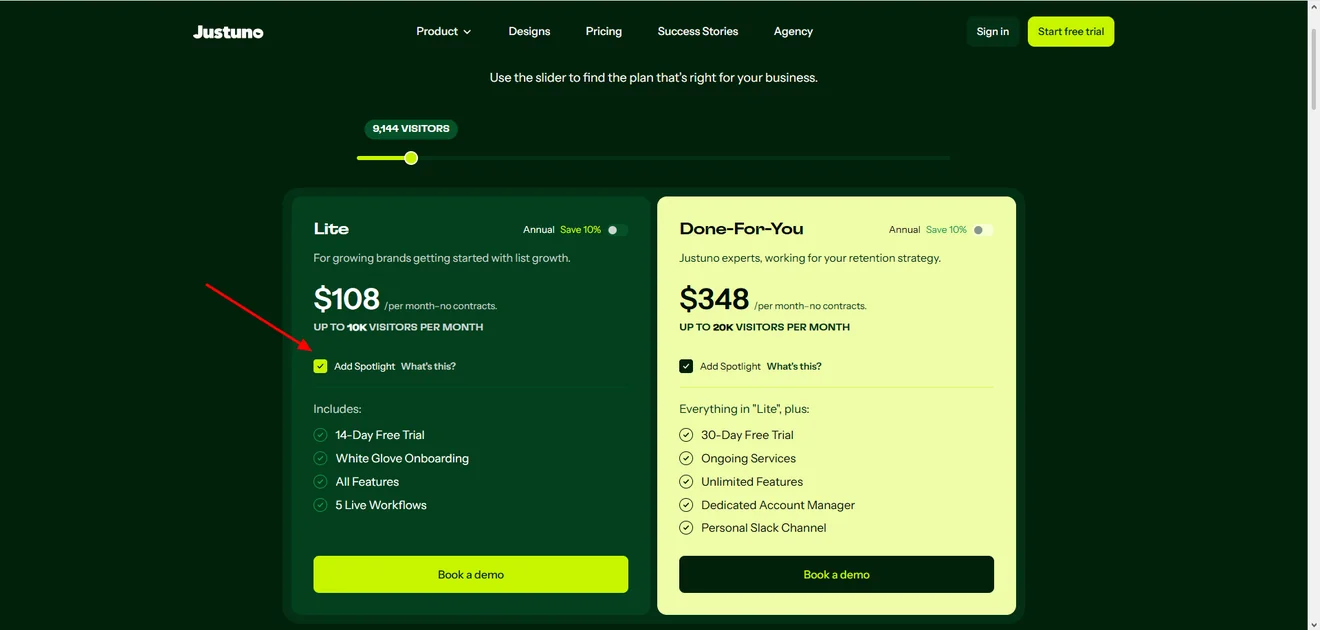
Spotlight is not part of the base subscription. It is sold as a separate add-on, and its price rises with traffic. At the 10,000-visitor tier, switching it on takes Lite from $59 to $108 a month — an extra $49 before any other upgrade.
Choose Justuno if you will use its profiles, workflows, and recommendation logic — not merely run a few signup popups.
10. Picreel — for trying popup ideas before scaling
Verdict: for a small site, Picreel offers more room to experiment than its free plan might suggest. A/B testing is available before you pay, and one test can compare as many as five popup campaigns. Moving beyond 5,000 monthly pageviews changes the picture, though: exit intent and several advanced options sit on more expensive plans.
Why consider it: Picreel’s newer AI tools can generate a formatted popup from a brief, pull a website’s logo, colors, and fonts from its URL, and edit individual elements through written instructions. AI report summaries are also meant to flag peaks, drops, and behavioral patterns in campaign data.
For manual campaigns, the builder supports lightboxes, nanobars, sidebars, multi-screen forms, and video or iframe popups. Displays can react to scrolling, inactivity, clicks, time on page, or the number of pages viewed. Targeting can also use location, device, browser, traffic source, cookies, and visitor behavior, although several of these options move to higher plans.
Testing: the free account includes A/B testing. A single test can compare between two and five existing campaigns. Picreel provides a separate report for each version, but its documentation does not describe custom traffic allocation, an automatic winner, or statistical-significance reporting.
The main analytics dashboard tracks visitors, impressions, conversions, and conversion rate, with daily, weekly, or monthly views. There is an important reporting limitation: Picreel counts both a popup click and a completed response as a conversion. The dashboard does not cover revenue attribution or separate clicks from submitted leads.
Common connections include Klaviyo, Mailchimp, HubSpot, and Zapier; there is also a Shopify app.
Support comes by phone, email, chat, or through the help center.
Pricing: on Picreel’s main site, Free covers 5,000 pageviews a month. Essentials costs $19.99 for 50,000, and Business costs $59.99 for 200,000.
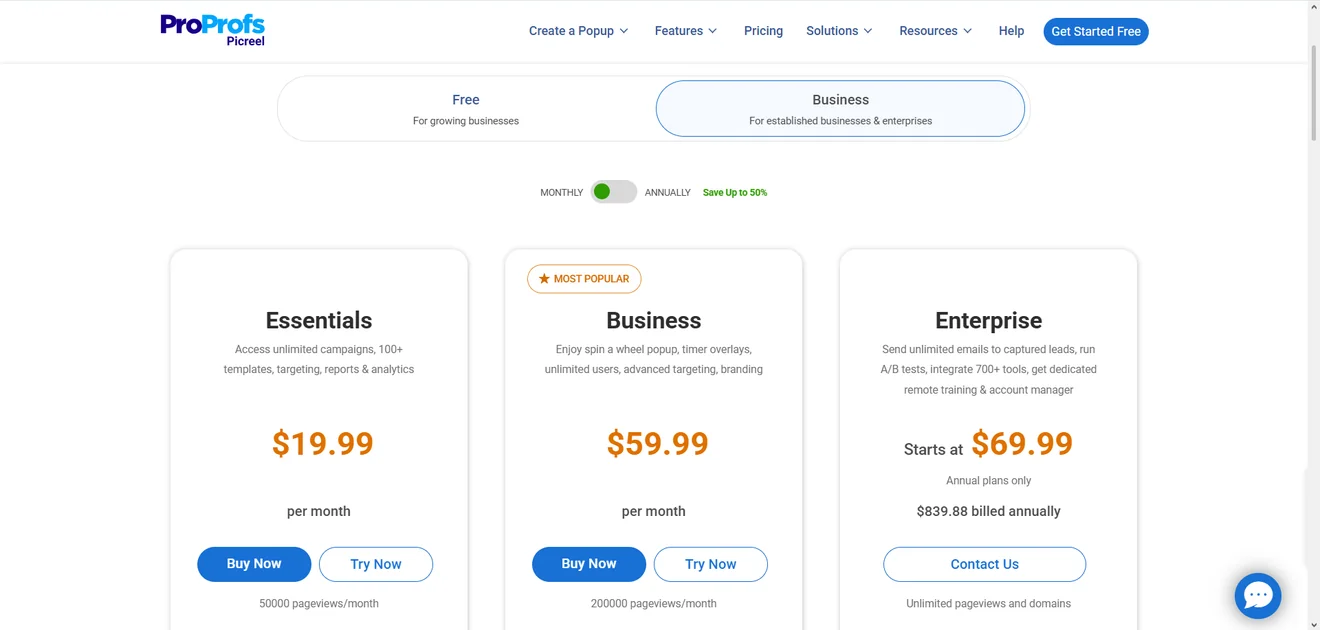
The catch is feature access. Exit intent — one of Picreel’s most advertised features — starts only on Business, together with Spin-to-Win, timers, multilingual popups, and advanced targeting.
The Shopify listing uses a different schedule: its free plan covers 5,000 visitors, while the $19.99 Business plan allows 10,000.
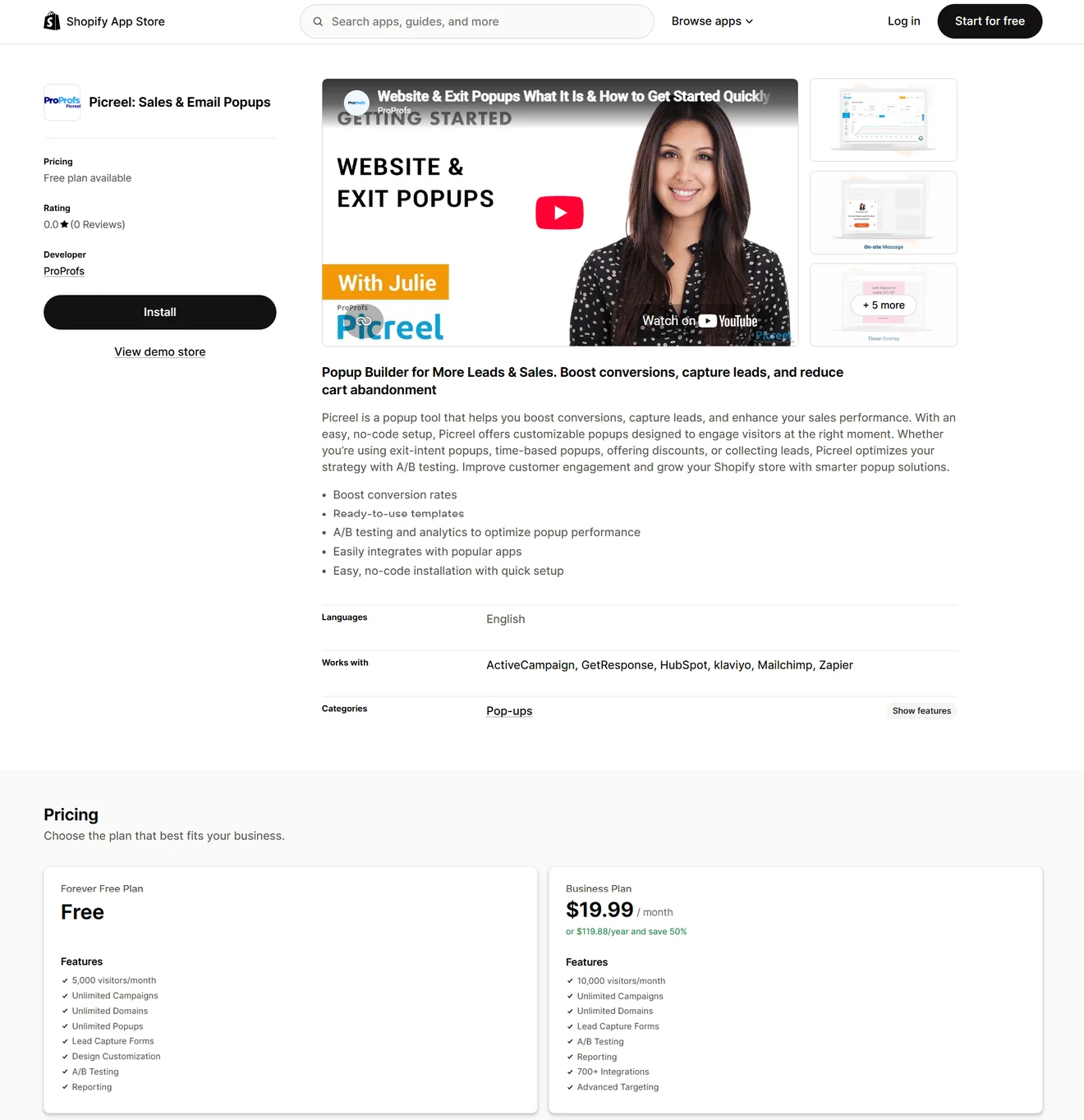
Picreel therefore uses different limits — and even different billing units — depending on where you subscribe.
Removing the “Powered by” link is another paid add-on: $30 a month, or $300 when purchased annually. On monthly billing, white labeling costs more than the entire Essentials subscription.
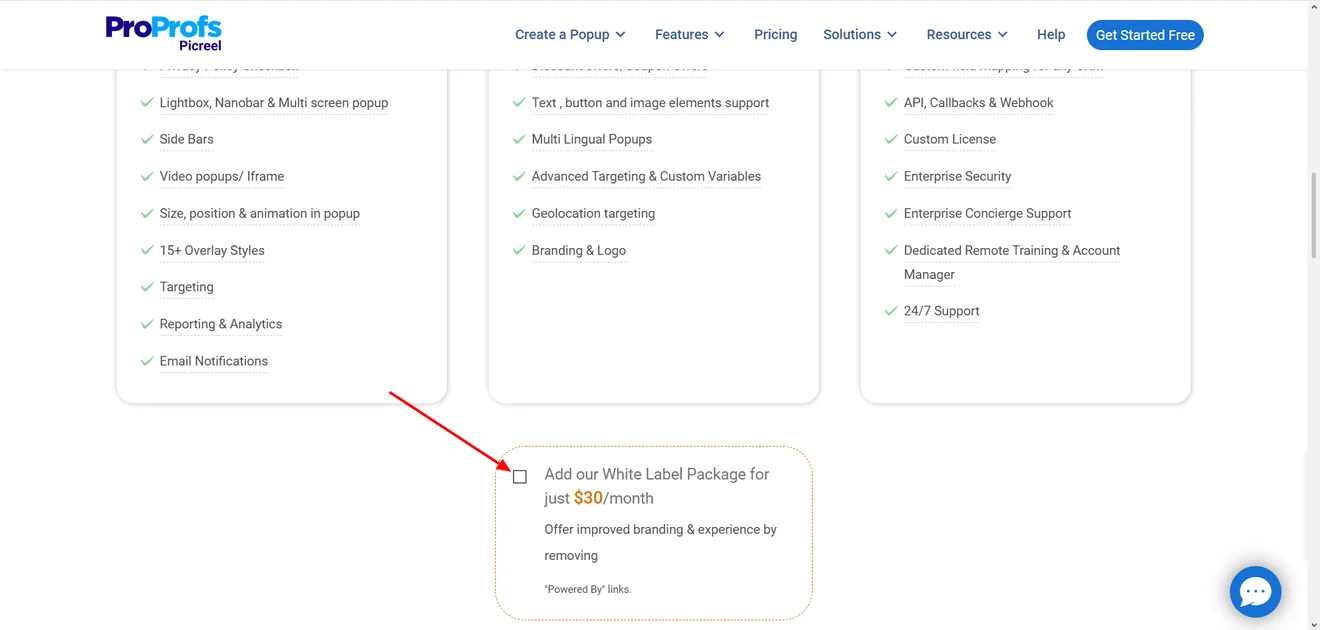
Picreel is worth a look if you already use ProProfs or only need a simple popup tool for a small site. The free option also makes it easy to try without much commitment. Just check the plan details first: some essential features may depend on the plan.
11. BDOW! — for collecting leads and emailing them from one place
Verdict: BDOW! — formerly Sumo — combines list capture with lightweight email marketing. Free users can send broadcasts, while paid plans add welcome emails and campaigns. For a small team, that may postpone the need for a separate email platform.
Why consider it: campaign formats include popups, scroll boxes, inline forms, welcome mats, click triggers, sticky bars, and social-proof notifications. Targeting uses exit intent, scrolling, pages visited, referrals, cookies, devices, and other behavior. BDOW! has a direct Showit integration and connects with popular email tools, Zapier, and webhooks.
Testing and analytics: paid plans include A/B tests with adjustable traffic shares, improvement tracking, and statistical significance. BDOW! recommends reaching at least 95% before you choose a winner. Reports cover form impressions, collected emails, conversion rates, and email opens and clicks. Free accounts retain one month of data; paid plans retain two years.
Pricing: BDOW! takes an unusual approach to Free: instead of pageviews, the allowance is 100 conversions on one site. Email submissions and CTA clicks both count, so that does not necessarily mean 100 new contacts. The plan includes 500 email sends, BDOW! branding, and no A/B testing.
Once you leave Free, BDOW! starts counting pageviews. Plus is the one-site option: $25 a month ($19 with annual billing) for 25,000 pageviews and 6,000 email sends. Pro does not unlock new tools. Its $49 monthly price ($39 annually) simply raises the allowance to three sites, 25,000 pageviews per site, and 10,000 sends. Both can be tried for 14 days.
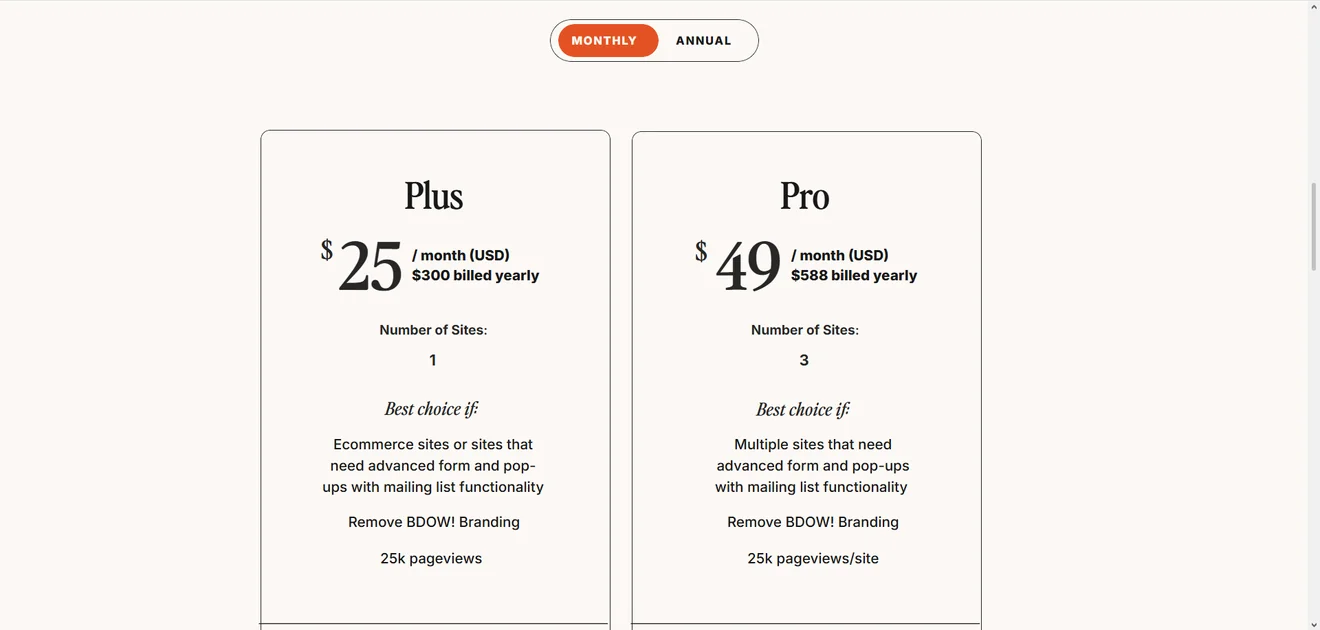
Keep in mind: Shopify takes some manual work because there is no app to install at the moment. You have to add the BDOW! script to the store theme yourself. A WordPress plugin is still available, although its listing says it has not been tested with the latest three major releases.
Choose BDOW! if you want forms, popups, and basic email tools in one place, especially for a Showit or content-led site.
12. Alia — for revenue-focused popup optimization on Shopify
Verdict: Alia is built for Shopify brands that want to know what happens after the signup. Its reports connect popup activity with orders, sales, AOV, and time to purchase, while tests can compare sitewide conversion and revenue across variants.
Why consider it: Alia supports email and SMS forms, quizzes, surveys, games, exit and cart campaigns, countdowns, and custom popups. Targeting draws on behavior, traffic source, location, Shopify data, and Klaviyo segments.
Integrations include Klaviyo, Attentive, Omnisend, Postscript, Sendlane, and Yotpo.
Rewards can use shared codes, unique Shopify codes, or free shipping. Smart Reward chooses among several offers based on shopper intent. Codes can be restricted by product, cart value, expiration, or subscription and applied automatically.
Testing and analytics: regular A/B tests can compare design, timing, teasers, content, and triggers. Alia distributes traffic automatically, although the documentation does not describe custom allocation or statistical-significance reporting.
Prism AI takes a different approach: it continuously tests combinations of headlines, images, buttons, and offers, then shifts traffic toward stronger variants. It works with anonymous behavior, pages, and UTM data rather than known-customer information such as Shopify order history.
Analytics separate raw submissions from confirmed net-new opt-ins. Reports also cover attributed orders and sales, AOV, bounce rate, median time to purchase.
Pricing: there is no ongoing free plan. The Shopify listing starts at $100 a month for 20,000 visitors, followed by $200 for 50,000, $300 for 100,000, and $400 for 300,000. Every tier includes all features and a 14-day trial.
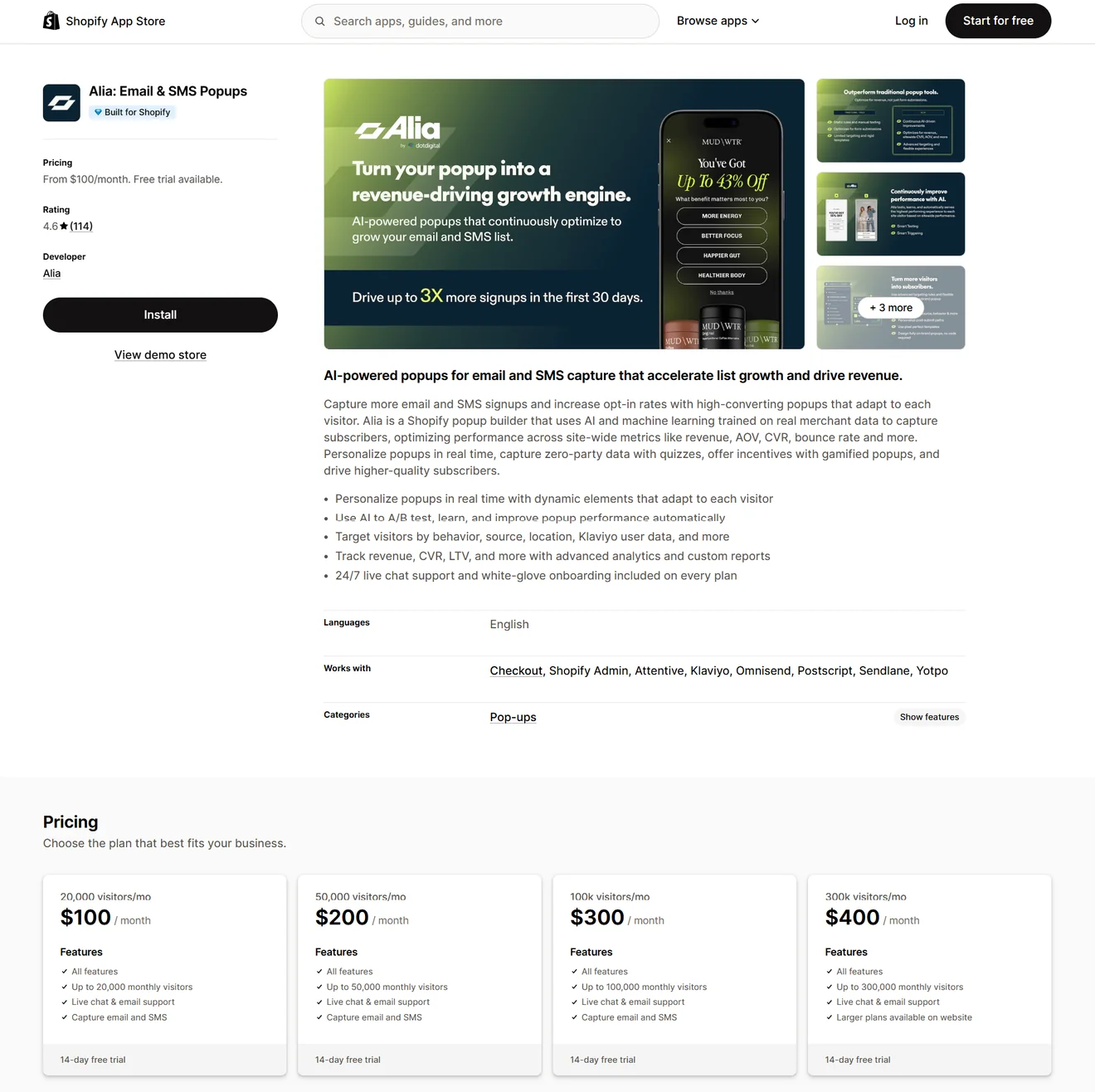
Alia’s website also offers a Fully Managed plan from $400 a month for 50,000 visitors. It adds a dedicated customer success manager, managed A/B testing, a private Slack channel, and a 30-day trial. Subscribing through the website begins with a demo call.
Choose Alia if you run an established Shopify store and want popup decisions tied to subscriber quality and revenue, with the option to hand ongoing testing to Alia’s team.
How to choose popup software that fits your growth model
The best popup software is not necessarily the one with the longest feature list. It should help your team turn traffic into something measurable without adding an awkward new process. Before comparing plans, decide what the tool must accomplish and how you will judge whether it worked.
1. Start with the outcome, not the format.
“Run a popup” is not a business goal. Collecting confirmed subscribers, recovering carts, increasing order value, and learning what shoppers want are.
This distinction also affects reporting. One popup builder software may count a button click as a conversion; another reports only confirmed new contacts. A third connects signups to purchases. Their conversion rates may look comparable in a table while measuring completely different events.
Choose campaign formats the same way. Quizzes, games, product recommendations, bars, and embedded forms are useful only when they support the outcome you have chosen. A library of 700 templates is still just a library. Start with the goal, then browse popup examples for a format that fits it — not the other way around.
2. Decide where the workflow should live.
An email platform with built-in forms can be enough when the journey is simple: someone signs up and immediately enters a welcome flow. Keeping capture and follow-up together also means fewer integrations to maintain.
Dedicated popup software makes more sense when onsite campaigns have their own strategy. Think multiple audiences, cart-aware offers, frequent experiments, or data that must move into several marketing tools. The practical question is who will own this work and whether that team can launch changes without waiting for developers.
3. Price the plan you will actually use.
A $19 plan is only cheap if it can run the campaign you have in mind. Build the setup you would actually pay for first. Perhaps exit intent or A/B testing forces an upgrade; perhaps removing the vendor’s logo or connecting your email platform does. If exit intent is central to your strategy, compare dedicated exit-intent popup software before paying for a higher tier.
Price that version at today’s traffic, then run the numbers again for a busier month. One vendor bills every pageview, another counts visitors, and a third charges by contacts or conversions. Those models behave very differently as you grow. Add-ons and managed services belong in the calculation too. Ultimately, cost per additional subscriber or order tells you more than the monthly fee alone.
4. Look at targeting and suppression together
More triggers do not automatically mean better targeting. First ask whether the platform can use the data your business already has:
traffic source,
cart contents,
product viewed,
customer status,
previous campaign activity, etc.
Shopify popup apps differ most in how deeply they can use cart, product, and customer data — not in how quickly they install.
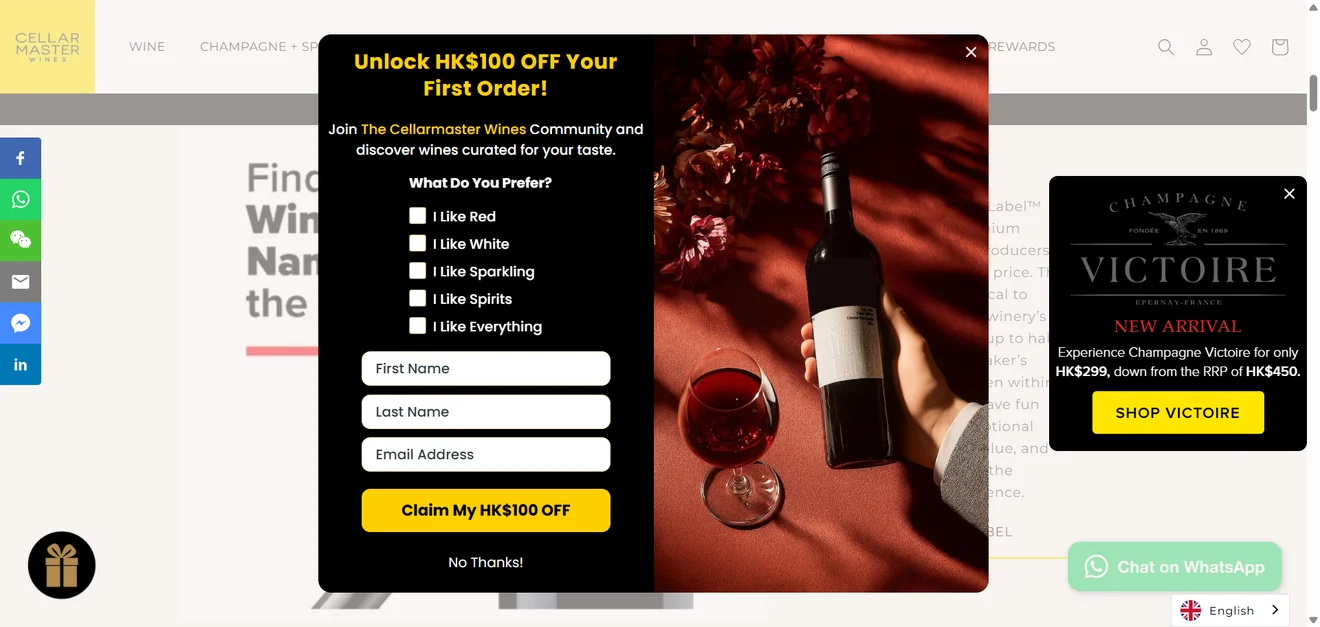
Then check who can be excluded. Existing subscribers, recent buyers, and visitors who just saw another campaign rarely need another popup. Without frequency controls and campaign priorities, even sophisticated targeting can produce three perfectly targeted messages fighting for the same screen.
5. Make sure the results deserve your trust.
For experimentation, look beyond the words “A/B testing”. Check traffic allocation, control groups, statistical significance, and how the winner is chosen. If revenue appears in the dashboard, find out how orders are attributed and which window is used.
Finally, treat integrations, mobile controls, performance, consent handling, and privacy as launch requirements. Data should reach the right system with its fields and consent status intact. Open a campaign on an actual phone before you commit. Can you adjust the mobile layout without changing the desktop version? Does it load quickly, and can you test it properly? Those answers are more useful than another hundred templates you may never open.
Which popup software should you try first?
If capture and follow-up need to live in the same account, Privy or BDOW! can simplify your stack. For deeper ecommerce personalization, start with OptiMonk, Justuno, Wisepops, or Alia. Claspo is a stronger fit when you want room to test formats, targeting rules, games, and experiments without rebuilding your setup around one campaign type.
Still, the best popup software on paper may feel different once it meets your website. Claspo’s 14-day trial lets you run a real campaign on your own traffic and see what actual visitors do. Once you have enough traffic for continuous experimentation, the AI CRO agent can help find opportunities, build campaigns, and learn from the results.
FAQ about popup software
What should I test during a popup software free trial?
Do not spend the whole trial browsing templates. Build one campaign you would genuinely launch, connect your ESP or CRM, and recreate the targeting and suppression rules you need. Check the mobile version separately, then put a small share of real traffic through it. Did the correct fields reach your integration? Do the analytics match what happened?
Before the trial ends, open the pricing page one more time. The targeting rule or integration you just used may disappear on the cheaper plan. For your team, the best popup builder is simply the one you can keep using without an unexpected upgrade.
Can popup software slow down a website?
Any website popup software adds JavaScript, but that does not automatically produce a noticeable slowdown. Architecture and loading behavior matter more.
In our controlled PageSpeed test, we compared the same page without Claspo, with a text popup, and with a gamified popup. We did not trust a single PageSpeed screenshot, so we repeated each setup 250 times. On mobile, adding either popup moved the median performance score by only one or two points. FCP, LCP, and CLS did not move in our test.
For another tool, ask how it loads. Does the script run asynchronously? Are popup assets fetched only when needed? Does it compress uploaded images, or bring extra JavaScript libraries along for the ride?
Can popups hurt SEO or mobile UX?
Popup tools are not an automatic SEO problem. Someone who clicks a search result should get to see the promised page first. Covering it with a full-screen offer is exactly the pattern Google warns about, and it is even harder to tolerate on a phone. If the message must appear immediately, use a compact banner. Save larger popups for a later trigger, give them an obvious close button, and do not repeat the same offer on every page. Legally required dialogs, such as consent or age verification, are treated differently. For practical guidance on size, timing, copy length, and close controls, see our mobile popup best practices.
How many popup campaigns should run at the same time?
You can keep many campaigns active, but one visitor should not have to close a pile of them. Set frequency limits so the most relevant campaign wins. A cart saver, for example, should take precedence over a general newsletter offer.
Good popup builder software should also provide overlap protection or a silent interval between messages. Test the full journey rather than previewing each campaign separately; conflicts often appear only when several targeting rules become true at once.
How long should an A/B test run?
There is no universal seven- or fourteen-day answer. Choose the success metric before launch, cover a normal business cycle, and wait until each variant has enough traffic to support a decision. Stopping after the first few conversions can turn an early fluctuation into a false winner.
The best popup tools report traffic and results for every version and provide a confidence or statistical-significance indicator. If the campaign affects purchases, check orders, revenue, or AOV too. The version with the highest signup rate may not produce the most valuable customers.