12 Best Exit-Intent Popup Plugins for WordPress in 2026


Summarize
You have an offer in mind and want to show it before a visitor leaves. Finding the best exit intent popup plugins for WordPress sounds straightforward — until you check the details. A mobile-friendly popup might run on a timer, with no mobile exit detection. The subscription you’re considering might leave exit intent locked behind a higher plan.
Those details don’t always make it into banners or sales pages. At Claspo, we dug through help docs and pricing tables to see what each service with an exit popup for WordPress actually offers. You’ll also find practical checks for choosing a tool, and a short Claspo setup guide.
WordPress exit intent popup tools: quick comparison
If you’re short on time, compare pricing, A/B testing and desktop and mobile triggers here. Below the table, we take a closer look at each tool’s setup, campaign features and limitations.
Tool | Free plan or trial | Plan with exit intent | Paid plans from | A/B testing | Desktop exit trigger | Mobile behavior |
Claspo | Free: 1 site, 3K pageviews/mo. Free trial: 2 weeks. | Free | $29/mo (annual) or $39/mo (monthly) | Yes | Cursor moving toward the top of the browser | Rapid upward scrolling |
OptinMonster | Free: 3 campaigns, 500 lifetime impressions | Pro or higher; Pro plan costs $87/mo | $21/month (monthly) | Yes | Mouse movement toward the browser edge; adjustable sensitivity | Upward scrolling |
OptiMonk | Free: 1 domain, 10K pageviews/month | Free | $29/month | Yes | Pointer entering the top 10 pixels of the browser’s inner area | Tab/focus change, fast scrolling to the top, or browser/device Back action |
Poptin | Free: 1 domain, 1,000 visitors/month | Free | $25/month | Yes | Cursor moving toward the close button or address bar | Back action when leaving the site |
Popup Maker | Free: unlimited popups and views; limited features | Pro plan: $59.40/first year, then - $99/year (for 1 site) | $99/year (for 1 site) | Yes (Pro) | Mouse leaving through the top edge | Lost browser focus and Back action |
Popupsmart | Free: 1 site, 5K pageviews/month, 1 live popup | Free | $39/month | Yes (Advanced plan) | Mouse movement toward the browser-exit area; adjustable sensitivity | Fast upward scrolling; campaign must be enabled for mobile |
Thrive Leads | No free option listed | Paid subscription | $99 for the first year; $199/year renewal | Yes | SmartExit desktop exit-intent trigger | Timed trigger on mobile |
Popup Builder | Free; limited features | $29/year for 1 site, or included in a paid bundle | $49.95/year for 2 sites | No | Top-bar-only mouse detection | Tab switching or Back action |
BDOW! (formerly Sumo) | No Free plan. Free trial: 2 weeks, card required. | Pro plan (the only option) | $19/mo (annual) or $25/mo (monthly) | Yes | Mouse movement indicating an attempt to leave | Mobile exit behavior not confirmed |
Hello Bar | Free: 5,000 lifetime views | Free | $39/month | Yes (from Growth plan, $39/mo) | Cursor movement toward the address bar | Mobile exit behavior not confirmed |
Elementor Pro | No free plan. No trial; 30-day money-back guarantee | Advanced Solo: €84/year | €60/year | No | Mouse movement toward the browser-exit area | Mobile exit detection not confirmed |
Sleeknote | No free plan. 14-day trial | Core plan: €62/month | €62/month | Yes | Cursor-based exit-intent trigger | Exit intent does not fire on mobile |
Starting prices refer to the lowest paid option listed, which may not include exit intent.
How we evaluated these exit intent popup WordPress tools
This comparison is based on desk research using official pricing pages, help-center documentation, and WordPress listings. Trigger descriptions reflect what each provider documents; they aren’t results from our own browser or device tests.
We looked at what you’d actually pay to use exit intent. Sometimes the free plan covered it; sometimes you’d have to skip the cheapest subscription. We checked how much usage free accounts allow and when that allowance runs out or resets. Trial card requirements, annual payments and renewal increases were noted, too.
For tools with an official WordPress plugin, we read through its listing and setup guide to see how campaigns get from the builder onto your site. A plugin that loads campaigns from a hosted account was identified as a connector. For script-based services, we checked the documented WordPress installation route.
Desktop and mobile behavior were reviewed separately. A mobile-friendly design wasn’t treated as evidence of mobile exit detection. We looked for documented triggers, sensitivity controls and restrictions, alongside A/B testing access and other campaign features.
When a source didn’t establish a capability, we marked it as unconfirmed or not specified. An explicit statement that a feature doesn’t work — such as exit intent on mobile — was reported separately.
Pricing and feature details reflect the sources reviewed in October 2026.
What counts as a WordPress exit-intent plugin?
A WordPress exit popup plugin may run inside WordPress or connect your site to a hosted service. With a native plugin, you build popups and manage their settings in your WP dashboard. Hosted tools have a separate editor and account. You connect them to your site through a WordPress plugin or a code snippet. Both approaches appear in this comparison; each review explains how the tool connects.
If you’re also considering tools for sites beyond WordPress, our exit intent software comparison covers more options.
Before choosing an exit intent plugin, check what actually triggers the popup. On desktop, it usually detects the cursor moving toward the browser toolbar. Mobile devices have no cursor, so some tools use a quick upward scroll to trigger an exit intent popup on mobile. Others substitute a time delay or scroll-depth trigger. These alternatives let you show popups on phones, though they don’t necessarily signal that someone is leaving.
The popup should also leave browser navigation working normally. Google announced its back button hijacking policy in April 2026, with enforcement beginning June 15. Any implementation that prevents visitors from immediately returning to their previous page through Back can violate this policy. Check this behavior when testing your mobile campaigns.
12 exit intent popup WordPress tools compared
A free plan might cover your exit campaign. A paid one might still leave the trigger locked. Below, we check which plan you actually need, how desktop and mobile triggers work, and what else you get for creating and improving your offers.
Claspo — for exit campaigns built and improved with AI
Yes, we put ourselves on the list. We’re the Claspo team, so we didn’t have to look far for this one.
Pricing and limitations
Free includes every self-service feature and unlimited published popups on one site, with 3,000 monthly pageviews and Claspo branding. Paid plans start at $29/month billed annually or $39 billed monthly; a two-week trial is available.

Setup and integrations
Claspo is a hosted builder with an official WordPress exit popup plugin. You create campaigns in Claspo and publish them through the plugin. It works with WooCommerce and connects to Mailchimp, Klaviyo, HubSpot and other marketing platforms.
Exit intent and AI CRO Agency
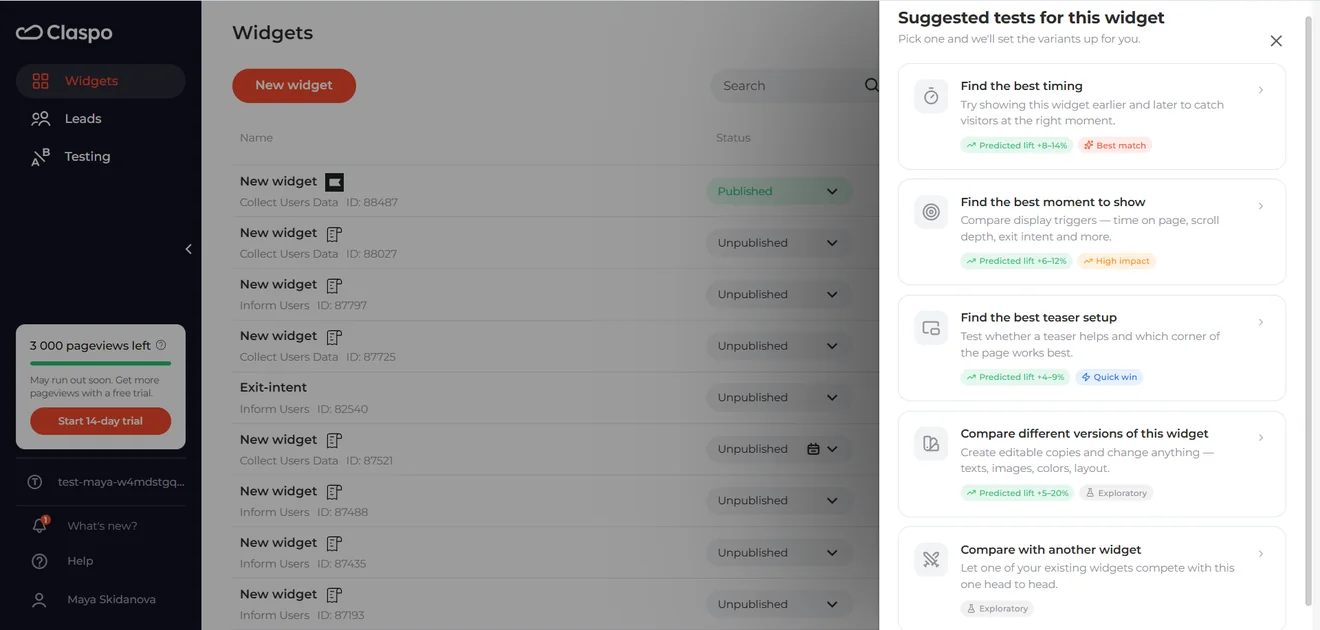
You can build campaigns yourself or hand much of the work to Claspo’s AI CRO Agency. The CRO Strategist studies visitor behavior and suggests opportunities. The Campaign Builder prepares the popup’s design, copy, targeting, triggers and test variants. Once it’s live, the Campaign Optimizer reviews results and recommends changes. You approve each launch and A/B test.
The service suits stores with steady traffic and regular orders. During beta, Claspo specialists work alongside the agents, and the full campaign cycle currently focuses on subscriber growth.
For your WordPress exit intent popup, you can combine exit intent with other triggers and targeting rules. An offer could be reserved for visitors from a particular campaign who’ve spent at least a minute on your site. It then waits for the cursor to approach the browser toolbar on desktop, or a quick upward scroll on mobile.

You can adapt Claspo’s exit-intent popup templates to your offer, adding games, multistep forms, promo codes or countdown timers. A/B tests support up to five variants, including on Free plan.
Claspo’s free exit intent plugin gives you the full platform to work with while you find out what converts on your site. When you need more room for growing traffic, you can upgrade and keep your campaigns running.
OptinMonster — adjustable exit triggers for desktop and mobile
Pricing and limitations
For anyone choosing a WordPress exit popup plugin specifically for its trigger controls, there’s a price consideration: you’ll need Pro at $87/month. The $21/month entry plan doesn’t include exit intent. The free account offers three campaigns and 500 lifetime impressions for trying the builder; it won’t let you test exit-intent campaigns.

Setup and integrations
You’ll build your campaigns in an OptinMonster account, then connect them to your site using its WordPress exit popup plugin. WooCommerce stores can use it too. For collecting leads, you can hook up Mailchimp, Klaviyo or HubSpot.
Exit intent and A/B testing
For mobile campaigns, you choose how far someone has to scroll quickly upward before the offer appears: 10% of the screen height on High, 30% on Medium, or 50% on Low. A higher setting therefore needs less movement to trigger the popup. Desktop has the same three levels, measured by the cursor’s distance from the browser edge.
You can reserve offers for certain pages or show returning visitors a different message. A/B tests let you compare variations of a campaign, including changes to its wording, appearance and settings.
OptiMonk — for A/B tests with a no-popup control group
Pricing and limitations
OptiMonk works as a free exit intent plugin for one domain with up to 10,000 pageviews a month. Exit-intent trigger and A/B testing are included. Paid plans start at $29/month.

Setup and integrations
The WordPress exit popup plugin installs OptiMonk’s code for you. You manage campaigns in your OptiMonk account and can connect WooCommerce, Mailchimp, Klaviyo or HubSpot.
Exit intent and A/B testing
On desktop, the popup fires when the cursor enters the top 10 pixels inside the browser window. Mobile has several signals: switching tabs, scrolling quickly to the top, or pressing the browser/device Back button. Back only counts after someone has interacted with the site and tries to leave from their entry page. Some mobile browsers don’t support every signal.
You can test an offer against a group that sees no popup, which helps answer whether showing it makes a difference. You can pick the winner yourself or let OptiMonk end the test once its thresholds are met.
Poptin — for multi-step and gamified exit offers
Pricing and limitations
Free plan includes exit intent and A/B testing for one domain, up to 1,000 visitors per month. Paid plans start at $25/month. The allowance counts visitors, rather than pageviews.

Setup and integrations
Install the WP exit popup plugin to connect WordPress to Poptin’s hosted builder. Leads can go to Mailchimp, HubSpot or Klaviyo. Its listing describes deeper WooCommerce integration as “coming soon”.
Exit intent and campaign features
For an exit offer, you could use a scratch card, a wheel or Pick a Gift, or build a multi-step flow with custom form fields. You can show a different offer on a specific page or to visitors who interacted with an earlier popup.
Desktop exit intent follows the cursor toward the close button or address bar. Mobile uses Back when visitors leave for the site or app they came from. It needs prior interaction and can miss quick exits; ordinary navigation between your pages doesn’t trigger it. Poptin notes that detection also varies with mobile browser behavior.
A/B tests can compare offers, designs and triggers, with each visitor seeing the same variant throughout their visit.
Popup Maker — for reusing WordPress forms in exit popups
Pricing and limitations
Free allows unlimited popups and views, but exit intent requires Pro: $59.40 for the first year, then $99/year for one site. Pro works with WooCommerce; cart management, automatic discounts and popup-to-purchase revenue attribution belong to Pro+.

Setup and integrations
You build popups inside WordPress with this exit intent WordPress plugin. If you already use WPForms, Gravity Forms, Ninja Forms or Contact Form 7, those forms can go into your popups.
Exit intent and campaign features
Mouse Leave detects the cursor crossing the browser’s top edge. You can adjust sensitivity and add a short delay, giving someone time to move the cursor back into the page without seeing the popup.
Mobile Scroll requires visitors to scroll down first, then quickly back up. You choose the scroll percentage. Other mobile options include switching tabs or apps, interacting with links, and a time-delay fallback when the other signals don’t suit the visit.
Pro also includes split testing. You can compare content inside a popup, including different forms, or test popup settings.
Popupsmart — for targeted exit offers
Pricing and limitations
Free covers one site, 5,000 pageviews per month and one live popup. You can create more campaigns, but only one can run at a time. Paid plans start at $39/month. Built-in analytics, custom fonts and CSS start on Basic; A/B testing requires Advanced or higher.

Setup and integrations
Popupsmart’s exit popup plugin links WordPress to its hosted builder. You can also connect your site with an embed code, then manage campaigns from the Popupsmart dashboard. Mailchimp, Klaviyo and HubSpot integrations are available on Free.
Exit intent and campaign features
An offer meant for visitors arriving from an ad can have its own traffic-source rule. Other targeting options include location, browser language, cookies and whether someone has visited before. Frequency settings control how often the message returns.
For a WordPress popup on exit, desktop detection follows mouse movement, with Low, Medium and High sensitivity settings. On phones, a fast upward scroll is the signal. You’ll need to enable the campaign for mobile devices.
There are 500+ designs to start from, with forms, coupons and gamified campaigns available on Free.
Thrive Leads — for WordPress blogs and lead magnets
Pricing and limitations
There’s no free plan. The standalone subscription costs $99 for the first year and renews at $199/year. Factor that renewal price into your budget, particularly if you only need one exit campaign.

Setup and integrations
Thrive Leads is a native WordPress exit intent popup plugin, installed through Thrive Product Manager. You design forms inside WordPress using the embedded Thrive Architect editor. Mailchimp and ActiveCampaign are among the services you can connect.
Exit intent and campaign features
Say your blog covers both email marketing and paid ads. Lead Groups let each category have its own offer, with shared page rules for the forms in that group. A change to those rules applies across the group, saving you from editing every form separately. You can also A/B test different form types within a Lead Group, such as a popup against a ribbon.
Asset Delivery emails new subscribers a link to the PDF or ebook they requested. Later, the Content Marketing Report shows which posts and pages brought in the most leads — useful when deciding where to develop another download.
SmartExit handles desktop exit intent. Mobile lightboxes and fullscreen forms use a timed trigger instead, so they don’t depend on detecting an attempted exit.
Popup Builder — for adding exit intent to existing popups
Pricing and limitations
The exit-intent extension costs $29/year for one site. Starter includes all 28 extensions for $49.95/year across two sites — worth comparing if you also need analytics, scheduling or other add-ons.

Setup and integrations
Popup Builder runs inside WordPress. To use it as an exit intent popup plugin, you’ll need the free core plugin and the paid Exit Intent extension. WooCommerce and Mailchimp connections are available as separate extensions too.
Exit intent and campaign features
Exit intent is an event you can add to different popup types. Soft mode shows the popup when someone is about to leave. Aggressive mode adds a browser alert when they try to close the tab; there’s also an alert-only option. A checkbox lets you restrict desktop detection to mouse movement toward the top bar.
You can save the exit-intent cookie separately for each page or apply it across the site. Setting expiry to −1 allows the popup to appear whenever exit intent is detected.
For mobile, the help guide describes tab switching and pressing Back as triggers.
BDOW! — for popup capture and built-in email campaigns
Pricing and limitations
New customers get one Pro plan: $19/month billed annually or $25 billed monthly, including 1,000 stored contacts. Additional contact storage costs extra; the features stay the same.

If storage fills up, new leads still forward to your connected integration. Each additional website needs another Pro subscription, so account for that when comparing costs across several sites.
There’s no free plan. The 14-day trial requires a card; cancel before day 14 to avoid a charge.
Setup and integrations
BDOW! connects to WordPress through its official plugin, with campaigns managed in a hosted dashboard. WooCommerce is supported too. You can send contacts to Flodesk, Mailchimp, Kit or AWeber, or work with BDOW!’s own email tools.
Exit intent and campaign features
A signup from your WP exit popup can feed a mailing list inside BDOW! itself. Pro includes welcome emails, campaigns and broadcasts, with unlimited native email sends. Form and email statistics stay available for two years.
You can target offers by referring website, page URL or previous visitor behavior. A/B tests cover headlines, form fields and messaging, with control over how often each variation appears. Desktop exit intent follows mouse movement indicating an attempt to leave. Mobile exit behavior remains unconfirmed.
Hello Bar — for simple exit offers with room for more targeting
Pricing and limitations
Free plan includes unlimited popups and subscribers, but only 5,000 lifetime popup views. That allowance doesn’t reset next month. Hello Bar branding stays, and A/B testing isn’t included.
Growth costs $39/month, or $29/month billed annually, with 50,000 popup views per month. It adds unlimited A/B tests, branding removal, Yes/No questions and a custom thank-you page. For ongoing campaigns, those controls may matter as much as the extra views.

Setup and integrations
You’ll create campaigns in your Hello Bar account, then connect them to WordPress using the official plugin. The plugin loads your campaigns onto the site; editing happens in Hello Bar’s dashboard.
Zapier is available on Free. Webhooks require Growth or higher, while the listed HubSpot and Salesforce CRM integrations need Premium or Elite.
Exit intent and campaign features
On desktop, your WordPress exit intent campaign can appear as the cursor heads toward the address bar. Mobile exit behavior remains unconfirmed.
There are over 100 templates, with formats including slide-ins, fullscreen overlays and inline forms. Even Free lets you use custom fonts and brand colors.
The bigger restriction is targeting. Want a separate offer for someone leaving a particular product page? You’ll need Growth. URL rules, geographic targeting and device targeting are all reserved for paid plans.
Elementor Pro — for sites already built with Elementor
Pricing and limitations
Essential plan costs €60/year but excludes popup builder. For exit intent, you need at least Advanced Solo: €84/year for one site, paid upfront.

There’s no free popup builder or trial, although purchases come with a 30-day money-back guarantee. A/B testing isn’t built in, so if you’re comparing exit intent popup plugins for regular campaign experiments, factor in a separate testing solution.
Setup and integrations
Popup builder runs inside WordPress, using Elementor’s visual editor. If you already design your pages there, the workspace will feel familiar. Elementor forms can connect signups to services such as Mailchimp and ActiveCampaign.
Exit intent and campaign features
The On Page Exit Intent trigger responds to mouse activity indicating that someone is leaving. Mobile exit detection remains unconfirmed; the builder also offers separate time, scroll and inactivity triggers.
You could reserve an exit offer for visitors who’ve browsed several pages, or tailor it to people arriving from a particular website. Page conditions determine where it appears, while advanced rules control who qualifies and how often they see it.
One useful setting is Avoid Multiple Popups: it suppresses a popup when the visitor has already seen another on that page. Handy when your newsletter offer and seasonal promotion are both running.
Sleeknote — for targeted campaigns across several sites
Pricing and limitations
Core starts at €62/month, or €49/month billed annually, for up to 25,000 monthly visitors. Unlimited campaigns and domains, A/B testing and branding removal are included.
Spin to Win, Scratch to Win, seasonal calendars and the Quiz feature require Core and Gamification.

The 14-day trial gives access to all features without a credit card, so check which package your chosen campaign needs before subscribing.
Setup and integrations
Sleeknote is a hosted alternative to native exit intent WordPress plugins. You build campaigns in its dashboard, then connect them to WordPress with a tracking script. Its installation guide also offers the option of adding that script through a third-party plugin. Email integrations are included in Core.
Exit intent and campaign features
On desktop, Sleeknote watches for the cursor moving toward the address bar. Once someone closes the campaign, repeating that movement won’t bring it back during the same session.
Exit intent doesn’t fire on mobile. Sleeknote recommends a mobile teaser instead, letting visitors open the offer themselves.
Core includes multistep campaigns and targeting by page, UTM campaign, referral source, cookies and query parameters. Someone arriving from a particular ad could see an offer matching that promotion. You can also collect preferences through dropdowns, checkboxes or radio buttons.
How to choose a WordPress exit popup plugin
Use your first planned campaign to compare the best exit intent popup plugins for WordPress. These five checks will help you decide which tool fits.
If you also need welcome popups or embedded signup forms, our guide to the best WordPress popup plugins covers those options.
1. Find out where you’ll edit the offer
You’ll probably change a headline or discount more often than you change the plugin. Find out where that work happens. Native exit intent popup plugins keep the editor in WordPress; hosted builders give you a separate account.
Try making a small change using the account your marketer will have. They should be able to save it and publish the update without asking a developer to step in each time.
2. Browse normally before trying to trigger it
Scroll back up to the menu on your phone. Open another page, return to the first one and close the offer if it appears. This gives you a better feel for the experience than deliberately triggering the popup once.
Notice whether the same message keeps coming back. Look for settings that let you wait until someone has spent time on the site, reserve offers for particular pages and limit repeat displays. Test the Back button during that visit, too: it should let you leave normally.
3. Read the allowance behind “free”
Five thousand views every month is a different offer from five thousand for the lifetime of an account. Before choosing a free exit intent plugin, find out what counts toward its limit. A visitor, a pageview and a popup impression aren’t interchangeable.
Also check what happens when the allowance runs out. Will campaigns pause, or will you be charged? Once you’ve found the plan with your targeting and testing features, check its billing period and renewal price.
4. Use your real campaign for the speed check
Build the WordPress exit intent popup you plan to use, with its image and signup form. Measure the same page before and after connecting the tool, repeating the comparison several times.
Then put the score aside and use the page on your phone. Open the offer, type into the form and submit it. Pay attention to any delay when the popup appears — an exit offer has little time to catch someone who’s already leaving.
Our popup performance test explains the loading choices and how to compare results on your site.
5. Follow one lead through the integration
Submit a test signup and find it in your email platform. Check:
the destination list,
custom fields,
campaign source,
and any consent information your workflow needs.
Confirm that the expected welcome email or automation starts.
Repeat with an existing email address. You’ll learn whether the integration updates that contact, creates a duplicate or handles the submission another way.
How to add Claspo to WordPress
Connect your site once, then create and update your popups in Claspo.
In your Claspo account, go to Script → Install script and choose WordPress. Copy your script ID — you’ll need it to connect the plugin.
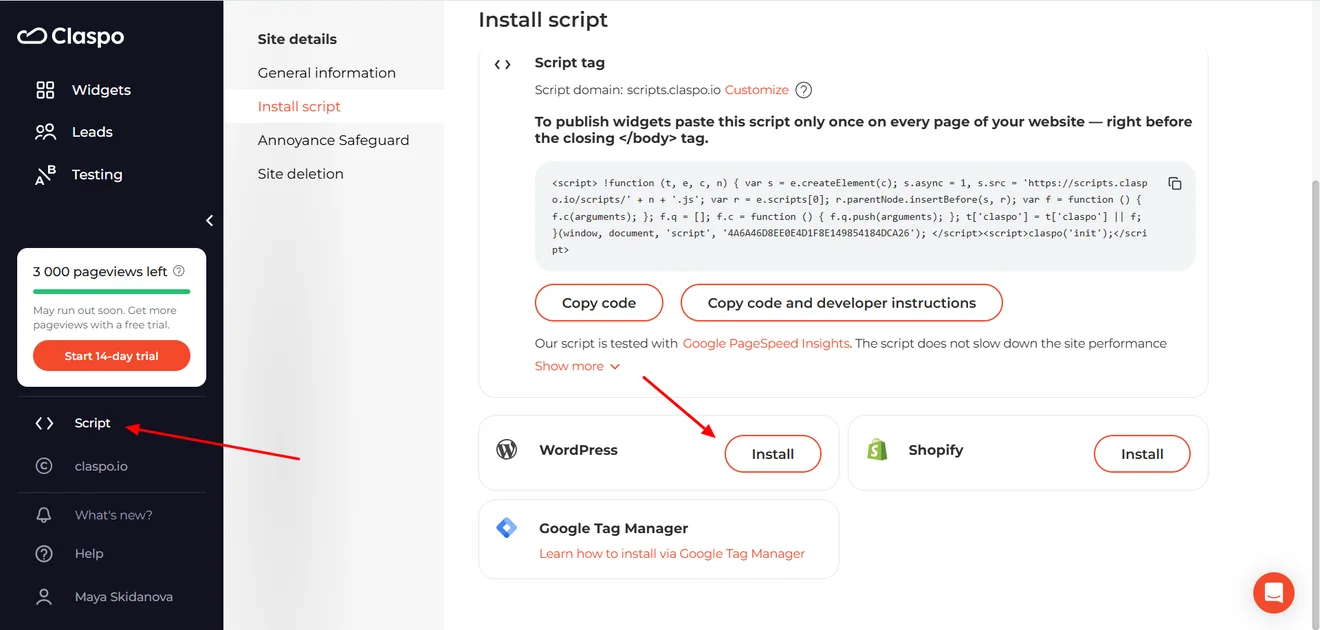
Download the plugin and switch to your WordPress dashboard. Under Plugins, upload the file and activate it.
You’ll now see Claspo in the menu on the left. Click it and paste your copied ID into Enter Script ID. Hit Connect to link the site to your Claspo account.
Return to Claspo and click Check to confirm the connection.
The plugin adds the Claspo script across your site, so you won’t need to install it separately on each page.
Our WordPress installation guide walks through the setup with screenshots.
Once your site is connected, choose one of our popup templates and customize it with your offer, text and brand colors.
From comparison to your first campaign
Your next exit offer might be a simple signup form or the first of many experiments. Claspo’s AI CRO Agency helps stores with steady traffic build and improve subscriber campaigns. OptiMonk and Poptin offer free exit intent and A/B testing within their limits. Elementor keeps popup design in a familiar editor, while OptinMonster offers adjustable trigger sensitivity, but only on Pro plan.
Start your shortlist with Claspo’s exit-intent popup builder. Build your first WordPress exit intent popup, check how it works on your site and see whether the workflow feels comfortable. The AI team is there when you’re ready to explore ongoing experimentation.
Frequently asked questions
Can exit-intent popups work without a discount?
Yes. Try offering help with the purchase: “Not sure which size to order? Ask us”. A blog could give readers a printable checklist from the article they’ve just read — something useful to take away and come back to.
Start with what someone might still need from that page. A WordPress exit intent popup can offer help, a useful download or a way to save their selection. For more ideas, browse our exit-intent popup examples to see how other brands present their offers.
Should I ask for an email or show the offer immediately?
If you promise to email a guide, you need an address. Explaining delivery costs doesn’t require one. Consider what happens after the form, too. Will you send something worth receiving? Is there a useful follow-up planned? If you mainly want someone to finish today’s purchase, try giving them the offer directly. You can test email capture separately.
What should existing subscribers see in an exit popup?
You already have their email. Give them something else to do: explore a relevant product, ask a question or view an offer. You can also exclude them from signup campaigns altogether.
The catch is recognizing them before they submit a form. Check what your exit intent plugin uses to identify subscribers. A person on your mailing list may still appear as an unknown visitor on another browser or device.
How can I tell whether an exit popup brings additional conversions?
Your report might show 30 purchases linked to a popup. Some of those customers could have bought anyway.
To estimate the difference, randomly split eligible visitors into a campaign group and a group that gets no popup. Keep each visitor in their assigned group. Compare signups, purchase rates or revenue per visitor across the whole groups — not just among people who clicked the offer.
How long should I run an exit-popup A/B test?
A week with six signups gives you very little to judge. The traffic entering the test matters, along with your usual conversion rate and the improvement you want to detect.
Estimate the required audience before starting, and allow for normal weekday and weekend differences. Follow your testing tool’s stopping guidance. If the evidence stays inconclusive, “no clear winner” is a valid result; you don’t have to pick whichever version happens to be ahead.