Mobile Exit-Intent Popups: Triggers, Examples & Best Practices


Summarize
Claspo’s benchmark data shows that an exit-intent popup with a discount code converts at 5.76%. That’s a solid number, and since most people shop on their phones now, you can’t afford to only run them on desktop.
But mobile users don’t have a cursor, so how do you detect exit intent and set the right triggers? In this guide, we’ll explain how Claspo spots when a mobile shopper is likely heading for the door, examine 5 great exit-intent popup examples, and show how to set up popups that win visitors back without getting on their nerves.
Do exit intent popups work on mobile?
Yes, exit intent popups can work on mobile, but they work differently from desktop. There’s no cursor movement to tell that someone is about to leave, so mobile exit intent relies on behavioral signals from users.
How mobile exit intent actually works
On desktop, tracking exits is easy: the mouse moves toward the "close tab" button, and the popup triggers.
Phones are trickier. There’s no mouse cursor to follow, and websites can’t tell when someone is about to swipe away or switch apps. Thus, you have to predict it based on how they browse.
Claspo watches for fast upward scrolling. When people are ready to leave a page on mobile, they usually flick back to the top to hit the back button or the address bar. It’s not 100% accurate—sometimes people just scroll up to re-read something—so think of mobile exit intent as a smart educated guess, not an exact science.
Mobile exit intent signals: what counts and what doesn't
A mobile visitor slowing down or swiping around doesn't always mean they’re leaving. A pause might just mean they're reading, and a quick swipe could just be normal browsing.
Here’s a quick breakdown of what mobile actions actually hint at an exit versus what’s just normal behavior — and which ones Claspo uses to trigger your popups.
Signal | What it may indicate | Exit intent value | Claspo support |
Rapid upward scroll | Visitor may be returning toward browser controls or preparing to leave | Primary exit-like signal | Yes — mobile exit intent |
Browser/device Back | Visitor is navigating away from the current page | Useful but inconsistent | No |
Tab/app visibility change | Visitor has switched tabs/apps or hidden the page | Usually too late for a popup | No |
Inactivity | Visitor has stopped interacting | Proxy, not exit intent | Yes — separate trigger |
Time on page/site | Visitor has stayed for a set period | Qualification, not exit intent | Yes — separate trigger |
Scroll depth | Visitor has consumed part of the page | Engagement signal, not exit intent | Yes — separate trigger |
Orientation change | Device orientation changed | Weak/ambiguous | No |
Generic swipe/edge gesture | Visitor made a navigation-like gesture | Weak/browser-dependent | No |
Not all mobile behavior is a good reason to fire a popup. Hijacking the Back button often breaks how the browser works. By the time someone minimizes a tab, it’s already too late to show an offer. And things like rotating the screen or swiping around are too random to mean anything.
How to set up mobile exit intent in Claspo
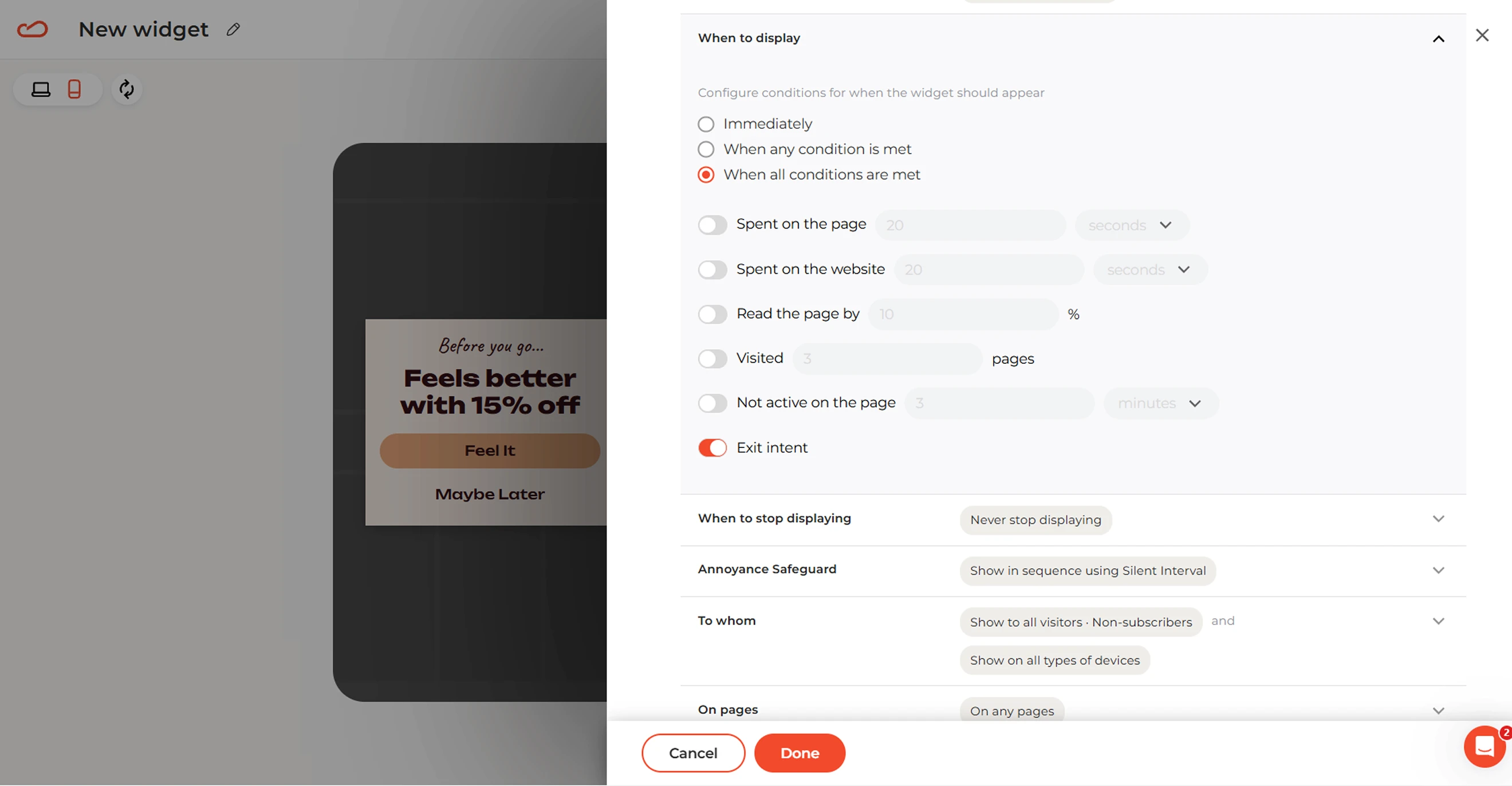
With Claspo, you don’t need to build two different campaigns. The same Exit Intent trigger works for both desktop (cursor motion) and mobile (rapid upward scroll) users.
Pick from exit-intent popup templates or start from scratch, tweak the design, then double-check the mobile view in the editor.
Go to Audience & Triggering → When to display.
Switch on Exit intent (exit intent templates usually have this enabled by default).
Set any extra targeting rules you want, and hit publish.
How to make mobile exit intent more precise with other conditions
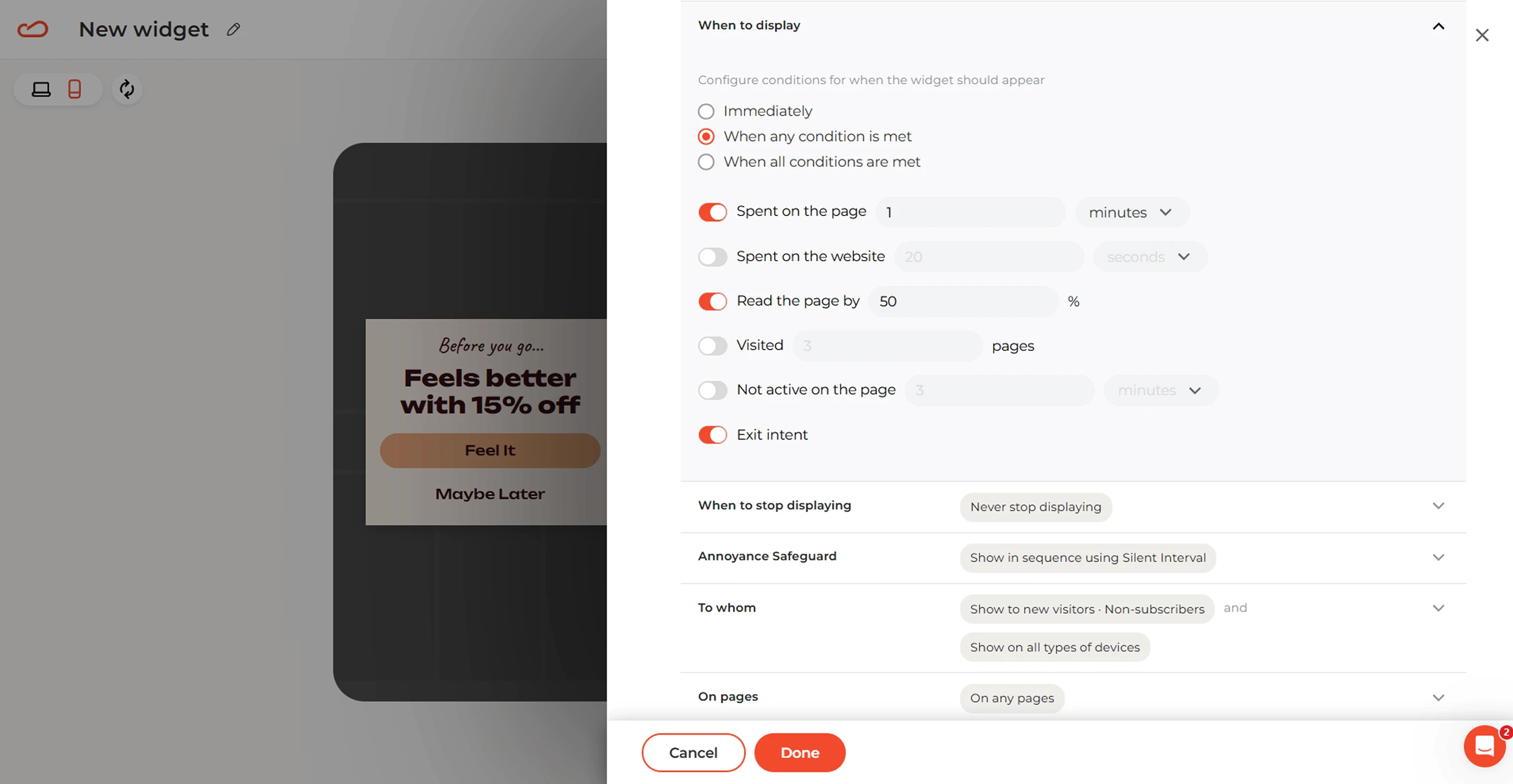
Exit intent can work on its own, but not every visitor who is about to exit is a buyer. You are more likely to get much better results by stacking it with a few extra Claspo rules. This way, your offer only pops up for people who actually showed real interest.
Goal | Combine exit intent with… | Why it works |
Catch interested visitors | Time on page or scroll depth | Filters out quick bounces and targets only engaged visitors. |
Recover high-intent sales | Specific page URLs | Focus the campaign on cart, checkout, pricing, or another high-value page. |
Personalize the offer | New vs. returning visitor status | Adapt the message to the visitor’s relationship with your brand |
If you want to target only serious shoppers, trigger the popup when a person has read 50% of a page and is about to exit. The scroll depth indicates they’ve engaged, and exit intent ensures the popup appears right as they begin to leave.
It’s important to find a specific approach for every page. By limiting exit offers to high-intent URLs or to certain visitor segments, you’ll keep the popup timely and won’t spam casual browsers.
5 Mobile exit intent popup campaigns you can build in Claspo
There are different exit campaigns: someone leaving a cart needs a different reason to stay than someone leaving a blog post or pricing page. Below, we’ve collected five mobile exit intent popup campaigns you can build in Claspo, with targeting, offers, and KPIs matched to each situation. For more inspiration, explore additional exit-intent popup examples.
1. Cart abandonment recovery
Catch visitors who loaded up their cart but are about to leave without paying. Our benchmarks show that popups with promo codes triggered to prevent cart abandonment get a 4.43% CTR in ecommerce.
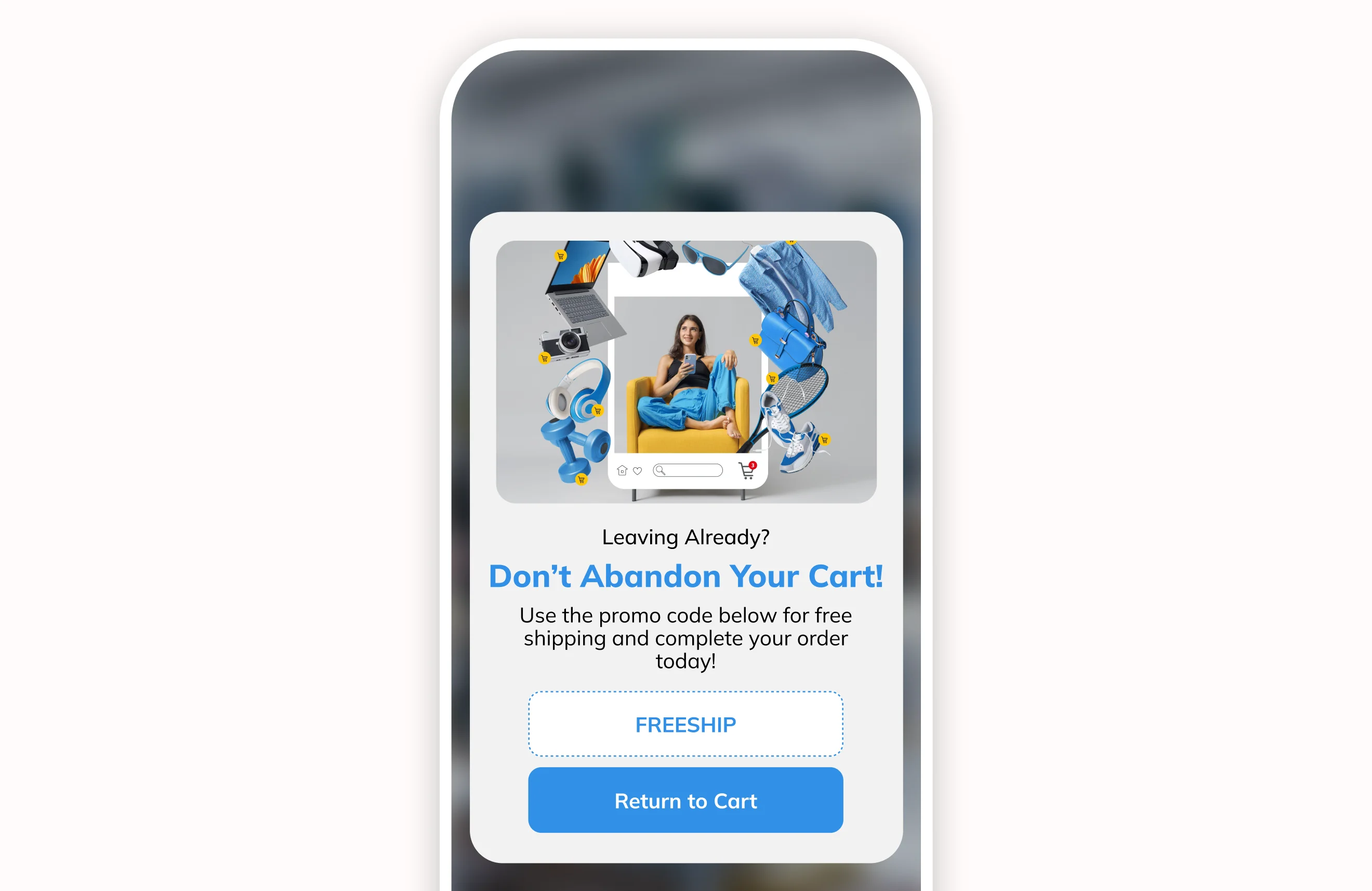
How to set it up: Target your cart URL and toggle on Exit intent. Add additional audience filters if you only want to show it to specific shoppers.
The offer: A 10% off coupon code shoppers can copy with one tap. Don’t use the form fields so shoppers can complete their purchase right away.
What to track: Look past code clicks. Track recovered orders, recovered revenue, purchase conversion among exposed visitors, and revenue per exposed session.
2. Product-page price hesitation
Not everyone who visits your product page is ready to buy right then and there. A good discount can give a real incentive to stay when a visitor looks at the product and decides to leave.
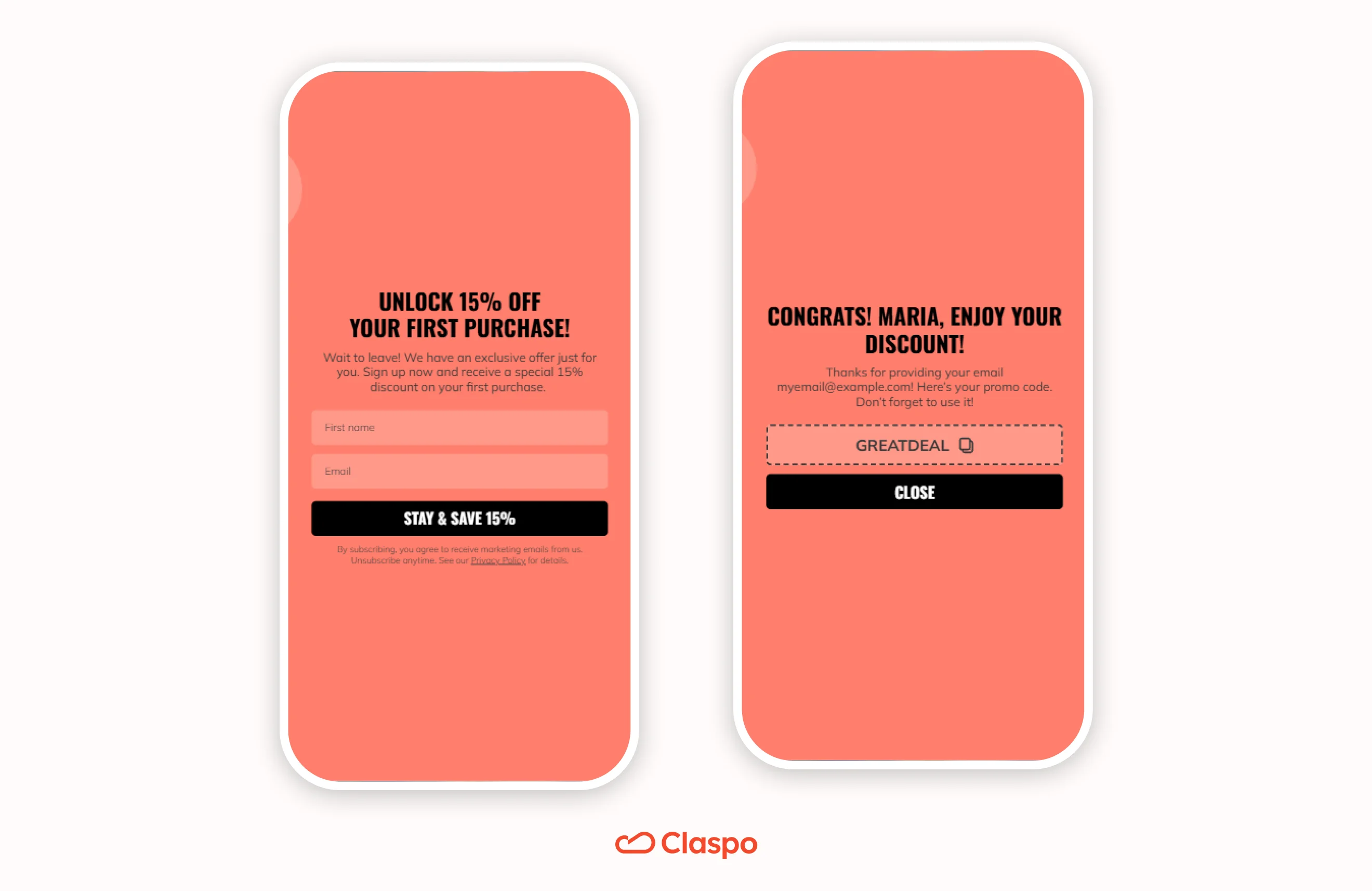
How to set it up: Select your product pages and turn on Exit intent. Pair it with New visitor targeting and a minimum scroll depth or time-on-page to filter out casual bouncers.
The offer: A 15% welcome discount in exchange for an email. It’s tailored for early-funnel shoppers who need a reason to buy before leaving the site.
What to track: Look at the email submit rate, plus follow-up add-to-cart and purchase rates to verify that the offer turns browsers into paying customers.
3. Blog/content lead capture
Turn engaged readers into leads right before they click away by offering high-value bonus content.
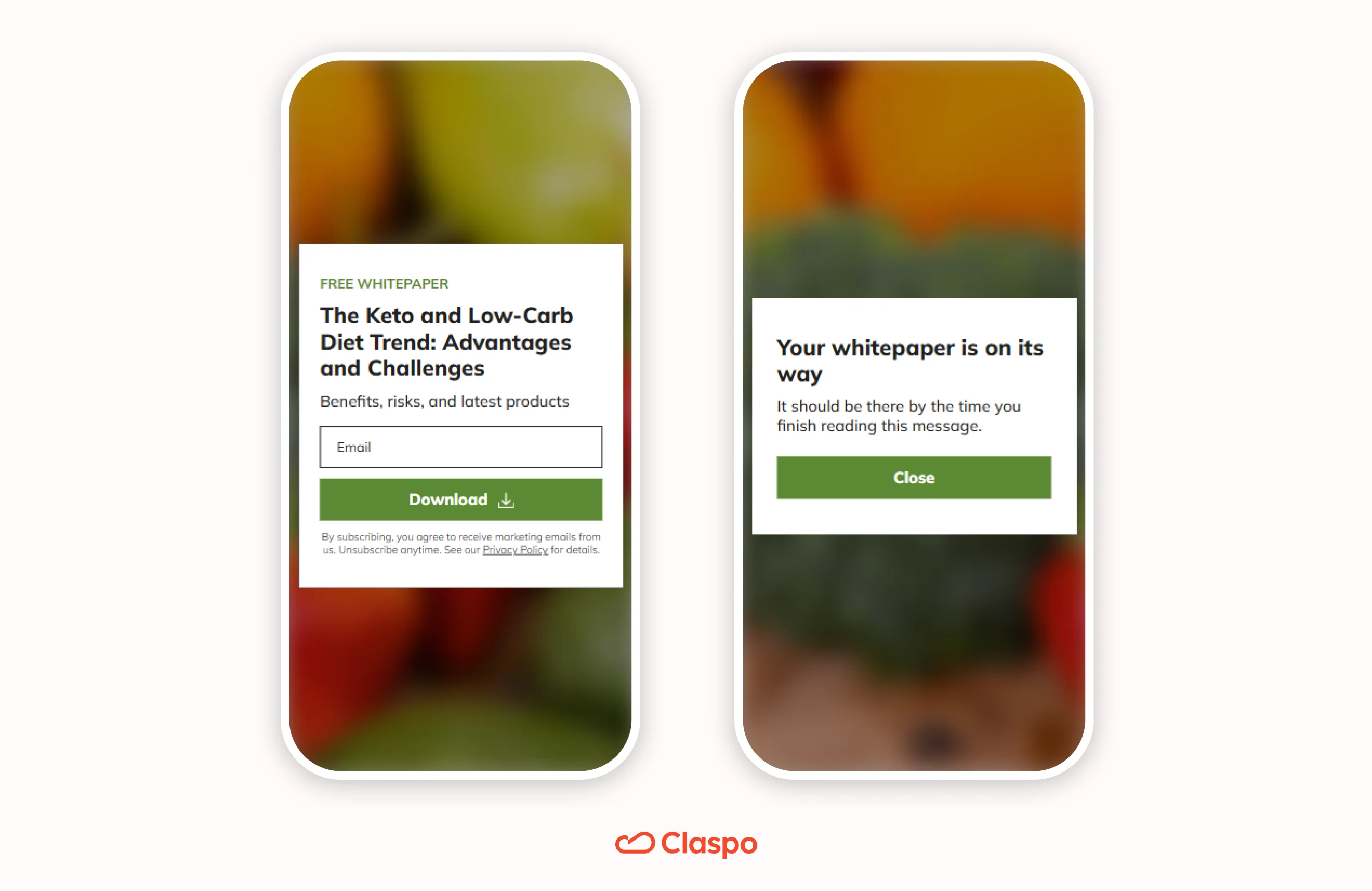
How to set it up: Set the popup to appear on blog posts, pairing Exit intent with scroll depth. This ensures the popup only pops up for readers who reached a meaningful portion of the article.
The offer: Email address for a free guide or whitepaper. Good for educational and top-of-funnel content when visitors are not ready to buy, but can trade their contact info for deeper insights.
What to track: Measure the initial sign-up rate, then monitor lead quality and downstream engagement if your email platform or CRM supports it.
4. SaaS pricing/feature-page exit
Visitors on pricing or feature pages have high intent and are already sizing you up. If they start to leave without converting, give them a low-pressure way to talk to sales.
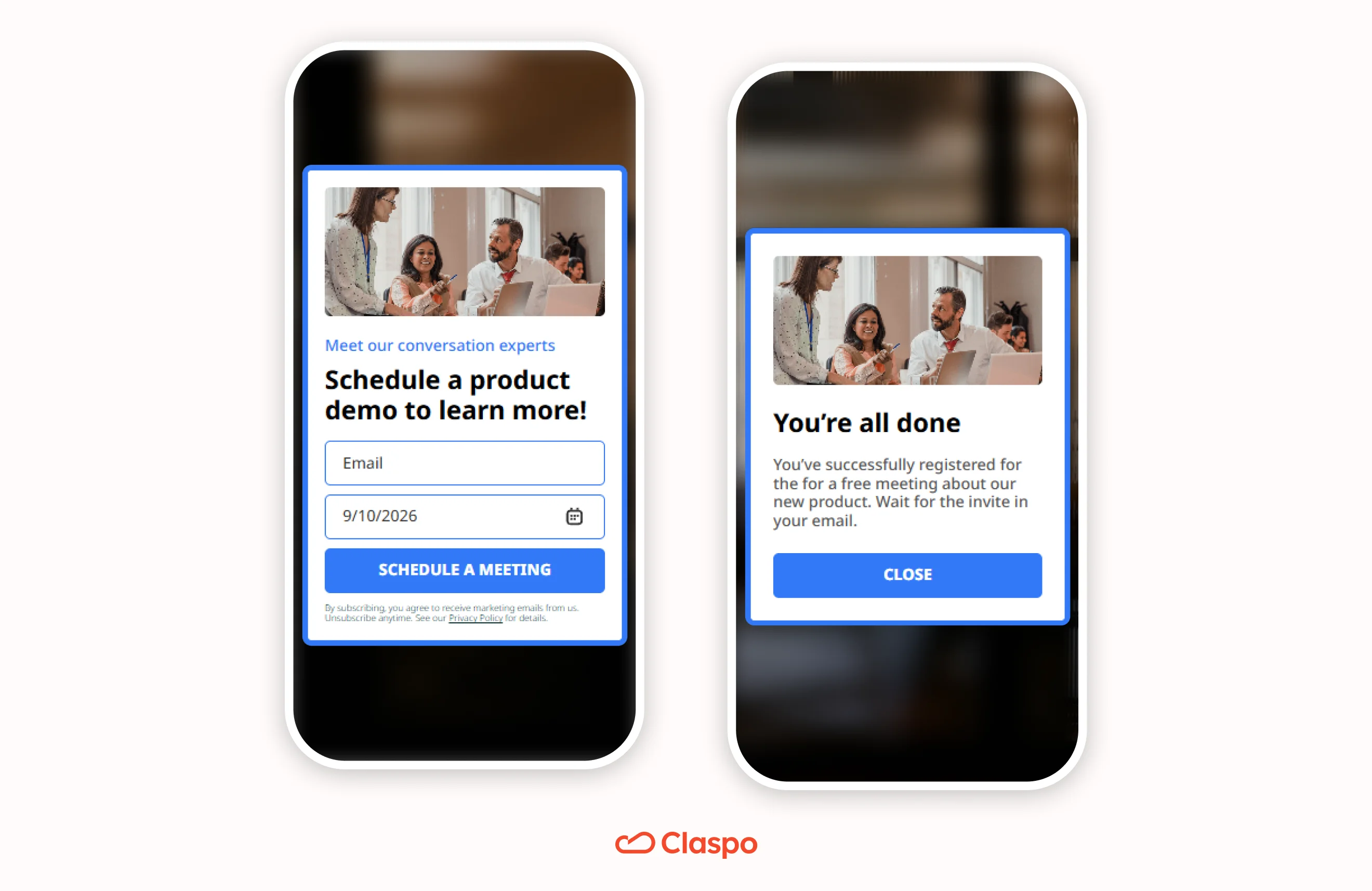
How to set it up: Target pricing or feature pages and turn on Exit intent. For better targeting, combine it with time on page or scroll depth to qualify their interest first.
The offer: An invite to schedule a product demo. Great for high-consideration buyers who need a walkthrough before buying.
What to track: Measure initial demo requests first, then monitor how many of those leads become qualified opportunities or customers.
5. Exit survey/objection discovery
An exit popup doesn't always have to sell. When high-intent visitors walk away, finding out why is often worth more than a forced coupon code.
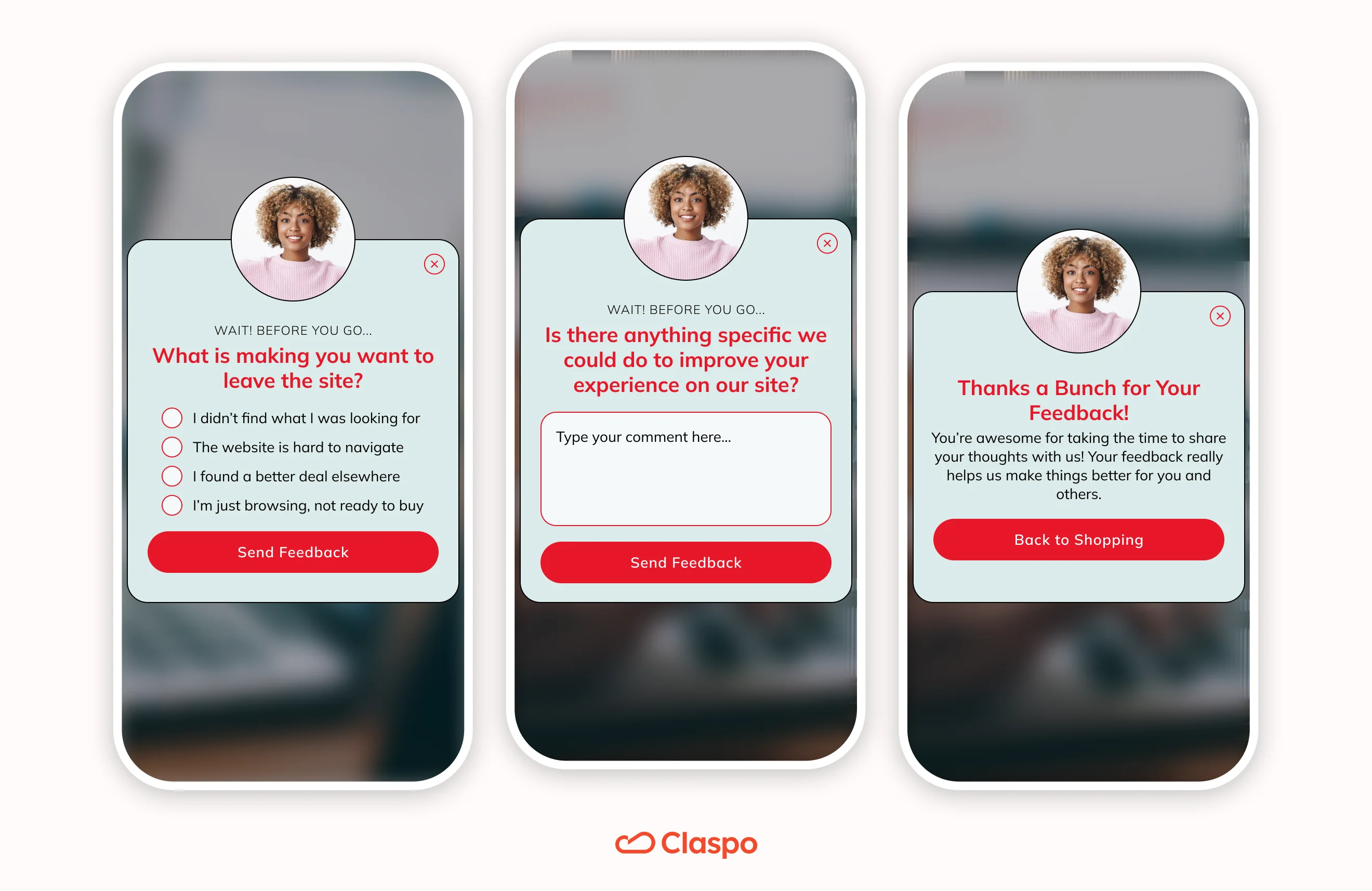
How to set it up: Turn on Exit intent on pages that create high friction, such as checkout, cart, or pricing tiers.
The offer: A quick exit survey asking what prevented customers from making the purchase, providing you with direct feedback about your pricing, credibility, or technical problems.
What to track: Measure total responses and group the objections by theme to prioritize high-impact UX or copy fixes.
Best practices for mobile UX and accessibility
Exit intent popup on mobile appears when visitors are already about to leave, so the experience should be simple, fast, and easy to dismiss.
Stick to one clear action
Focus the popup on one next step: claim an offer, subscribe, continue checkout, or answer a short question. Multiple competing CTAs add friction on a small screen.
Limit the form fields (or split them up)
Only ask for what you actually need. If an email address will do, don't insist on a first name, phone number, and shoe size. Our data proved that every extra field kills conversions.
If you need several fields, consider splitting them into steps: according to our multi-step popup benchmarks, multi-step popups averaged a 4.94% CR vs. 3.67% for standard email popups.
Make the “X” easy to tap
Never hide the close button, make it microscopic or require people to interact before they can leave. If a visitor’s thumb can’t easily dismiss your popup, they’re going to close the whole tab.
Don't spam repeat visitors
Don’t show the same exit offer every time someone changes pages or dismisses it. Use frequency limits, repeat visitors targeting rules, and avoid stacking multiple campaigns in the same session.
Stop showing after conversion
Once someone has subscribed or completed the intended action, stop showing the same campaign to them. It wastes the exit moment and creates unnecessary friction.
Test what happens when the keyboard pops up
Desktop previews often lie. Check the popup on actual devices, especially with the keyboard open:
The headline and main button don't get shoved off-screen.
The keyboard doesn't cover the input field.
The “X” button stays visible and tappable.
Users can easily scroll the popup if screen space gets tight.
Use Claspo’s mobile editor to simplify the design specifically for smaller screens.
Never hijack the browser's back button
A good exit intent popup will encourage the visitor to stay on your site, but it won’t force them to. Avoid Back-button hijacking, browser-history manipulation, or other techniques that interfere with normal navigation.
Does mobile exit intent affect SEO?
Using mobile exit intent will not affect your SEO alone. The risk comes from intrusive interstitials that make the main content difficult to access, especially on mobile.
To stay on Google’s good side:
Avoid unnecessarily covering the entire screen,
Keep the popup easy to dismiss,
Monitor page performance after launch.
How to measure and test mobile exit intent
Measure the popup itself, but also what happens after someone interacts with it.
What to measure | Metrics | Why |
Popup performance | Submit rate, CTA rate, close rate | Shows whether visitors engage with the popup |
Business outcome | Recovered orders or revenue, trial starts, demo requests, qualified leads | Shows whether the campaign creates real value |
Guardrails | Funnel conversion, repeat-exposure performance, engagement, Core Web Vitals | Helps catch fatigue or UX issues |
Choose the primary KPI based on the campaign goal. For example, judge a cart-abandonment popup by recovered orders or revenue, not email signup rate alone.
Test real ideas, not random button colors
Tinkering with button colors or font sizes won't fix a broken strategy. Test questions that can improve the campaign strategy. For example:
Does exit intent convert better if you wait until someone scrolls past the halfway mark?
Does free shipping save more abandoned carts than a 15% discount?
Does a compact popup reduce closes without hurting conversions?
Should new and returning visitors see different offers?
With Claspo, you can launch a split test right from your popup settings and test display timing, display triggers, teaser design and position, popup content or design, or another existing popup. Claspo creates the variants, splits traffic automatically, and lets you compare up to five versions in one A/B/C/D/E test.
iOS, Android, and browser limitations
Mobile browsers don't provide a universal way to detect the event of user abandonment:
Lifecycle events (beforeunload, pagehide): Very hard to trigger reliably on mobile devices.
Tab switching (visibilitychange): Signals that the tab is hidden but says nothing about whether or not the user actually intends to quit.
Back button: Inconsistent across browsers and SPAs, and intercepting it ruins navigation.
That’s why Claspo doesn't try to trap the Back button or guess when an app is closing. Fast upward scrolling gives you a clean window to show your offer before they actually tap away.
Make your last impression count
Mobile exit intent should give visitors a reason to stay, not get in their way. In Claspo, one Exit Intent toggle handles both mobile and desktop behavior, while smart targeting filters for high-intent pages and engaged visitors.
Keep your mobile offer focused and easy to close.
Look past vanity clicks; measure real downstream sales.
Test your triggers, copy, and layout to dial in performance.
Start with a pre-built exit template or build a custom campaign in Claspo for free.
FAQ
Does exit intent work on mobile?
Yes. Mobile exit intent relies on behavioral signals rather than cursor movement. In Claspo, rapid upward scrolling is used to detect exit-like behavior while the visitor is still on the page.
Does mobile exit intent work on iPhone and Android?
Claspo’s exit intent trigger works on mobile devices, but browser behavior can vary across iPhone, Android, in-app browsers, and webviews. Claspo uses in-page scrolling behavior instead of relying on browser-close or Back-button detection.
Is inactivity the same as mobile exit intent?
No. Inactivity shows that a visitor has stopped interacting, while exit intent looks for behavior associated with leaving. In Claspo, inactivity is a separate trigger that can be combined with Exit intent if needed.
Does Google penalize exit intent popup on mobile?
Not because they use exit intent. The SEO risk comes from intrusive interstitials that block access to the main content or create a poor mobile experience.
How do I create a mobile exit intent popup in Claspo?
Create a popup from scratch or choose a popup template, open Audience & Triggering → When to display, and enable Exit intent. Claspo automatically applies cursor-based detection on desktop and rapid upward scrolling on mobile, so no separate mobile setup is required.