Do popups slow down websites? We tested PageSpeed with real data


Summarize
A familiar dilemma for any ecommerce marketer: Should you capture emails, recover carts, and drive sales — or should you protect site speed?
Many marketers fear this, and it’s valid. Adding another marketing tool might improve conversions, but quietly damage performance. A slow store can lose mobile shoppers before they ever see an offer, which destroys the high conversion rate you are chasing after.
However, performance today is less about avoiding marketing tools — and more about choosing the right architecture behind them. In this article, we’ll put an end to the “popups vs. speed” dilemma.
Do popup apps affect website speed?
The answer is not a simple yes or no. Popup apps can affect performance — but so can every other script on the page. Analytics tools, chat widgets, personalization engines — they all add weight. The real question is whether that weight changes how fast the page loads and becomes usable.
Problems usually appear when tools:
Block rendering while the page is loading.
Load unused assets immediately on page load.
Include large JavaScript bundles or multiple external libraries.
Rely heavily on images, animations, or gamified interfaces.
Load multiple third-party scripts.
These patterns may slow load times and hurt key performance metrics like LCP and INP.
Does the Claspo script slow down your website?
To answer this properly, we didn’t rely on assumptions — we ran a controlled PageSpeed Insights experiment. We tested the same page under three scenarios:
A baseline page without the Claspo script,
The page with a standard text popup,
And the page with an active gamified popup.
Mobile results
We started with mobile testing, where performance issues matter most for UX and conversions.
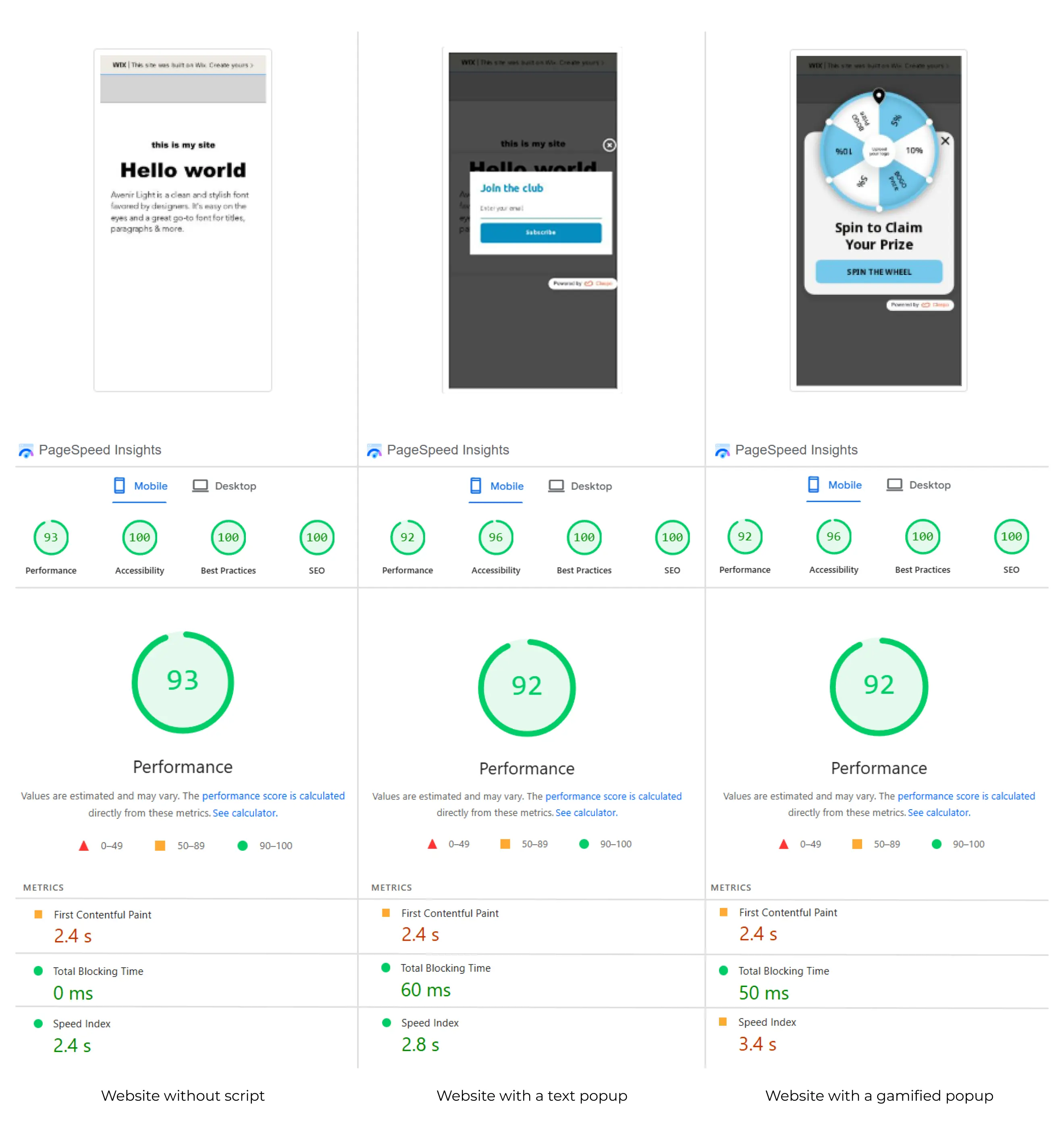
Metric | Baseline (No script) | With Claspo text popup | With gamified Claspo popup |
Performance score | 93 | 92 | 92 |
First Contentful Paint (FCP) | 2.4 s | 2.4 s | 2.4 s |
Largest Contentful Paint (LCP) | 2.8 s | 2.8 s | 2.8 s |
Total Blocking Time (TBT) | 0 ms | 60 ms | 50 ms |
Cumulative Layout Shift | 0 | 0 | 0 |
Speed Index | 2.4 s | 2.8 s | 3.4 s |
FCP, LCP, and CLS remained unchanged across our tests. The most noticeable changes were in TBT and Speed Index, which reflect the execution of additional JavaScript functionality. In other words, the page appeared just as quickly, the main content loaded at the same speed, and no layout shifts were introduced after adding the Claspo script.
Desktop results
We then repeated the same test on a desktop using identical popup configurations.
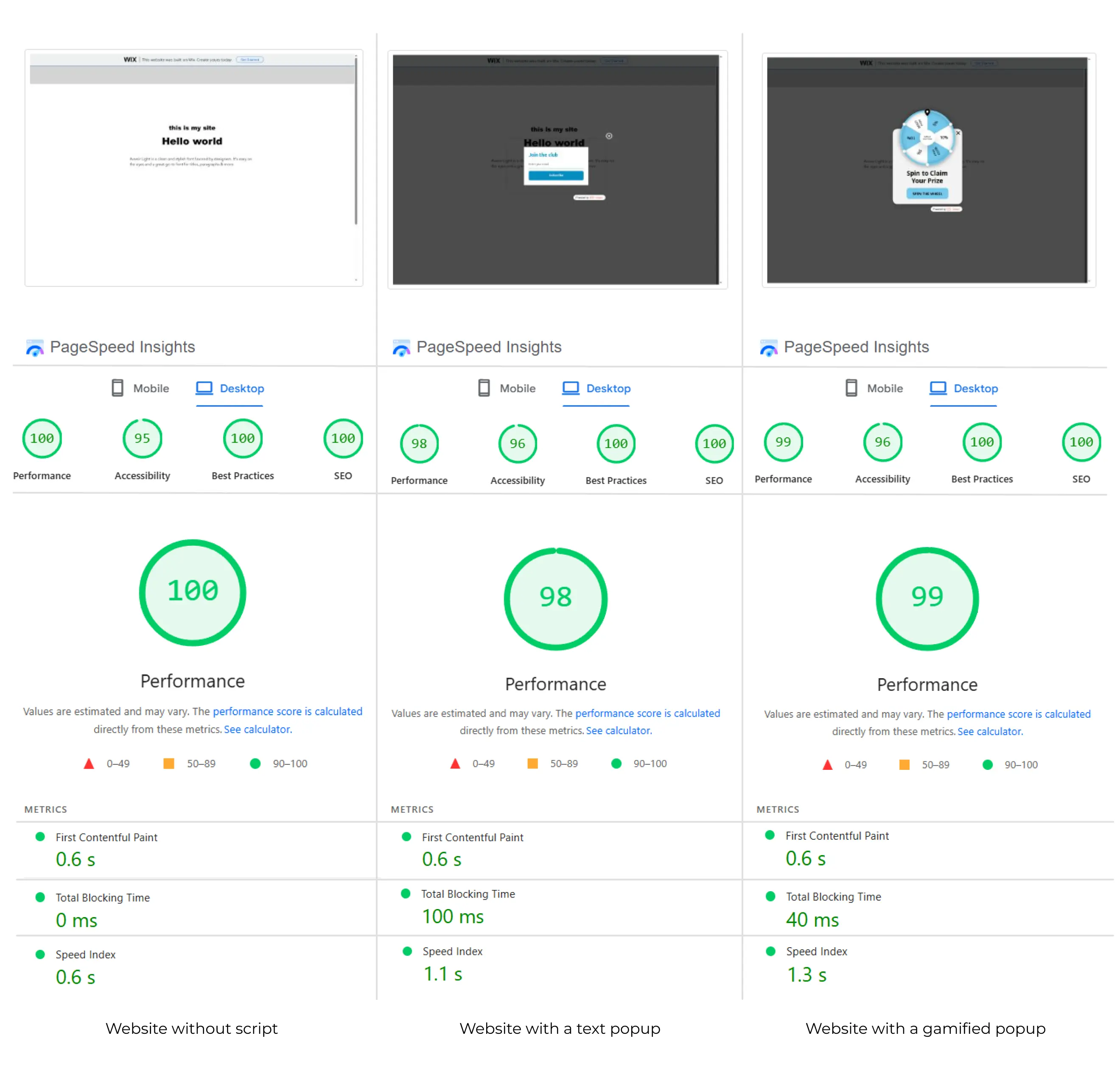
Metric | Baseline (No script) | With Claspo text popup | With gamified Claspo popup |
Performance Score | 100 | 98 | 99 |
First Contentful Paint (FCP) | 0.6 s | 0.6 s | 0.6 s |
Largest Contentful Paint (LCP) | 0.7 s | 0.7 s | 0.7 s |
Total Blocking Time (TBT) | 0 ms | 100 ms | 40 ms |
Cumulative Layout Shift | 0 | 0 | 0 |
Speed Index | 0.6 s | 1.1 s | 1.3 s |
Desktop results showed the same pattern. FCP, LCP, and CLS remained unchanged, while TBT and Speed Index increased slightly because of the JS execution. Despite that, PageSpeed Performance scores did not drop below 98 and 100 in all test runs.
Methodology note
Since a single PageSpeed Insights run can vary slightly from test to test, we repeated each scenario 250 times and compared the median Performance Score.
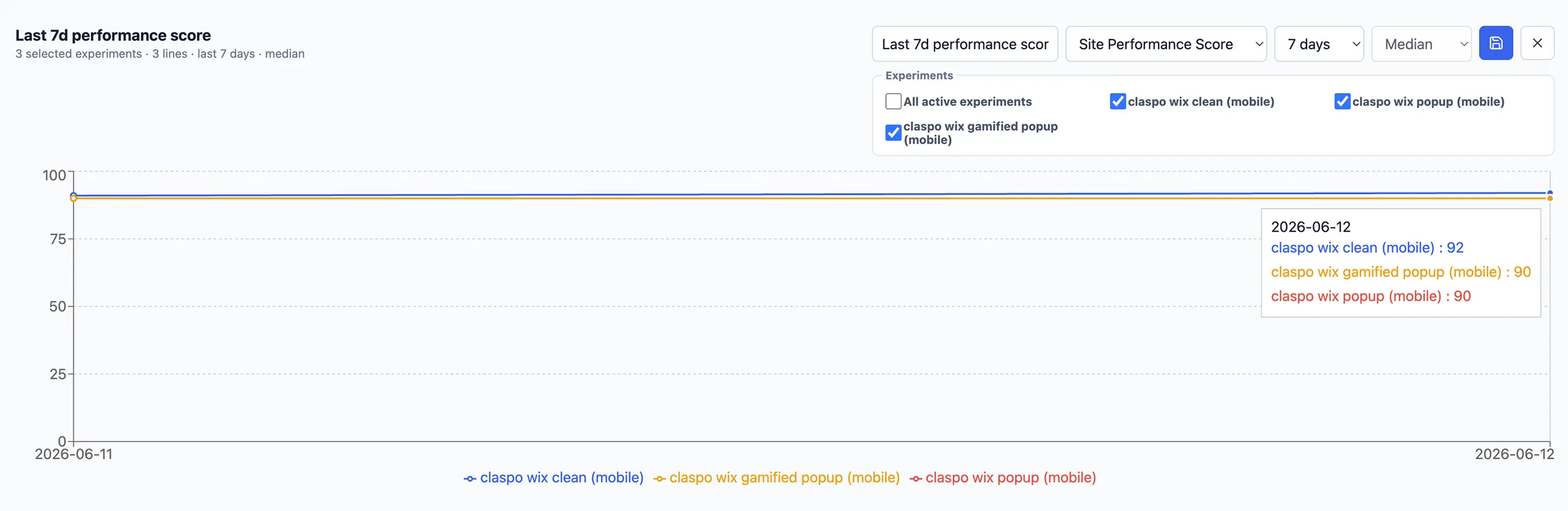
Scenario | June 11 | June 12 |
Baseline (no popup) | 91 | 92 |
Claspo text popup | 90 | 90 |
Gamified Claspo popup | 90 | 90 |
Across both test sessions, the median Performance Score remained within 1–2 points of the baseline. Standard and gamified popups produced virtually identical results, proving that only implementation determines your site’s performance.
How Claspo loads without blocking Shopify stores
We developed Claspo to both create a nice user experience for your users and drive conversions. The main focus for us is to minimize performance impact by separating when the script loads from when resources are actually needed.
Async loading
The Claspo script loads asynchronously, meaning that it will not block the rendering of other elements on the page. Store elements load while the script loads in the background.
Lazy loading of popup assets
Only display conditions are loaded on initial page load. Popup assets, such as layout, components, and images, are loaded closer to the moment of display. Users who never meet display conditions do not trigger additional popup asset loading.
Exit-intent optimization
For the exit-intent popups, we preload their content in advance. This way, the popup will show up instantly when your visitors trigger it. This is the choice we made to balance performance and responsiveness.
Reduced script footprint
Just recently, we reduced the script size by 37%, from 212 KB to 132 KB, by removing duplicated runtime code across bundled components, and continue optimizing for speed.
No external dependencies
Claspo does not use any third-party or external JavaScript libraries. This helps reduce bundle sizes and also avoids any conflict with other scripts present in the web page.
Web Components architecture
Popups are built using native Web Components, a browser standard that isolates styles and behavior. This reduces the risk of CSS conflicts and ensures that Claspo elements do not interfere with existing storefront styling.
Automatic image optimization
When adding popups to Shopify, merchants often upload unoptimized images, which can significantly increase page weight. In Claspo, any image uploaded will be automatically optimized. The system automatically converts images to WebP, compresses them (~80 quality), and resizes them when needed. In a recent test, Claspo reduced image size by 89% on average — saving ~480 KB per image and 65 MB in total bandwidth.
Font optimization
Claspo loads only the font weights used in each popup, reducing requests from 32 to 7 and cutting font payload from ~800 KB to ~200 KB. This results in approximately 4× less font-related network overhead.
Telemetry and performance monitoring
Claspo collects performance telemetry across customer environments to monitor script loading behavior and optimize execution performance.
What matters more than the popup app
When teams look at website performance, popup tools are often the first thing they suspect. In practice, these are rarely the primary source of performance issues.
Page speed is more often driven by the combined impact of the full tech stack rather than one script. Common performance-heavy elements include:
Multiple tracking tools,
Analytics scripts,
Chat widgets,
Video embeds,
And unused third-party apps running in the background.
Each adds JavaScript execution, network requests, and main-thread work that can exceed the cost of a single popup script.
How to evaluate any popup tool
When comparing popup tools, evaluate performance based on architecture and execution behavior instead of relying on features or marketing claims.
Use this checklist to understand whether a tool is likely to affect Core Web Vitals:
Does it load scripts asynchronously without blocking rendering?
Does it defer popup assets until they are needed?
Does it minimize unnecessary dependencies or third-party libraries?
Does it optimize media such as images and fonts before delivery?
Does it provide evidence of real-world performance monitoring (not just synthetic testing)?
Does the tool separate display logic (when to show) from asset loading (what to load)?
If most of these answers are unclear or negative, performance impact depends more on implementation than on the presence of a popup itself.

![How to add a Shopify newsletter signup form [+Tips & Templates]](https://framerusercontent.com/images/FavgBqCU1zgoOwEdQvBHxtOWIc.png?width=1320&height=756)