How to Create a Discount Pop-Up on Shopify [Step-by-Step Guide]

![How to Create a Discount Pop-Up on Shopify [Step-by-step guide]](https://framerusercontent.com/images/PX8lSAAZlmWTKyTRZ5bULuK0o.png?width=1320&height=756)
Summarize
Most Shopify advice tells you “Just add a discount to sell more,” but our 2026 Benchmark study of 779M+ impressions shows that the size of the discount matters far less than the logic of the trigger. A Shopify discount popup is a conversion rate optimization (CRO) tool, not another static design element on your store. Thus, when treated right, your numbers shift — from a 3.5% average to an elite 17% CTR.
What is a Shopify discount popup?
According to the standard ecom playbook, a Shopify discount popup is a small window that pops up on top of a store’s content and offers some benefit to a visitor. But we at Claspo see it as a set of conversion tools that sense visitors’ intent. For us, popups not only show a promo code, but they also see where your customer is in their journey and offer some value at the moment that feels like a natural next step. For the general setup process, see how to add a popup to Shopify.
How a discount popup grows your Shopify revenue
Most Shopify merchants see popups as a way to get email and send marketing promos. But what if we change the perspective and consider Shopify discount popups as a revenue multiplier? This move from a basic static form to a CRO-ready popup impacts three substantial business metrics: conversion rate (CR), average order value (AOV), and customer acquisition costs (CAC).
Conversion rate growth
On average, 97 out of 100 visitors leave a store empty-handed. A CRO popup catches all that traffic at the peak moment of interest. The industry average for Shopify discount code popups is a 3.53% CR; the top 10% of Claspo users get 9.10% for list growth and 17.48% for sales-driven clicks.
Average order value increase
To grow revenue, you don’t necessarily need more customers; sometimes, you need bigger carts. CRO popups work as a persistent nudge to buy more. Our data shows that popups aiming to increase AOV get an elite 19.55% CTR.
Why? By using a threshold incentive (e.g., “Spend $15 more to unlock Free shipping”), you give the customer a psychological goal to pursue. This is how a $50 browser turns into a $65+ customer.
Customer acquisition cost reduction
To stay profitable in the current market, where ad costs are constantly rising, and customers are growing more and more picky, you must convert “cold” traffic faster. Our client, a DTC brand Man’s Set, saw a -10% drop in CAC after using our gamified popups.
Instead of a generic discount, they gave users a reward they had to win. When a visitor wins a 15% code on a wheel, they value it more as a personal achievement. And because people don’t want to lose the prize they’ve earned, this significantly increases the likelihood that they'll finish the purchase on the spot.
Shopify conversion benchmarks: Audit your strategy
Based on 779M+ impressions, here is what the top performers achieve by matching their popups to their business goal:
Marketing goal | Avg. performance | Top 10% | How popup makes you money |
Increase sales | 8% CTR | 17.48%CTR | Closes the deal immediately while people are just browsing. |
Grow email list | 5.19% CR | 9.10% CR | Builds a list you can work with later without paying for ads. |
Prevent cart abandonment | 4.43% CTR | 11.03% CTR | Saves the sale right before the visitor leaves forever. |
Increase AOV | 5.41% CTR | 19.55% CTR | Nudges users to buy more items in a single visit. |
Why average popups fail
As we said before, popups fail not because your discount is too small, but because they create friction. According to our CRO research, we’ve noticed three primary “conversion killers”:
Popups that appear too soon. If you show a popup the second a user opens your website, you interrupt their discovery phase, add irritation, and increase bounce.
Popups that feel off. If your Shopify discount code popup looks like a third-party ad, it kills trust.
Popups that want too much. If your Shopify discount popup asks for a name, email, phone number, and birthday at once, you drop your CR by 10% by field.
Types of Shopify discount popups that drive revenue
To get maximum return on investment (ROI), you need to match the popup type to what the user is doing now. Based on our analysis of 779M+ impressions, these are the four types that work best:
1. Welcome popup
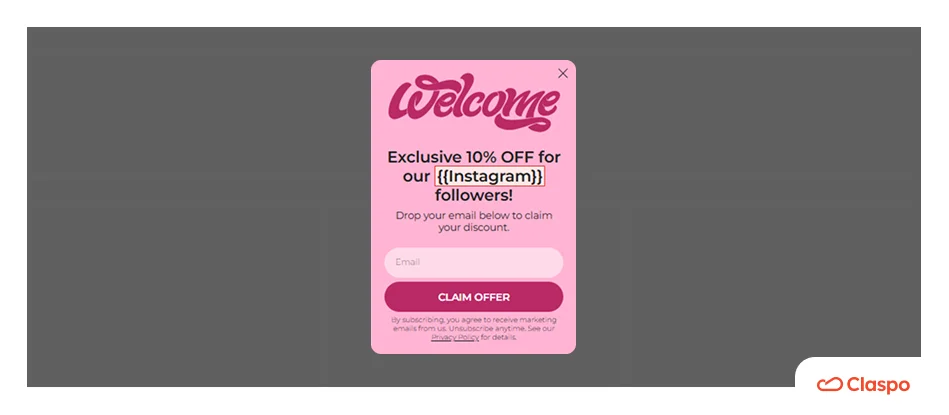
This is your core tool for turning anonymous visitors into owned leads. Offer a first-time reward (10-15% off) in exchange for an email.
Pro tip: Position it as a “Welcome gift” and use a 20-second delay so that your visitors see your products first before you ask for their data.
2. Exit-intent discount popup
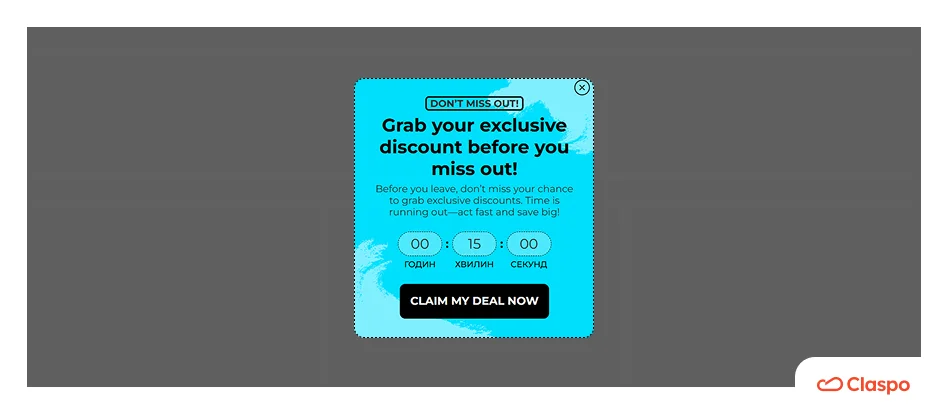
In these popups, smart triggers detect when a user moves their mouse to dismiss a page and show your offer. A well-timed exit-intent Shopify discount popup saves an average of 11.03% of abandoning sessions, according to our research.
Pro tip: Use high-contrast visuals. This is your last chance to save the session, so you need to be bold.
3. Gamified discount popups
These Shopify discount code popup types have proven to reach peak performance. Static forms usually hover around 3.53% CR, while gamified components like Spin-the-Wheel, Pick a Gift, Scratch Cards, and others reach an average 9.18% CR. These forms work because, instead of making people work and fill out fields, they offer the easy dopamine win.
Real-life example: DTC brand Man’s Set used gamified popups to drive a 10% increase in email-driven sales. As a result, they also managed to reduce acquisition costs (CAC) by 10%.
4. Cart abandonment discount popups
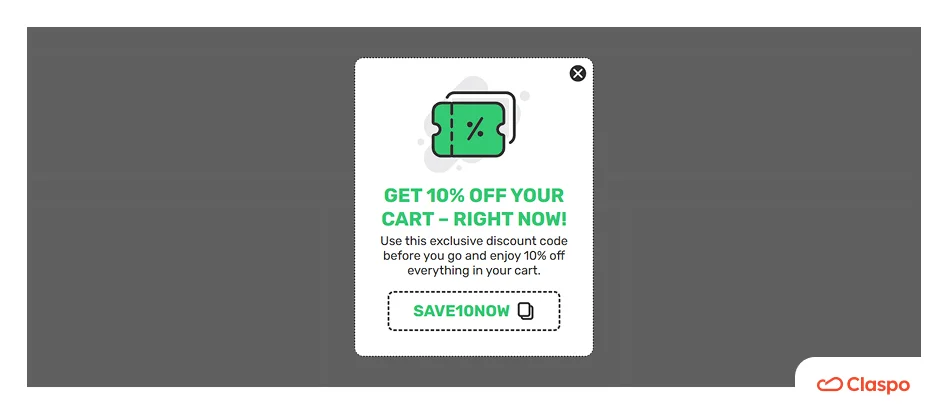
Use these Shopify discount popup types to trigger specifically for users who have items in their cart but are hesitating to purchase.
Pro tip: Instead of deep discounts (like 20% off), try the Free shipping offer to protect your margins. For many shoppers, an unexpected shipping fee is a bigger dealbreaker than the product price itself.
How to add a discount popup on Shopify
Now, let’s move from theory to execution and learn how to create popup discount on Shopify, step-by-step. Here is how to build a high-performance converting Shopify popup discount flow in a few clicks. See our roundup of the best Shopify popup tools for discount and promo-code popups.
Step 1: Install Claspo
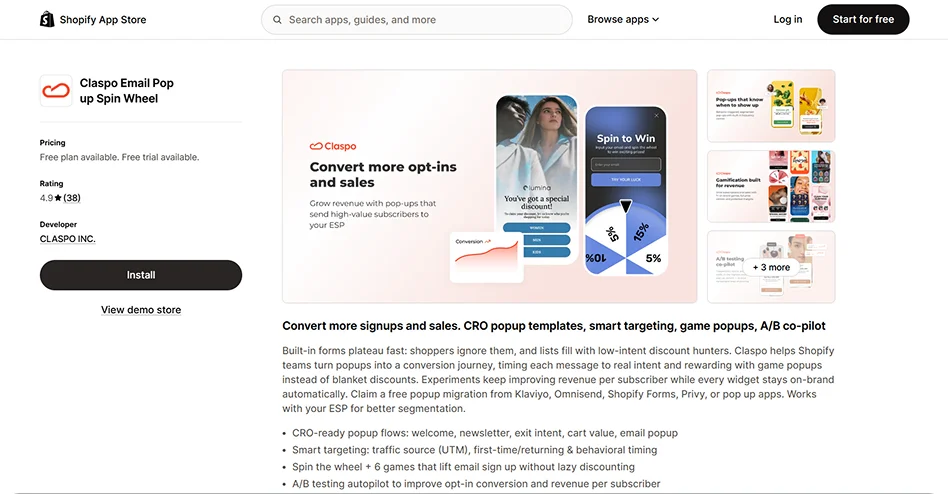
First, search for Claspo in the Shopify App Store (or just click the link while you are here) and click the big Install button. The authorization process takes less than 30 seconds and connects the app directly to your store’s API.
Step 2. Pick a template to achieve your goal
To add a discount popup on Shopify, you don’t need to start from scratch. Start with proven winners — our template library has over 1,000 templates built to achieve various goals. There, you can find newsletter popup templates, subscription form templates, and various opt-in examples to boost your email campaign.
Filter the templates by the “Increase sales” goal or the “Promo code” feature. What you’ll see is not a set of nice designs; every template is a CRO-ready tool for your shop, with the components and layouts that will help you achieve your goal. If you’re comparing platforms rather than templates, review Shopify discount app options.
Step 3: Customize the template to your store
Remember that your popup should be a natural continuity of your store’s design. If your Shopify discount popup looks like a generic add-on, users will ignore it.
While Claspo discount form templates give you the structure and visual hierarchy, our drag-and-drop editor gives you total creative control for customization.
1. Drag and drop the components
First, you can move, add, or delete any element to match your offer. For example, you can add a countdown timer to your Shopify discount popup. The email + timer + code combination has proven to deliver 3.42% CR and a 6.2% CTR.
2. Apply brand colors
Second, you can adapt the popup colors to fit your brand. In the editor, use our smart Theme setting and pick a color palette that will recolor the entire popup in one click. Or, if you need a specific shade of blue, you can still manually hex-code every element.
3. Write a high-converting copy
Third, you can write on-brand copy with our AI agent. Our research shows that generic copy is uninviting and hurts conversions. Our AI agent scans your domain to write relevant, brand-aligned text that converts your shoppers.
Use one-click prompts like “Match my website voice” or “Rewrite for conversion” to make your message resonate with your brand. The AI handles everything: headlines, buttons, and even the thank-you page.
4. Set your prizes
Next, since we have a gamified popup, you can manage the reward pool. The win needs to feel real to the customer but remain safe for your shop.
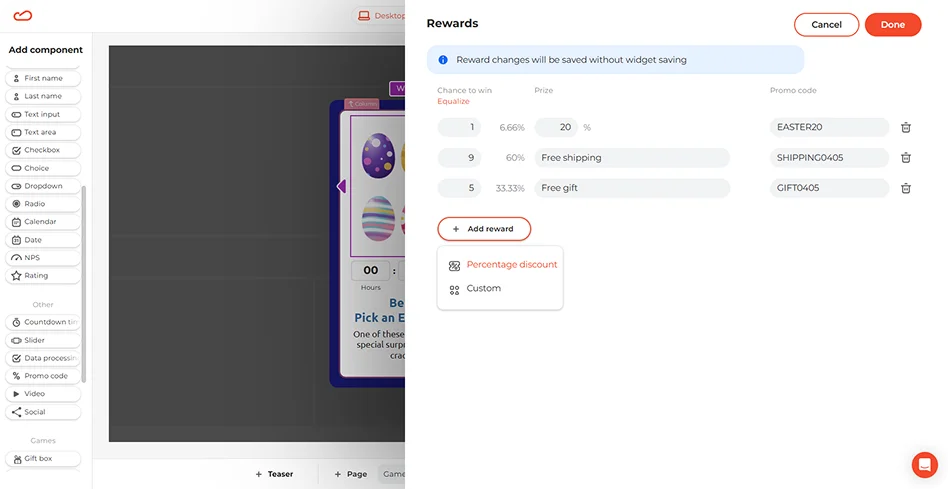
Setting the odds and managing rewards is as intuitive as the game itself:
Set the odds. You have total control over the payout. Want to offer 20% off, but only have it land 5% of the time? You can specify the exact probability of winning each prize.
Diversify the prizes. You don’t need to offer discounts only. Add custom rewards like Free shipping, Special packaging, or even a Gift with purchase.
Assign codes. Make a unique promo code for each prize. This way, you keep your Shopify admin tidy and ensure everything is applied correctly at checkout.
5. Perfect your mobile UI
And finally, let’s optimize the popup for mobile users, who account for 62% of Shopify traffic. To do this, you’ll want to add large, clear, and high-quality images of your products to whet the visitors’ appetites. Our data shows that 85% of top-performing Shopify discount popups have visuals.
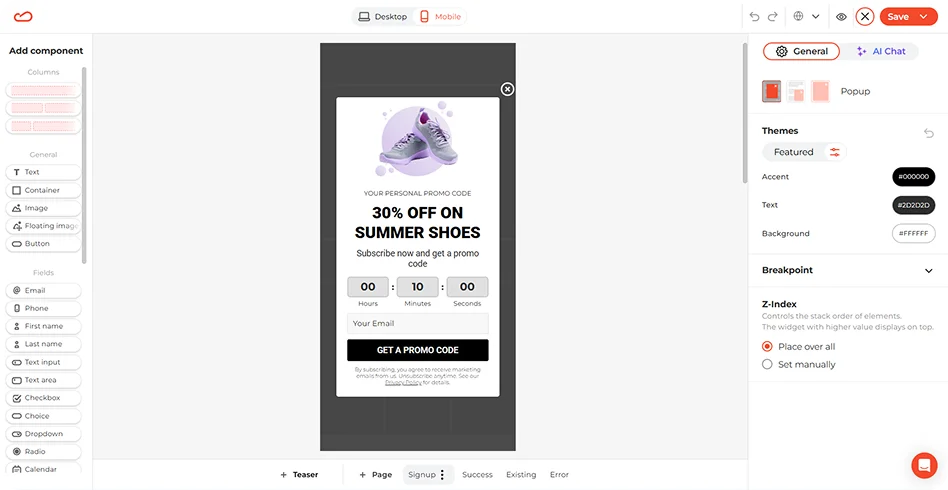
Then, make the code easy to copy and include a click-to-copy icon. Also, make sure the button with the code is big and easy to tap.
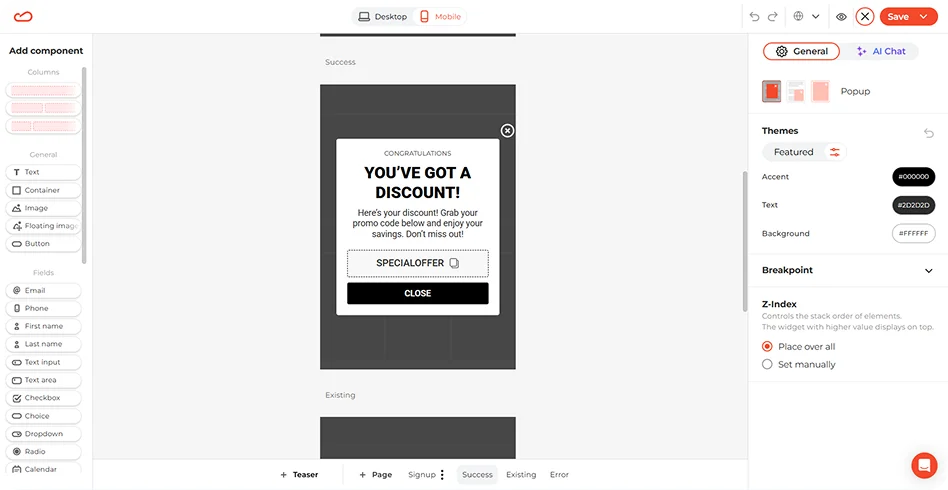
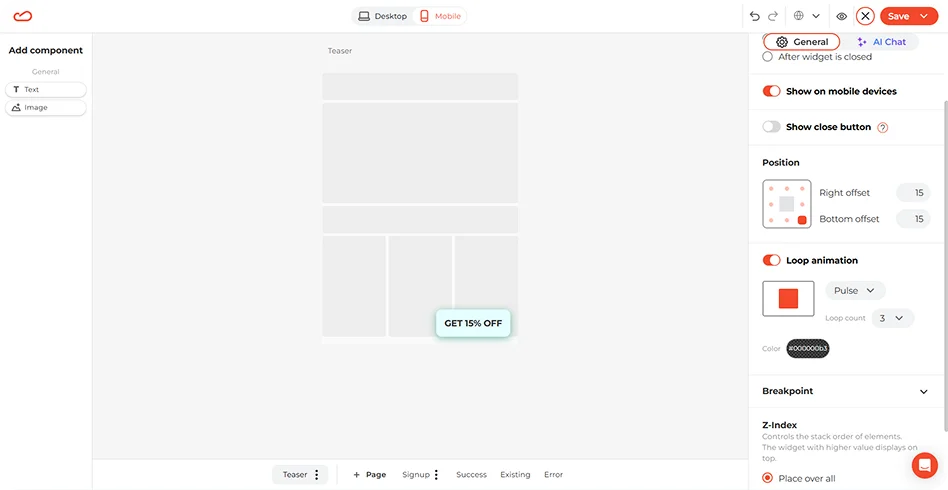
Eventually, don’t let users click “X” and kill your offer forever. What if they change their mind after finding THE pair of shoes? Add a Teaser to save the deal. This is a small floating button (e.g., “GET 15% OFF”) in the corner of the screen that stays on the page after a user dismisses the main popup window. It lets shoppers return to your offer, and doesn’t cover the main content.
Step 4: Set smart display rules
Even the best popup design won’t convert if it appears at the wrong time. At this step, we’re going to set the correct Triggering and Targeting rules. Check out the settings based on your goal.
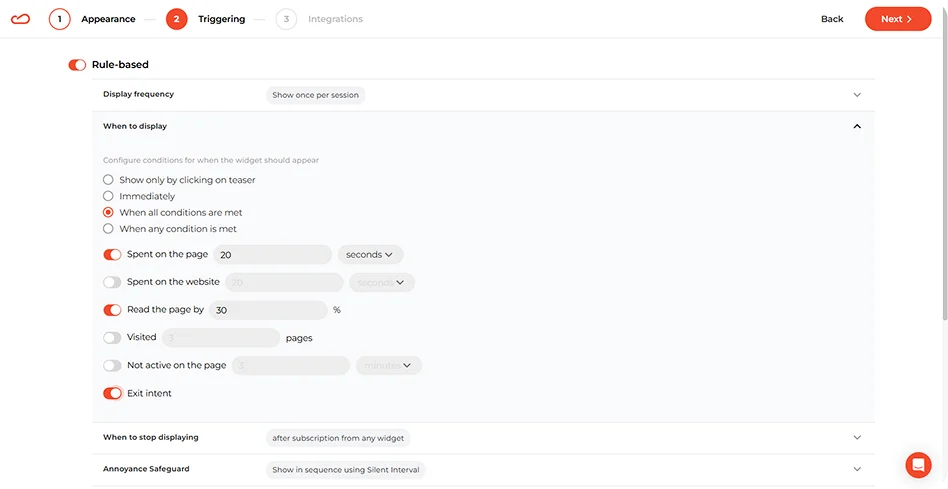
If your goal is… | Set trigger to… | Show it to… | Pro tip | Why it works |
New customer acquisition | 20-sec delay | New visitors | Show once per session | Prevents “door-slams” and doesn’t discount loyal customers. |
Stop abandonment | Exit-intent | All visitors | High-contrast visuals | Catches the bounce at the perfect moment. |
Mobile sales lift | 30% scroll | Mobile users only | Teaser + Large, thumb-friendly CTA | Doesn’t block the screen until the user shows interest. |
Region-specific sale | 15-sec delay | Geotargeting (Country/City) | Local language copy | Makes the offer feel local and builds trust. |
Scaling ad traffic (TikTok/IG) | 10-sec delay | UTM targeting | Match the ad’s visual style | Creates a “bridge” from the ad to the purchase. |
Step 5: Sync your stack
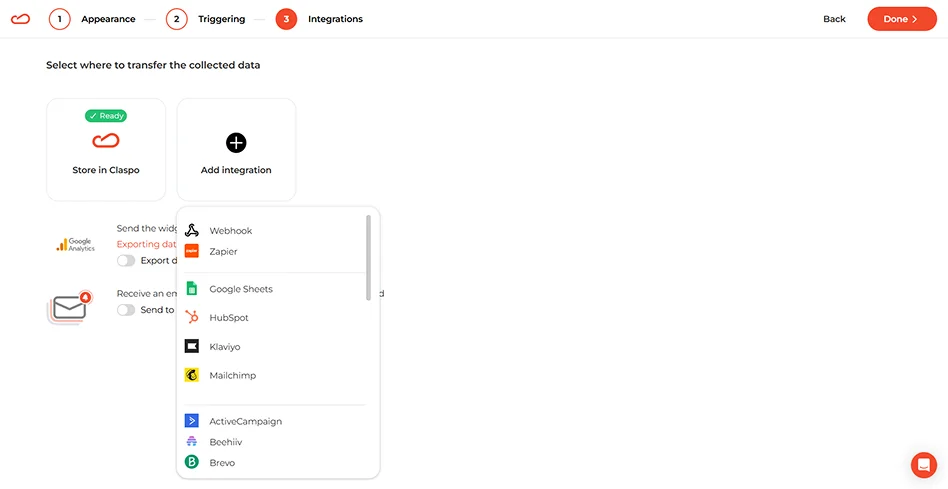
Connect your Claspo account to Klaviyo, Mailchimp, or HubSpot. When a user shares their email and wins their code, they will be automatically added to your welcome email flow.
Step 6: Go live
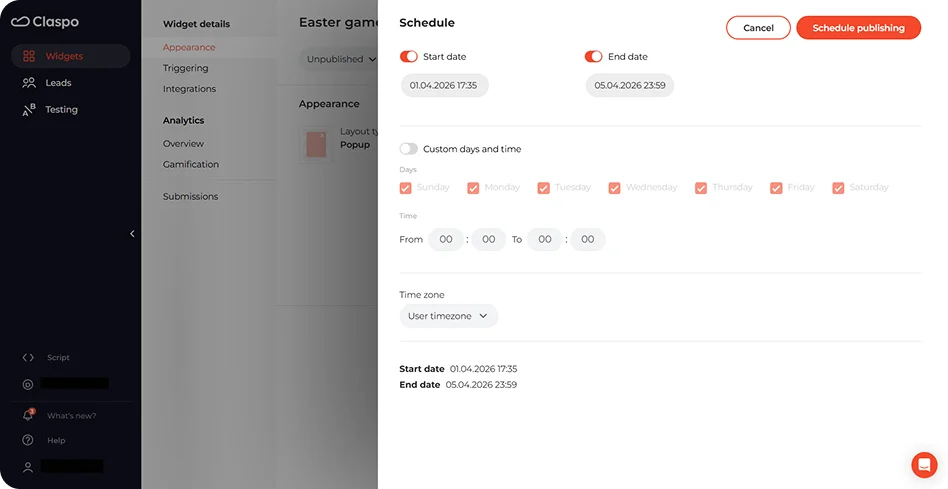
Schedule the campaign for the desired dates. Click “Test widget” to preview how it looks and behaves on your store. Check whether it appears as planned, then click “Published.” Since we already enabled the app in your App Embeds, Claspo’s script goes live immediately.
How to match the layout with your goal
Each popup layout is a specific tool in your CRO toolbox, and our research proves it. Using our research data, we’ve compiled a performance benchmark table to make it easier for you to audit your performance.
Layout type | Avg. CTR | Top 10% threshold | Use case | Where to place |
Popup | 10.6% | 17.48%+ | Hooks: Welcome offers, first-order discount, flash sale. | Homepage and/or exit-intent |
Floating box | 7.49% | 14.30%+ | Guides: Promote a specific deal without blocking the products. | Product pages and collections |
Floating bar | 5.13% | 8.10%+ | Reminders: Free shipping, Sale deadlines. | Header or Footer |
How to choose the right incentive for your Shopify discount popup
In 2026, slashing prices is not quite the tactic that is going to increase your sales. Brands that get the deals match the reward to the average order value (AOV) and the visitor’s stage in the journey. According to our study, 90% of top-performing Shopify discount popups use immediate rewards, but they choose their fighter carefully.
Percentage vs. Fixed vs. Perks | ||
Incentive type | Best use case | Why it works |
Percentage (10%) | Lower ticket items or variable carts. | Feels bigger on small orders. |
Fixed ($10) | High-ticket items or stable AOV. | Feels like a gift, no need to do mental math. |
Free shipping | Cart abandoners and first-time buyers. | Eliminates the top reason for abandonment. |
Gift | Seasonal or loyalty campaigns. | Adds excitement and value to the order. |
Tiered rewards | Increase AOV. | Gamifies the experience. |
Use the incentive logic strategically:
The rule of $100: A common CRO rule says that for orders <$100, percentage discounts usually convert better. For items >$100, fixed amounts feel more impactful.
Margin protection: If you have a tight margin, go with Free shipping or Tiered rewards. These incentives only cost you when a very specific, profitable behavior occurs (e.g., >$75 cart value)
First-time vs. returning visitor: Use a percent-off or gifts to hook new visitors. To encourage your regular, recurring consumers to spend more than they often do, use tiered rewards.
How to measure the success of the Shopify discount popup
To see whether the Shopify discount popup you’ve built truly works, you need to track these core metrics in your analytics:
1. Impressions
This is the total number of times your Shopify discount code popup was shown. A high impression rate with low sales often means your timing or triggers are off.
2. Click-through rate (CTR)
This is the percentage of people who clicked your call-to-action (CTA) (e.g., “Get my discount”). If your CTR is below the 8.95% ecommerce average, check your visuals and/or offer. Maybe it’s not strong enough to stop the scroll.
3. Conversion rate
This is the percentage of visitors who completed the final action (e.g., signed up or finished the purchase). CR is the ultimate truth metric that you want to constantly improve. A high CTR but low CR usually signals friction. Perhaps your promo code is hard to copy, or the page doesn’t match your popup’s promise.
How to improve Shopify discount popup performance
Even with 779M impressions as a guide, your audience is unique as a snowflake. Don’t just set a popup and forget about it for a week. Use Claspo’s built-in A/B testing feature to compare:
The visual: lifestyle photo vs. Product shot.
The trigger: 20-sec delay vs. 50% scroll depth.
The incentive: 15% off vs. Free shipping.
With our automated A/B testing that runs on autopilot, you’ll easily see what makes your visitors buy. Small tweaks here and there often lead to the final 5-10% lift needed to cross the elite threshold.
Ready to join the elite 10%?
Now that you’ve learned how to make a discount popup on Shopify, don’t let another 97% of your traffic walk away. Leverage our CRO-based templates and the power of gamification to transform your store’s performance. Get a 14-day Pro trial with full access to every feature to turn missed opportunities into revenue.