Spin-the-wheel popup [Guide + How to make]

Turn visitors into subscribers with interactive rewards

Gamification changes the tone of email capture. With a spin-the-wheel popup, users aren’t filling out a form — they’re taking a chance. The reward makes the decision easy.

Start for Free Now
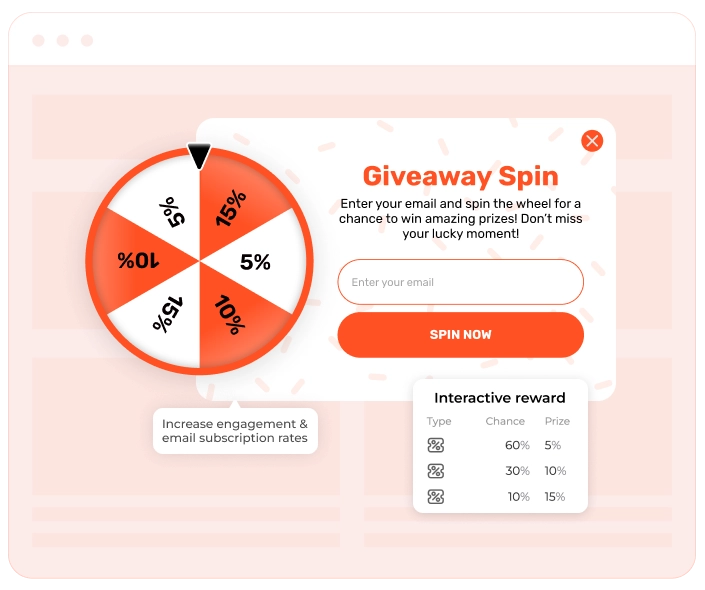
Spin the wheel popup widget interface showing interactive wheel with prizes and email capture form

What is a spin-the-wheel popup?

This format doesn’t have one fixed name. Some call it a spin-the-wheel popup, others say spin-to-win or lucky spin. And this name speaks for itself. A spin-the-wheel popup is a gamified opt-in form on a website that attracts the attention of your website visitors and collects their email in exchange for a reward. The spin-the-wheel game mechanic lets you set the reward of your choice, usually, discount codes, free shipping, exclusive gifts, etc.

In e-commerce, gamification isn’t about entertainment for its own sake. It’s about using simple game mechanics — chance, anticipation, reward — to change how users perceive an offer. A discount that’s “won” feels more valuable than the same discount shown in a banner. A small action (like spinning a wheel) breaks passive browsing and pulls the visitor into the interaction.

What spin-the-wheel popup solves & why businesses use it

People love surprises — and that “what will I win?” moment is exactly what makes this type of popup so effective. Instead of asking for an email outright, you're offering a quick, interactive experience with a reward on the other side, capturing engaged email subscribers. Here’s why it works:

  • Urgency without pressure

The wheel naturally creates a now-or-miss-it moment. Even without hard deadlines, users feel prompted to act immediately — something static signup forms rarely achieve.

  • The reward feels earned

A discount revealed through play is perceived as more valuable than the same offer shown outright. That sense of “I won this” makes users more willing to share their email.

  • Instant gratification wins

Users see the result right away. No waiting, no vague promises. That immediacy taps into impulse behavior and speeds up decisions.

  • Higher-quality subscribers

People who take time to spin the wheel are usually more interested, which means you’re getting more engaged subscribers.

  • Attention turns into action

The motion grabs attention; the reward drives action. Simple incentives like discounts or free shipping become much more effective in this format.

  • A positive brand moment

Even small wins create a short emotional lift. That moment sticks — and brands that feel enjoyable are easier to remember and return to.

Spin-to-win wheel popup performance benchmarks (2026)

Our benchmarks show a clear performance gap between standard signup prompts and gamified ones. While typical email forms convert around 3.53%, spin-the-wheel mechanics perform at 9.25%, driven by curiosity and instant rewards. And when optimized well, results scale fast: the Top 10% reach 17.98%, with the Top 1% hitting 62.50% conversion rates.

The email capture spin the wheel pop up has proven to convert visitors more effectively than static forms, especially for seasonal promotions. For instance, WHOSE, an accessory brand from Europe, used gamified popups in their Black Friday campaign and got a mind-blowing conversion rate result: from around 3-5% to a massive 50% with the gamified popups. This only proves that this type of wheel pop-up is especially effective for eCommerce websites, where every extra captured visitor can result in increased ROI.

Our benchmarks show a clear performance gap between standard signup prompts and gamified ones. While typical email forms convert around 3.53%, spin-the-wheel mechanics perform at 9.25%, driven by curiosity and instant rewards. And when optimized well, results scale fast: the Top 10% reach 17.98%, with the Top 1% hitting 62.50% conversion rates.

Winning patterns of Top 25% gamified widgets
Pattern & share among Top 25% widgets Why this works
Popup format — ~73% Popups interrupt just enough to be noticed, which matters for games.
Centered layout — 61% It's instantly readable. Users immediately understand where to look and what to do.
Single CTA — 100% One clear button keeps the interaction frictionless and avoids decision fatigue.
CTA placed at the bottom — ~88% Matches natural reading and scanning flow.
Visible close button — ~85% Users feel in control, which lowers resistance and doesn't hurt engagement.
Email-only forms — 56% Email is the lowest-friction "currency" users are willing to exchange for a reward.
Discount rewards — ~88% Discounts are immediately actionable and easy to understand during shopping.
Percent-off discounts — ~78% They scale with basket size, which makes the reward feel flexible and fair.
Promo codes — ~83% Codes create a bridge between the game and checkout. The reward feels concrete.
No urgency elements — 61% The game itself creates enough tension. Extra pressure isn't always needed.

When & how to use spin-the-wheel popup widget

Spin-the-wheel popups are a versatile tool, but they work especially well for:

  • First-time visitors: Use the wheel to make a memorable first impression. New visitors are more likely to engage when there’s something fun and rewarding waiting for them. It’s a great way to turn casual browsers into email subscribers — and even first-time buyers.
  • On exit: When a visitor is about to leave, this is your last shot. A spin-to-win popup can re-capture attention. Even if they don’t buy, you might still grab their email for future follow-up.
  • Special promos and seasonal sales: Spin-the-wheel popups shine during holidays, limited-time offers, or major sales events. The game element adds excitement to your campaign and creates urgency because prizes are tied to exclusive deals that expire soon.

How spin-the-wheel popup looks

A spin-the-wheel popup typically includes:

  • The spinning wheel game element: Users click to spin and see what prize they land on.
  • Clearly divided sections with rewards: Every slice of the wheel contains a prize, like a discount, free shipping, or bonus product.
  • Email input field: Users must enter their email to spin or to claim the prize after spinning.
  • Strong call-to-action: Phrases like “Spin to Win” or “Try Your Luck” make it irresistible to interact.
  • Immediate reward display: Instantly informs visitors of their prize to encourage immediate action.
How to create a spin-the-wheel popup

Step 1: Choose a template

Start by selecting a ready-made spin-the-wheel template from our library. We offer a variety of wheel designs and layouts, so you can pick the one that best fits your website’s style and campaign goals.

Step 2: Customize it

Now it’s time to make the widget your own. Replace the default text and adjust the colors and fonts to match your branding.

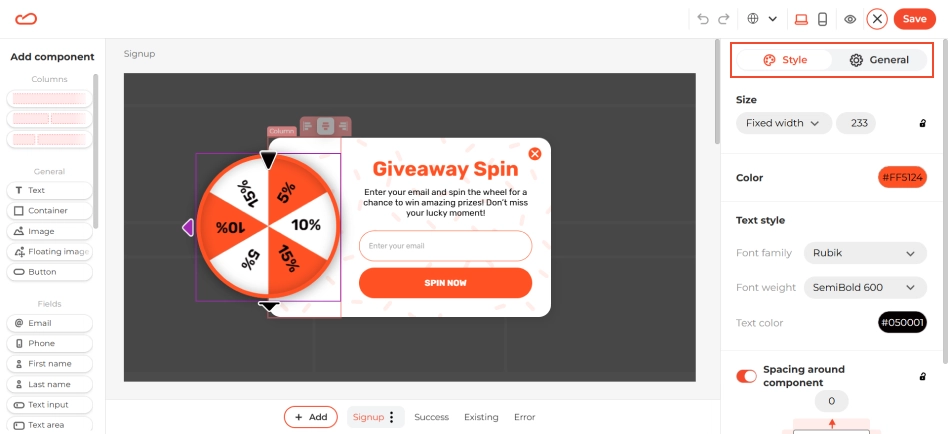
Next, configure the wheel segments. Click on the wheel element — on the right-hand side, you'll see two tabs: Style and General.

  • In Style, you can customize how the wheel looks.
  • In General, you’ll set the prizes for each slice and add static promo codes.
Spin the wheel popup configuration showing prize setup with discount codes and rewards on wheel slices

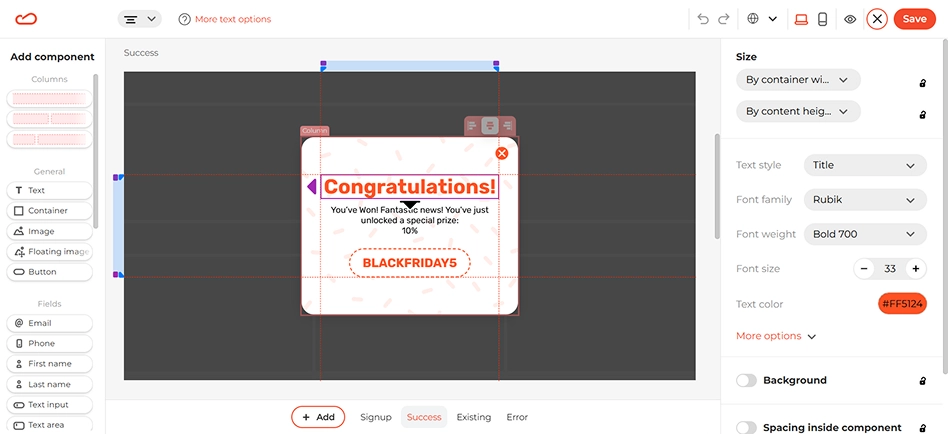
In the main editor area, scroll down to edit the widget states (e.g., success, existing, error). You don’t need to change the promo code field — it will automatically update depending on the prize the user lands on.

Spin the wheel popup widget states editor showing success, error, and existing user message screens

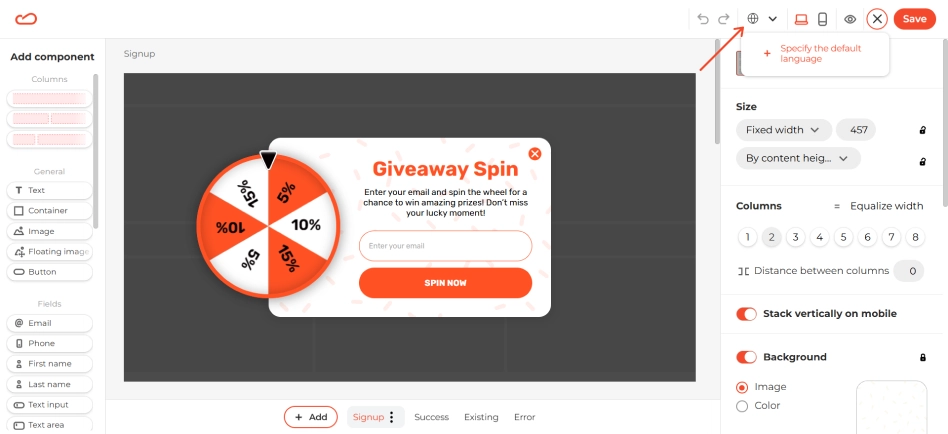
If your site supports multiple languages, you can add translations for the widget. Just click the globe icon in the top panel and set up additional language versions.

Spin the wheel popup localization settings with multiple language options and translation interface

Step 3: Configure the display rules

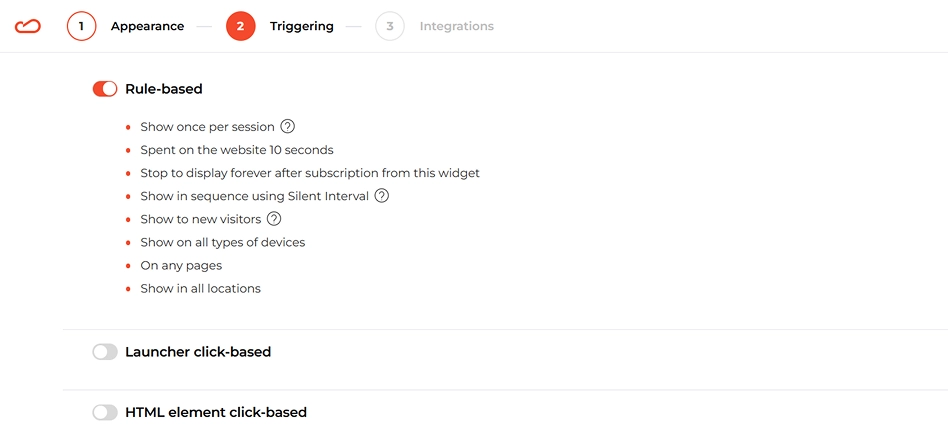
Given the cases when this type of widget can be used, we suggest the following settings for display rules:

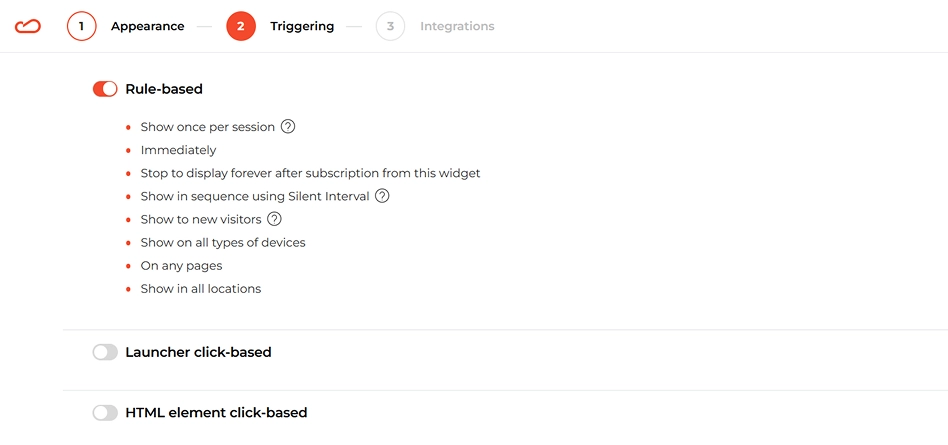
1. New Visitors

Show the popup soon after a new visitor arrives. This creates an instant moment of surprise and increases the chance they’ll engage and leave their email. To avoid being pushy, set it to appear only once per user/session.

Spin the wheel popup display rules configuration for new visitors with welcome message settings

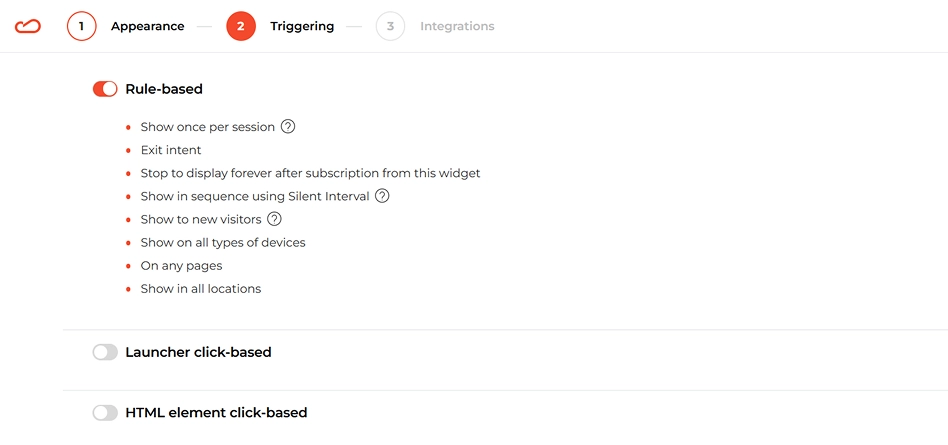
2. Exit-Intent

If a visitor is about to leave your site, trigger the wheel as a last attempt to keep them engaged. The chance to win a discount or freebie can be just enough to make them stick around — or at least sign up.

Spin the wheel popup exit intent trigger configuration showing settings for displaying widget when visitors are about to leave

3. Engaged Visitor Triggers (Time Delay or Scroll Depth)

Show the popup after the visitor has been browsing for a while (e.g., after 10–20 seconds or 50–70% scroll). This works well for users who’ve already shown some interest and are more likely to interact.

Spin the wheel popup time delay and scroll depth trigger settings for engaged visitors

Step 4: Integrate with your marketing tools

Once your widget looks great, it’s time to connect it to your marketing tools. We strongly recommend integrating your email service provider so that any emails you collect are automatically added to your list. This lets you trigger welcome emails, confirmation messages, or follow-ups right away.

Claspo supports a wide range of integrations with the most popular marketing platforms. And if yours isn’t on the list, you can still connect it using webhooks.

When everything’s ready, publish your widget, and you’re good to go!

Fully designed spin-the-wheel popup templates

Explore our entire library and find the perfect template to launch your next campaign in no time.

Proven recipes to grow email list

No matter what your goal is, there’s a widget for that. Explore pre-designed, user-friendly templates and find the perfect fit for your next campaign.

Best Practices for Spin-the-Wheel popups

A Spin-the-Wheel popup works when it shows up at the right moment and offers a reward that makes sense. It’s not about the biggest discount — it’s about giving users a quick, fair win they can actually use.

Pick the right win logic:

  • Guaranteed win — everyone gets a reward. Works well for first-time visitors, list building, and trust. People are more willing to share an email when they know they’ll get something in return.
  • Probability-based win — only some spins win, based on odds you set. Good for longer campaigns and repeat visits. The chance of a bigger prize keeps people coming back without hurting margins.

Keep rewards simple. The easiest rewards convert best: percent discounts, free shipping, instant bonuses. If a reward needs explanation or extra steps, it loses momentum.

Use a tiered prize mix. A balanced setup usually looks like:

  • frequent small wins (most spins);
  • occasional mid-level rewards;
  • rare high-value prizes.

Trigger the wheel at the right moment. Best-performing triggers:

  • short time delay (after users settle in);
  • scroll-based triggers (shows intent);
  • exit intent (last chance to convert).

Avoid showing the wheel instantly on page load — it’s easy to ignore.

Add light urgency. A clear time limit on the reward works better than heavy pressure. Countdowns and limited validity help users act, as long as they feel honest.

Types of spin-the-wheel popup

You can display a Spin-the-Wheel gamification in different ways on your site. Each format grabs attention differently and changes how visitors interact with the offer.

  • Built-in Spin-to-Win in the hero section

The wheel is placed directly in the hero area of the homepage. Visitors see it immediately, without a pop-up.

Best used when the promotion is a key message and needs maximum visibility. Users can spin, see the reward, and copy the code right away. Email can be asked, for example to remind users to return for another chance during longer campaigns.

  • Spin-to-Win popup with a countdown timer

A classic popup with a visible timer on the first screen. It works especially well for quick campaigns. The timer can run individually for each visitor, which keeps the pressure on — without ending the promo for everyone else.

  • Spin-to-Win Wheel popup with a teaser

The wheel opens from a teaser instead of appearing immediately. This format is less intrusive and fits content-heavy pages.

  • Spin-the-Wheel popup with a hero image

The wheel is paired with a strong visual of the main prize. Useful when one high-value reward drives most of the interest. Even with low odds, showing the prize upfront increases curiosity and motivation to play.

  • Full-screen Spinning Wheel widget

A full-screen overlay with a translucent background. It’s the most noticeable option and works best when the promotion is the main focus. The game element helps reduce irritation compared to static full-screen offers.

FAQ

Are Spin-the-Wheel popups mobile-friendly?

Yes. Spin-the-Wheel popups are mobile-friendly. All Claspo widgets, including spin the lucky wheel popup formats, are responsive by default and work on mobile devices without extra setup.

The wheel fits smaller screens, buttons remain clickable, and users can interact with the popup normally on phones and tablets. You don't need to create a separate mobile version. This matters because most seasonal and promo traffic comes from mobile.

Can I customize the design of the wheel to match my brand?

Yes. You can customize colors, size, pointer position, and slice text. The wheel can be styled to match your website.

From a conversion standpoint, this isn't just about looks. Wheels that visually match the site tend to get fewer instant closes and more interaction. Clear contrast between slices improves readability, balanced wheel size keeps the game noticeable without blocking content, and simple prize text helps users understand the reward at a glance.

Good customization helps the spinning wheel widget feel native and easy to engage with — which directly affects how often users interact with it.

Is it possible to set the probability of winning for each slice?

You can set the winning probability for each slice. In Claspo, every prize on the Spin-the-Wheel popup can have its own winning odds. You decide how often each reward appears — from frequent low-value wins to rare high-value prizes. This allows you to control how prizes are distributed on the wheel. For example:

  • smaller rewards can appear more often;
  • medium rewards can appear less often;
  • high-value prizes can be limited to rare wins.

Different prize types are supported. Each prize can have its own promo code. This helps keep both tracking and keeping the budget under control. The spinning wheel widget doesn't run on chance alone — it runs on rules you set.

Does this popup integrate with Shopify, WooCommerce, Klaviyo or other CMS/CRMs?

Yes. The spin-the-wheel widget works with common CMSs and marketing tools.

Claspo has an app for Shopify and a plugin for WordPress and WooCommerce. Installation follows the usual process for these platforms. Claspo also connects directly to popular ESPs and CRMs, including Klaviyo, so data collected through the spin-the-wheel email capture popup can be sent there instantly and used in your existing flows.

For most teams, this is enough: direct integrations cover around 80% of common use cases. If you need something more specific, webhooks are available to pass data to custom systems or less common tools.

Are these Spin-the-Wheel popups GDPR and CCPA compliant?

Yes. These spin-the-wheel email capture popups can be used in regions where GDPR and CCPA apply. Claspo supports standard privacy requirements at the platform level. Personal data is processed only for providing the service, and requests related to access, updates, or deletion of user data can be handled within the system.

At the same time, compliance doesn't happen automatically. Responsibility still sits with the website owner. You need to clearly explain how data is used and collect explicit consent where required.

For this reason, our widgets with email gathering fields include a built-in consent block. You can edit the consent text and link it to your own privacy policy or terms. There is also a dedicated "Data processing and terms of use" checkbox component, which allows visitors to confirm consent before submitting the form — a common requirement in GDPR-regulated markets.

Will a Spin-the-Wheel popup slow down my website speed?

No. A Spin-the-Wheel popup won't slow down your site when used correctly.

Claspo widgets are built with lightweight scripts and don't block page rendering. They are designed to stay within Core Web Vitals limits.

In most cases, speed problems come from heavy third-party scripts or popups that jump into the layout too early. Spin-the-Wheel widgets don't load as part of the initial page render, which helps avoid those issues. They are loaded after the page and shown only when trigger conditions are met.

Trigger execution time is up to ~200 ms. This applies to scenarios such as a discount spin-the-wheel exit popup.

Since the widget isn't part of the first page render, it doesn't push content around or interfere with Core Web Vitals. As long as the popup appears after some user interaction — not the moment the page loads — it usually stays within Google's page experience guidelines.

How can I limit spins to one per visitor (or per email) to prevent repeat attempts?

You can limit the Spin-the-Wheel to one play per email. When a visitor enters an email and plays the game, it is saved in Claspo. If the same email is used again, the widget won't allow another spin. Instead, the visitor sees a message like "Looks like you've already played" and is shown the prize and promo code they won earlier.

This prevents repeat attempts with the same email and keeps the reward logic fair. It also protects your budget by stopping users from spinning multiple times to hunt for a better prize.

Can I automatically email the winning coupon code to subscribers after they spin?

Yes. To send the winning coupon by email, the Spin-the-Wheel widget needs to be connected to your email platform. When someone spins the wheel and leaves their email, that contact is sent to your ESP together with the coupon they won.

The email itself is sent from your ESP using an automation triggered by a new subscriber or event. The message can include the coupon code the user won. This setup keeps delivery instant and reliable. Subscribers receive their reward in their inbox right after playing, and you don't need to send codes manually.

Can I A/B test different wheel designs, CTAs, and prize distributions to improve conversion rate?

Yes — you can A/B test different wheel designs, CTAs, and prize distributions. Claspo makes it easy to compare different versions of the same widget. You can create two variants — for example, with different wheel designs, CTA text, or prize logic — and test them side by side. The platform then shows each version to part of your traffic so you can see which one performs better. Claspo will split traffic between the versions and track key metrics like views, clicks, and conversions.

Typical variables you can test include:

  • layout or placement of the wheel,
  • CTA copy and button styles,
  • wheel design and colors,
  • prize offer or distribution,
  • trigger timing or other behavioral triggers.

Changing one element at a time makes the results easier to understand. Once a clear winner appears, that version can be used going forward or tested further.

Can I show a customized message to the winners?

Yes — you can show different, customized messages to winners (and not only to them). In Claspo, every screen of the widget can be edited — not just the wheel itself. That includes the Success page, Error page, and the "You've already played" message. You're not locked into default copy or layouts.

All of this is done in the drag-and-drop editor, so you can change text, visuals, buttons without touching code. With dynamic content you can show one message to someone who wins a discount, another one for free shipping, etc. From a practical point of view, this helps a lot. Clear, personalized messages reduce confusion, make the reward feel intentional, and keep the experience consistent with your brand.

Is the widget easy to use? Do I need coding knowledge?

Short answer: yes, it's easy to use — and no, you don't need coding skills.

Claspo widgets are made for people who work with marketing, not code. You work in a visual editor: pick a template, tweak the design, set up prizes and triggers, and publish. No coding, no digging into site files, no developer needed.

That said, "easy" doesn't mean limited. You still get control over things that actually matter for performance: when the widget appears, who sees it, what happens after a spin, and how data is sent to your tools. All of that is handled through settings and toggles.

Get help with spin the wheel popup widget setup and customization

Need help or have questions?

Book a Call

What Our Clients Say About Us

Japan Direct review
Japan Direct

I installed Claspo to get an email newsletter popup when customers are getting ready to leave the page and it looks great! I also noticed that there are so many other popup options! It seems like it has the features of multiple apps all rolled into one. I'm looking forward to experimenting with all the options.

Shopify
Quote
Buyersheart review
Buyersheart

The Claspo app is easy to install, fast, and requires no technical hassle to set up. Its user-friendly interface and customizable features, like the spin-the-wheel widget, make boosting customer engagement effortless. With beautiful templates and smooth performance, it’s a great tool for driving more sales on Shopify stores.

Shopify
quote
Magdalena review
Magdalena

Owner, Educator

It’s honestly shocking how generous Claspo is.

The number of features included in the paid plan and the fact that you can use so much of this value for free within the limits shows real support for small creators and growing businesses.

Thank you for what you’re building. Keep growing - you’re doing something really valuable 🫶🏻

G2
quote