Discount coupon popup
Improve conversions and get more sales
Discount popups are effective for increasing sales by offering immediate savings with a promo code.
Start for Free NowLifetime free plan
All features in a free plan
Discount popups are effective for increasing sales by offering immediate savings with a promo code.
Start for Free NowLifetime free plan
All features in a free plan
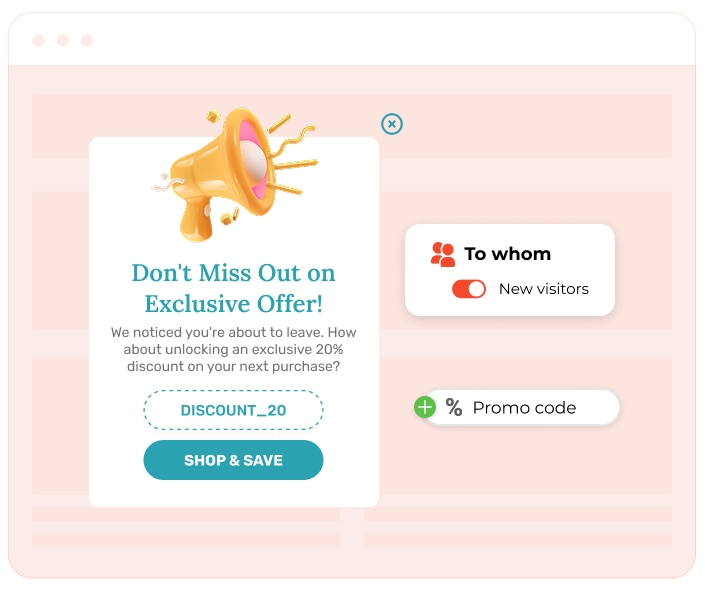
Discount popups are used to encourage immediate purchases by providing instant value and incentivizing visitors to take action and make a first purchase. They solve several challenges:
Our benchmarks indicate that adding a visible promo code makes a noticeable difference. Coupon popups average around 9.71% CTR, giving hesitant shoppers a clearer reason to commit rather than putting the purchase off. It’s a small nudge at the right moment, and it often turns a “maybe later” into a first order.
Discount popups are most effective when triggered at key moments in the user journey when visitors need a gentle push to make a decision. Key use cases include:
Discount popups are designed to be visually engaging and offer a clear value proposition. They typically include:
Now, let’s see how we can create a discount popup that triggers for new visitors who have spent 20 seconds on a page and want to leave the page.
Save your time on layout and styling and start off with a template. Everything's already designed to draw attention — from font sizes to where the CTA button is. All that’s left is to make coupon widget yours.
With Claspo’s editor, it’s easy to match the colors, fonts, background, and CTA button style to your brand’s vibe.
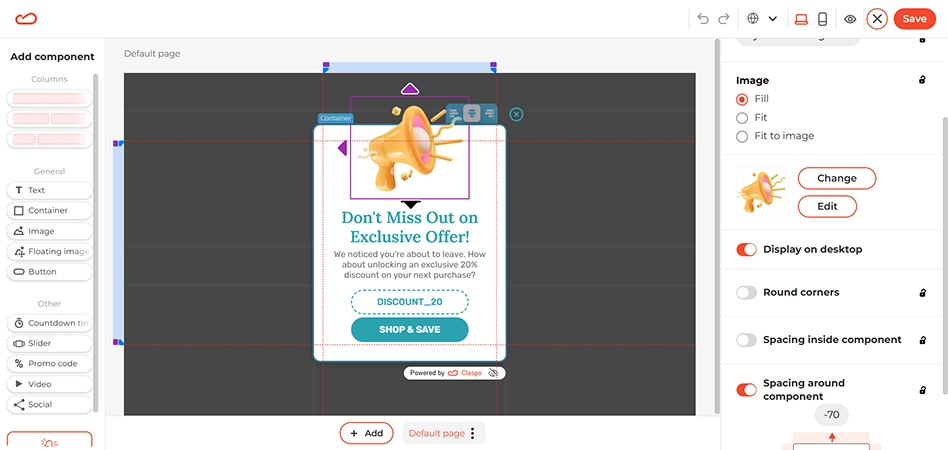
Want to draw attention to your offer? Just added an image – you can use your own (PNG, JPEG, WebP, or GIF) or choose from the stock image collection available at Claspo. Feeling bold? Go for something that really pops, like a floating image.
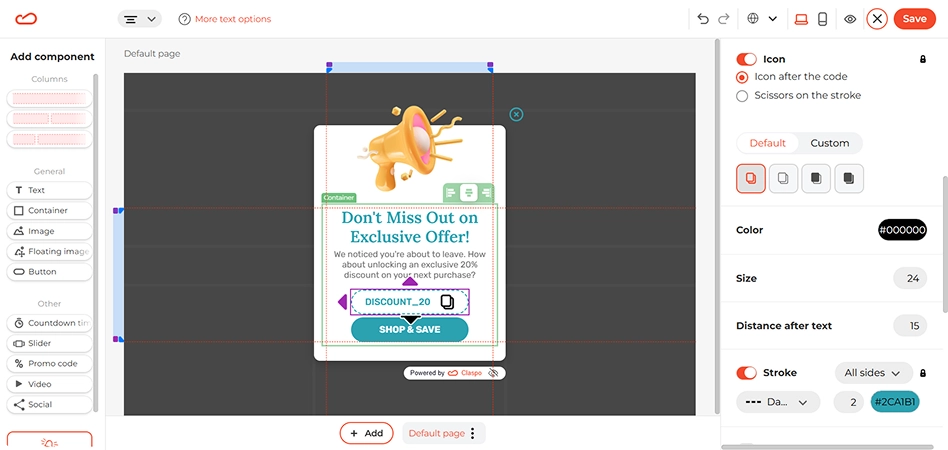
Now for the main attraction: the promo code. Let’s adjust its text and add a “Copy” icon so visitors immediately know they can copy and use it at checkout — no extra steps, no friction. Click on the promo code component on the coupon popup template and its settings will appear on the right, including stroke style, icons (copy or scissors), color options, etc.
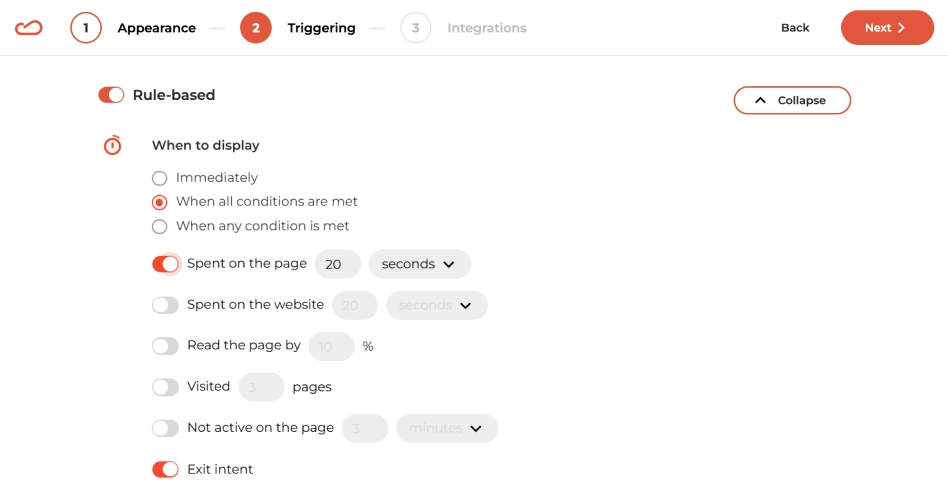
Let’s set the display rules to target new visitors and reduce bounce rates. In the When to display section, keep the default settings: When all conditions are met and Exit-intent. Then, activate the Spent on the page: 20 seconds option. This way, the discount popup will appear for visitors who’ve shown some initial interest — making it the perfect moment to catch their attention with a discount offer.
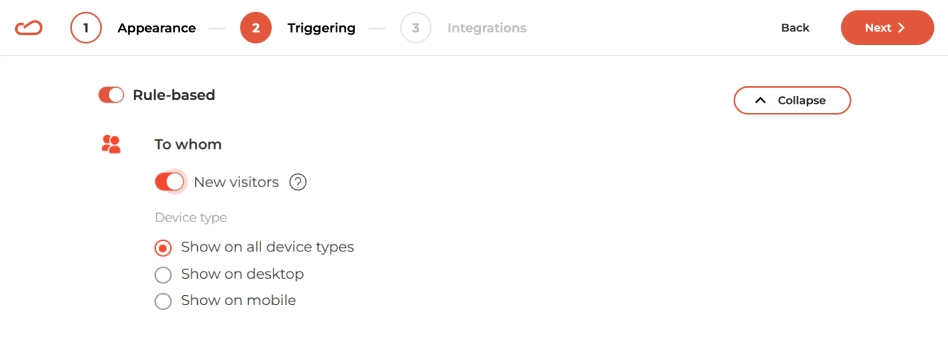
Scroll to the To whom section and simply activate the New visitors toggler to target the discount popup to newcomers to the site.
Everything’s ready — you can now start attracting new customers by easing their concerns about buying from a new website with a discount.
Explore our entire library and find the perfect coupon popup template to launch your next campaign in no time.
Whatever your goal, Claspo has a widget for that. Find the perfect recipe for your next campaign.

A discount coupon popup refers to a small, dynamic popup or embedded component that shows a promotional offer, such as a coupon deal, a discount code, free shipping, or a limited-time offer, right on a website. These popups frequently appear when a visitor lands on the page, scrolls down to a certain point, or wants to leave (via exit intent).
Vendors use discount coupon offer in ecommerce mostly. They are great if you need to capture attention and nudge the visitor toward conversion. Whether it’s a floating bar, slide-in box, or classic center-screen popup, this powerful popup provides an immediate incentive to act.
You can use discount coupon widgets to:
A discount popup solves the problem of visitors leaving your site to find better prices elsewhere. It answers the customer’s question “What’s in it for me?” with immediate value, and therefore prevents cart abandonment. Discount popups with promo codes on the page encourage hesitant shoppers to make to a purchase right now rather than putting it off for later.
Businesses use discount widgets to:
It is best to show a discount popup based on certain actions. Use a discount popup at the crucial points in the visitor’s journey, such as upon arrival, cart abandonment, and exit intentions.
Give visitors a little time to see what you offer. Don't flood them with deals the second they land on the website. To convert effectively, you must align the offer with the customer's journey.
Key timing (When):
Smart implementation (How):
The goal is to make the discount feel natural. With proper targeting, you can ensure that the visitor sees the discount at the right time.
A discount coupon popup is a window that matches your brand’s style to highlight a special deal. It highlights the deal with a bold promo code, a strong headline, and visuals to prompt immediate decisions.
For the best results, invest some time into the discount coupon popup design so it doesn’t look like an intrusive ad. Here are some of most important visual elements:
Setting up a discount popup is simple with a builder like Claspo. You start by choosing a pre-made discount popup template, customizing the design to match your brand, and setting triggers like “exit-intent” or “time on page.” Once ready, you can embed the discount widget via a simple script or connect directly to platforms like Shopify.
Here is the typical workflow:
As a top-tier platform, Claspo combines intuitive design with advanced features to enhance your coupon widget strategy and improve your conversion rate. With Claspo, you don’t need a developer, designer, or complicated setup. Just choose a coupon popup template, customize it to match your brand, set smart triggers, and go live in minutes.
Claspo stands out because it prioritizes both your ease of use and your visitor's experience:
There are several types of discount popups designed for different visitor behaviors. Common examples include “Welcome popups” for first-time visitors, “Exit-Intent” discount coupon popups to prevent bouncing, and “Cart abandonment” coupon popups to recover lost sales. You can also use “VIP offers” for returning customers or seasonal promotions for holidays.
An effective discount popup must have trigger-based logic to appear at the right moment, such as upon scroll or exit. It should also be mobile-optimized, fully customizable to fit your brand, and capable of integrating with your email platform. Urgency elements like timers are also crucial for a discount coupon popup.
When building a discount coupon widget, there are a few features that make a big difference in performance:
The best popup builder tools will let you tweak every part of the coupon widget — from layout and copy to behavior rules and targeting — so your discount coupon popup always feels natural and timely.
Yes, Claspo offers seamless integrations with major platforms to automate your workflow. You can connect your discount popups directly to CMS platforms like Shopify and WordPress, or sync data from coupon widgets with email services like Mailchimp and Klaviyo.
Our software integrates with:
And if you need to connect a different system, simply use a webhook.
To prevent annoyance, use “Silence intervals” in your discount popups to set a delay between popups so visitors aren't overwhelmed after closing one. Additionally, “Overlap protection” ensures that multiple widgets — like a newsletter signup and a discount popup — never appear on the screen at the same time.
Silence intervals: You can control how often your coupon widget appears by setting delays between displays. For example, if a visitor closes the discount coupon popup once, they won’t see it again for some time. This reduces the chance they’ll immediately dismiss every following popup. Many brands see a direct increase in conversion simply by giving visitors this breathing space.
Overlap protection: One of the most common mistakes in Ecommerce is accidentally stacking multiple offers. Imagine a welcome popup, a newsletter opt-in, and a discount coupon popup all appearing at once — confusing at best, annoying at worst. Claspo automatically prevents this, ensuring you don’t overwhelm visitors with too many messages competing for attention.
A discount coupon popup with an effective design balances visual effect with user experience. Your discount popup should use your brand’s fonts and colors to look native. At the same time, the popup should remain bright enough to capture attention. Crucially, the design of a discount popup must be mobile-responsive. So make sure buttons are thumb-friendly, and text is legible on any device.
To maximize the effectiveness of your discount coupon popup, focus on these four aspects:
Match your visual identity: Don't settle for a generic template. Use the Claspo editor to adapt the discount popup layout to your store’s specifics. Vary text fonts, add product images to demonstrate to shoppers what they are missing, or use a lightbox effect to darken the background and draw attention to the coupon widget.
Personalize the experience: Generic discount popups are easy to ignore. Use dynamic merge tags to address visitors by name (e.g., “Hey John”) or assign unique discount codes to specific segments. For example, offer a "Welcome" code to new visitors and a “VIP” code to returning loyal customers. A personal approach is always appreciated.
Prioritize mobile users: Since most traffic comes from mobile, your discount popup design must adapt automatically. Ensure it’s easy to tap close buttons and that the promo code is large enough to copy without frustration.
Test and optimize: Use A/B testing to experiment with different incentives. Ever wondered what would convert better: “Save $25” or “15% Off”? Do you think adding a countdown timer to a discount widget would drive more clicks? With continuous testing, you can track how your discount popups evolve from “good looking” to “high converting.”
No, Claspo discount widgets don’t slow your website down. Our coupon widgets load asynchronously, which, in simple words, means that they do not block or slow down your main website content. Claspo scripts consistently score a perfect 100 on Google PageSpeed Insights
Yes, Claspo is fully compliant with major international data privacy regulations, including GDPR (General Data Protection Regulation) and CCPA (California Consumer Privacy Act). We prioritize the security of your data; that’s why we use industry-standard TLS encryption and strict access controls.